Skip to content
View in the app

A better way to browse. Learn more.

LCPDFR.com

A full-screen app on your home screen with push notifications, badges and more.

To install this app on iOS and iPadOS
  1. Tap the Share icon in Safari
  2. Scroll the menu and tap Add to Home Screen.
  3. Tap Add in the top-right corner.
To install this app on Android
  1. Tap the 3-dot menu (⋮) in the top-right corner of the browser.
  2. Tap Add to Home screen or Install app.
  3. Confirm by tapping Install.

Zooniq

Members
  • Joined

  1. Off and on flashlights are different models. Scroll through them
  2. Zooniq changed their profile photo
  3.    HANAKO reacted to a comment on a file: EUP Simple Polo Shirt Pack [Add-on]
  4. Very cool job! It's probably the best polo shirt I've ever seen. Everything is thought out, great model, everything moves perfectly, very good texture. Thank you for your work! The only thing is, it would be cool to see a PSD file of the shirt texture for easier color changes and the like.
  5. To be honest, I'm not very good at this, but it sounds like something cool. Thanks for the nice comment!
    • 552 downloads
    • Version 1.0
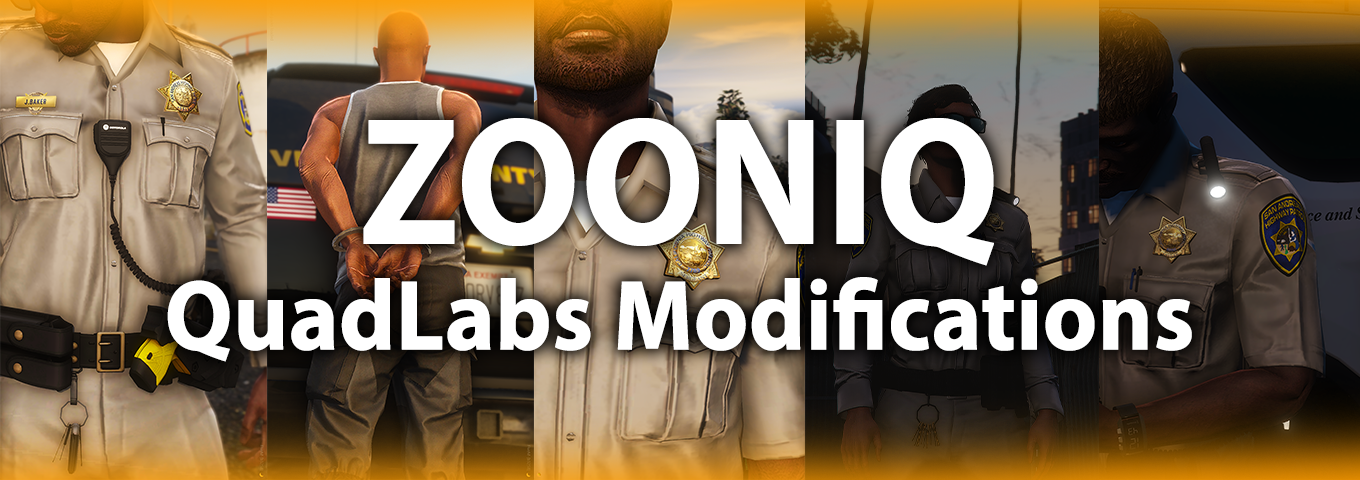
    Hello again! I'm giving you my little work on the basic model of the flashlight. I recently saw a video and a couple of photos where cops carry flashlights in a similar way, and it seemed like a good idea to develop. For a little understanding, these lights are mainly used by officers to make it easier to read documents at night, for example. Also, flashlights are worn not only by CHP officers, but also by other departments, such as Ventura County Sheriff. Some information about the work I have done: 1. I made 3 positions for flashlights: On the right shoulder, on the left shoulder, on the chest. Each position has two models where one flashlight is on and the other is off. There are 6 models in total. 2 out of 6 models are in our QuadLabs Modifications discord server, and are also free. 2. Flashlights have a special material that allows them to glow. This glow is mostly visible in the dark. However, due to the different texture, the glow can also be seen during the daytime. 3. The flashlights are already ready for use in FiveM and Singleplayer. The installation instructions will be below. If you like the work I have done, I will be glad to see your feedback and comments under this modification. You can find more works from me on our QuadLabs discord server. Have a good game! How to install: FiveM 1. Go to the "FiveM" folder 2. Drag the "police_flashlights" folder to the resource folder on your FiveM server; 3. Add this line to your server.cfg: start police_flashlights 4. It's done! Singleplayer 1. Start OpenIV. 2. Navigate to the 'mods' folder 3. Move the provided "police_flashlights" folder inside: mods\update\x64\dlcpacks 4. Locate 'dlclist.xml': mods/update/update.rpf/common/data 5. Add the following line to the bottom: dlcpacks:/police_flashlights/ 6. It's done! Credits: Model - Rockstar Games Textures - Rockstar Games Female Screenshots - Kirik(QuadLabs Modifications) Working with the model - Zooniq(QuadLabs Modifications) Creating FiveM & SP Resources - grzyClothTool Terms of use: - Do not rip parts from this pack; - Do not claim the content from this pack; - Do not reupload this file to other websites; - Do not exploit content of this pack for commercial, financial or personal gain.
  6.    Zooniq reacted to a comment on a file: FOCUS H2 | Camera & Display
  7. Thank you so much! I'll definitely have more assets to share.
  8.    Zooniq reacted to a comment on a file: FOCUS H2 | Camera & Display
    • 145 downloads
    • Version 1.0
    Hi! I'm finally giving you my assets! In the file "SafeFleet.z3d" you will be able to find a dashcam and a display from Safe Fleet [FOCUS H2], which you can hang on the desired transport. The display model was made a long time ago and based on videos and photos from CHP cars, I will most likely redo it a little in the future. A few features of my assets: - pretty high quality - as realistic as possible - have high-quality textures You can also change the textures to suit your taste. All the textures used in the models are in the "textures" folder. If you like the work I have done, I will be glad to see your feedback and comments under this modification. You can find more works from me on our QuadLabs discord server. Have a good game! Credits: Models - Zooniq(QuadLabs Modifications) Textures - Zooniq(QuadLabs Modifications) Exporting a file for Zmodeler 3 - Kirik(QuadLabs Modifications) Terms of use: - You may use and modify this modification and redistribute your work under the condition that complete and correct credits are given, listing all authors and their contributions. Unlocked versions of this modification may only be redistributed if you include these terms of use and a link to the original download. - Using this modification commercially is only allowed if credits as described above and a link to the original download are displayed before purchasing and are included with the download. - You may not convert or port this modification to other games or platforms without permission.
  9. Kiko05 started following Zooniq
  10.    Zooniq reacted to a comment on a file: CHP Badges [Add-On] [Singleplayer / FiveM]
  11.    Zooniq reacted to a comment on a file: Motorola PMMN4108 Radio Mic [Add-On]
  12. Hello. Yes, I'll make a female version for badges a little later.
  13. Thank you. Yes, I will add a version of the badges for female characters.
    • 718 downloads
    • Version 2.0
    Hello! It's time to show and give you the CHP badges. I made 3 badge models. 1 - the model of the badge on the chest; 2 - the model of the badge on the chest with a mourning ribbon; 3 - the model of the badge on the belt. Each model contains textures for the following ranks: officer, sergeant, lieutenant and captain. For the badge, pens were made in the pocket and seniority on the nameplate. In our discord server you will be able to find more textures for chest badges, thanks to them you will be able to change the model. For example: remove the handles from the badge, remove seniority, and so on. Also in our discord you can download the model of the CHP badge on the belt, which also contains 4 textures with ranks (the files in our discord are also free). A little more information about the models: The shape, size and texture are taken from real CHP badges. The mourning ribbon is made by a model, NOT a texture. The model is well optimized. The belt model is suitable for different types of pants. If you like the work I have done, I will be glad to see your feedback and comments under this modification. You can find more works from me on our QuadLabs discord server. I recommend using my CHP badges with these mics. Have a good game! How to install: FiveM 1. Go to the "FiveM" folder 2. Drag the "chpbadges" folder to the resource folder on your FiveM server; 3. Add this line to your server.cfg: start chpbadges 4. It's done! Singleplayer 1. Start OpenIV. 2. Navigate to the 'mods' folder 3. Move the provided "chpbadges" folder inside: mods\update\x64\dlcpacks 4. Locate 'dlclist.xml': mods/update/update.rpf/common/data 5. Add the following line to the bottom: dlcpacks:/chpbadges/ 6. It's done! Look at which gender you are adding badges for! The folder names are different: chpbadges / chpbadges_f. Credits: Model - Zooniq(QuadLabs Modifications) Textures - Zooniq(QuadLabs Modifications) Creating FiveM & SP Resources - grzyClothTool Terms of use: - Do not rip parts from this pack; - Do not claim the content from this pack; - Do not reupload this file to other websites; - Do not exploit content of this pack for commercial, financial or personal gain.
  14. Hey! Thank you very much! Yes, of course! I would like to see the actual dimensions and type of attachment of the mic to the walkie-talkie, because at the time of creating the model, it was quite difficult to find references for such things.
  15. Hey. You can easily use bodycams from other developers. Many of them come up to my radiomics.
  16. I am glad that you liked my radio microphones! Thank you also for mentioning me in your video. I accidentally heard that you will need to update the female form of the characters, so I'm notifying you that a version of these radio microphones for female characters will be released later. Enjoy using it!

Account

Navigation

Search

Search

Configure browser push notifications

Chrome (Android)
  1. Tap the lock icon next to the address bar.
  2. Tap Permissions → Notifications.
  3. Adjust your preference.
Chrome (Desktop)
  1. Click the padlock icon in the address bar.
  2. Select Site settings.
  3. Find Notifications and adjust your preference.