


officer Mshari
Members
-
Joined
-
Last visited
Everything posted by officer Mshari
-
 Maybe 👀
 -
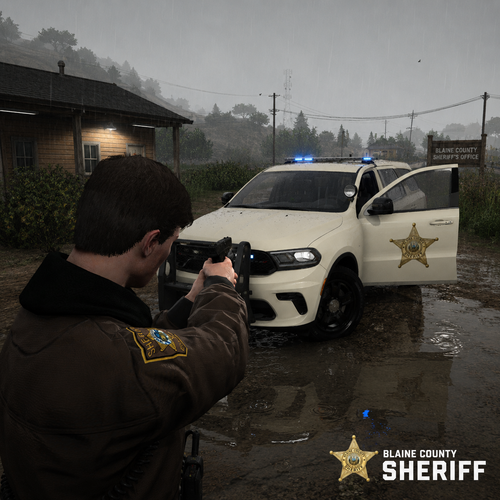
🚔New Blaine County Sheriff livery for the 🚓2021 Dodge Durango This texture features a clean and realistic Blaine County Sheriff style with two variants included:Standard version Version with side “SHERIFF” markings 📦 Installation instructions are included inside the ReadMe.txt📸Inspired by a real Payette County Sheriff’s Office Dodge Durango featured in local news coverageReference article https://www.ktvb.com/article/news/local/highway-52-in-payette-county-is-closed-mudslide/277-84c1febe-5481-4917-8402-d46293b6ac8f I downloaded the model from here: https://www.lcpdfr.com/downloads/gta5mods/vehiclemodels/53684-2021-durango-san-andrea-los-santos-police-department-hybridels/
-
.thumb.png.b8bf18f88991a95128f3a30d8c897629.png) A custom white police snow jacket created for winter patrol and field operations. Designed for realism and immersion in EUP Single Player and LSPDFR ⭐ Special Features - Custom white police snow jacket designed for winter patrol and field operations - Inspired by an existing jacket and reworked for snowy environments - Created in a short time with a clean and practical design in mind - Includes two options: - Version A: No "POLICE" text on the back - Version B: "POLICE" text on the back - Fully compatible with EUP Single Player & LSPDFR 🔧 Installation 1. Open OpenIV 2. Navigate to: mods\update\x64\dlcpacks\eup\dlc.rpf\x64\eup_componentpeds.rpf\mp_m_freemode_01_mp_m_importexport_01 3. Install or replace the jacket files 4. Launch the game and equip the jacket via EUP Menu ✨ Notes This project was made for fun and realism — staying clean in the field is not guaranteed 😉
A custom white police snow jacket created for winter patrol and field operations. Designed for realism and immersion in EUP Single Player and LSPDFR ⭐ Special Features - Custom white police snow jacket designed for winter patrol and field operations - Inspired by an existing jacket and reworked for snowy environments - Created in a short time with a clean and practical design in mind - Includes two options: - Version A: No "POLICE" text on the back - Version B: "POLICE" text on the back - Fully compatible with EUP Single Player & LSPDFR 🔧 Installation 1. Open OpenIV 2. Navigate to: mods\update\x64\dlcpacks\eup\dlc.rpf\x64\eup_componentpeds.rpf\mp_m_freemode_01_mp_m_importexport_01 3. Install or replace the jacket files 4. Launch the game and equip the jacket via EUP Menu ✨ Notes This project was made for fun and realism — staying clean in the field is not guaranteed 😉 -
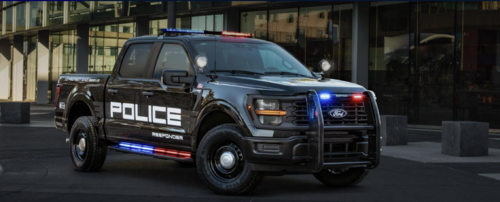 This is a simple texture modification for an existing police vehicle. I did not create the vehicle model — all credit for the original model goes to its creator. I only redesigned the exterior livery to give it a fresh and more realistic look. The textures have been carefully adjusted for a clean black-and-white patrol unit feel, including custom decals, and updated styling.

.thumb.png.b8bf18f88991a95128f3a30d8c897629.png)
