Skip to content
View in the app

A better way to browse. Learn more.

LCPDFR.com

A full-screen app on your home screen with push notifications, badges and more.

To install this app on iOS and iPadOS
  1. Tap the Share icon in Safari
  2. Scroll the menu and tap Add to Home Screen.
  3. Tap Add in the top-right corner.
To install this app on Android
  1. Tap the 3-dot menu (⋮) in the top-right corner of the browser.
  2. Tap Add to Home screen or Install app.
  3. Confirm by tapping Install.

HavocEVG

Members
  • Joined

  • Last visited

  1.    Alpha52 reacted to a file: 2020 SCSO Slick Top FPIU
  2.    JellyBeans reacted to a comment on a file: 2020 SCSO Slick Top FPIU
  3. The park mode is blue but code threes are red and blue
  4.    aIIoy reacted to a file: 2020 SCSO Slick Top FPIU
  5.    TankXking21 reacted to a file: 2020 SCSO Slick Top FPIU
  6. I am so sorry I forgot to delete that. I will chang that right away. Let me take a look real quick
    • 1,414 downloads
    • Version 1.0.1
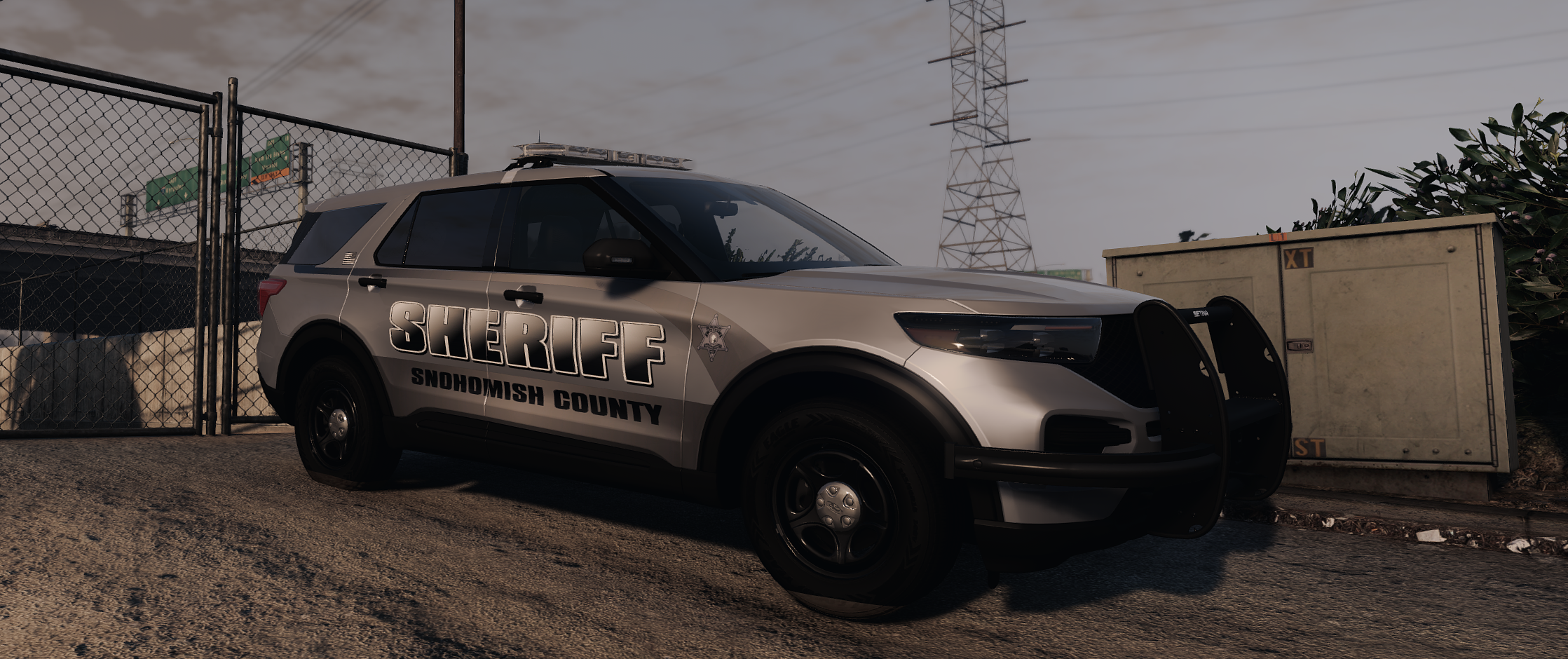
    Vehicle Name: 2020 FPIU Slick Top Snohomish County Description: This vehicle is a import from FiveM by one of are team members and has high quality texture work inside and out. It also has the real light pattern. The livery is also high quality and 4K. Created By: Evergreen Upfitters Livery By: Evergreen Upfitters If you have any questions or concerns please feel free to join are discord it is linked below. Join Here For more info/High quality models https://discord.gg/shVyEgAMPp Important note: This vehicle is made By Havoc the head of Evergreen Upfitters.
  7.    SO18 reacted to a file: 2018 Whelen Legacy Charger
    • 1,686 downloads
    • Version 1.0.0
    Vehicle Name: RoxWood Police department 2018 dodge Charger Description: This vehicle is a import from FiveM by one of are team members and has high quality texture work inside and out. It also has a fictional light pattern. The livery is also high quality and 4K. Created By: Evergreen Upfitters Livery By: Evergreen Upfitters If you have any questions or concerns please feel free to join are discord it is linked below. Join Here For more info/High quality models https://discord.gg/shVyEgAMPp Important note: This vehicle is made By Havoc the head of Evergreen Upfitters. This vehicle was recently removed from one of are other profiles and is now uploaded on this account we did not take there work we re-did are format for the company.
    • 802 downloads
    • Version 1.0.0
    Vehicle Name: Snohomish County 2020 Ford Police Interceptor Utility Description: This vehicle is a import from FiveM by one of are team members and has high quality texture work inside and out. It also has the real light pattern that is used by the department in real life. The liveries are also high quality and 4K. Created By: Evergreen Upfitters Livery By: Evergreen Upfitters If you have any questions or concerns please feel free to join are discord it is linked below. Join Here For more info/High quality models https://discord.gg/shVyEgAMPp Important note: This vehicle is made By Havoc the head of Evergreen Upfitters. This vehicle was recently removed from one of are other profiles and is now uploaded on this account we did not take there work we re-did are format for the company.
  8. This Is for Fivem non singleplayer the ELS version is posted by northwest the backround is changeable to allow the black variant as well
  9. Updated The File i uploaded the one from my Desktop not the dev drive apologies folks
    • 787 downloads
    • Version 1.0.0
    Based off of Snohomish Counties Contract City of sultan this build reflects quality and pride Full ULC stage control with functional TA A free release from my discord does not come with constable livery https://discord.gg/evergreenupfitters
    • 1,044 downloads
    • Version 1.0.0
    Base Off of Deputy Iverson Pre Core 2020 Kane 104 Base 360 Degree Environmental Emitting Cruise Lights Heavy ULC Control Extra 1-10 Lighting Extra 11 - M870 Shotgun Extra 12 - Custom Rifle

Account

Navigation

Search

Search

Configure browser push notifications

Chrome (Android)
  1. Tap the lock icon next to the address bar.
  2. Tap Permissions → Notifications.
  3. Adjust your preference.
Chrome (Desktop)
  1. Click the padlock icon in the address bar.
  2. Select Site settings.
  3. Find Notifications and adjust your preference.