bravozero
Members
-
Joined
-
Last visited
Everything posted by bravozero
-
Some visuals, maybe that can shine some light on what I'm doing wrong. This is after I've removed the ELS lights from the lightbar, the lightbar itself does not function when the emergency equipment activates. The lightbar itself still intact. I remove the body of the lightbar, only leaving the glass. Oddly enough, I can spawn this car numerous times and the game still runs fine, despite a big hunk of glass hovering over the car. That's where the RC20 error begins. Once I've removed the glass and it becomes an actual slicktop, I can't get the car to spawn at all. That being said, again I'm at a loss. If there was a way to make the glass invisible, I'd do it. However, I can't figure out why the glass is causing the RC20 error.
-
Tried that, nothing. It has something to do with the glass. I'm at a loss.
-
Now I've narrowed it down to the lightbar glass. The physical lightbar assembly is gone, and now the lightbar glass is floating above the car. However, I can keep spawning the car all day long and it won't crash. The moment I remove the glass from the model, it RC20's. Which texture are you referring to?
-
Update... after messing with it, I've come to the conclusion that it's the lightbar itself, not the extras lighting. I went the route of removing the lights from the lightbar, and keeping the lightbar there. The car spawns fine, the lightbar is still on the car, but it doesn't light up since I removed those Extras from it. Now, I have to figure out how to remove the lightbar from the car completely and not have the RC20 crash. Any ideas?
-
Worked, thanks. However, now I'm getting the RC20 error. All I've done with the car, that was perfectly functional before, is remove the lightbar completely from the hierarchy, removed Extra 5 and Extra 6 since they were the takedowns on the lightbar, and removed just the extras lighting on the lightbar. The mirror lights, front and rear strobes and rambar lights are still present and still mapped. I do only have Extras 1, 2, 3 and 4. Extras 5 and 6 were takedowns, and 7-9 didn't exist.
-
As the title says, I am creating a slicktop version of the car I've been working on. I can remove the lightbar body, but the extras lighting is still there. However, those extras are also attached to the mirror lights, front and rear strobes, rambar lights, etc. How do I go about just isolating and removing the lightbar extras, while leaving the rest of the car alone?
-
Figured it out. I did have my extra parts renamed properly. The problem was the long CB antenna, it added too many polys to the car. Once I removed it, the car spawned properly.
-
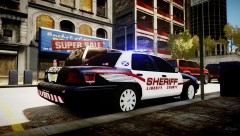 What model is that?
 -
I just put a few antennas on my CVPI and now I'm getting RC20 errors. The car worked before adding them. However, in Zmodeler I just threw them into the hierarchy at the bottom, should I have placed them elsewhere? What else could be the issue?
-
Thanks for posting this. They have GTA The Complete Pack, which has GTAIII, Vice City, San Andreas, IV and EFLC for $12.49 altogether. I currently have the Gamefly download of IV(EFLC) and I can't play LCPDFR in any version other than IV, so I went with this so that I can freely play TLAD or TBOGT freely. Plus, now I have the classics to play as well.
-
Nobody has witnessed this?
-
Bringing this back up. Now that I have access to Zmodeler and an unlocked vehicle, I want to look into this issue. Anyone care to explain how to go about creating distance models?
-
I downloaded Boatinman's CVPI, which is unlocked and he gives permission for modifications (provided you credit the appropriate people of course). I'm trying to figure out how to remove the reverse light strobes that he's created, too blinding. I also just got Zmodeler so I'm still learning how to use it. Can someone either guide me or show me how to remove the rear reverse strobes?
-
I just had a seizure watching that clip.
-
Any word on this car?
-
This might have been asked already and I apologize for asking again. When I commence a traffic stop and the driver takes off, normally I can activate my siren and the pursuit is underway. However, I've noticed with ELS 7 that once the driver takes off, I activate my siren and he pulls over again like with normal traffic, but the red arrow is still above the car indicating that there's still an active pursuit. Any way to alleviate this? It doesn't make pursuits fun anymore.
-
Are these the 16" wheels on this model? The wheels look smaller in diameter than the normal steel wheel variants.
- 18 comments
- 18 reviews
-
Hmm, just noticed that this car has no computer. Any chance of adding one and releasing an update?
- 31 comments
- 21 reviews
-
Do want.
-
There are several different models, this one in particular is actually nice. Don't be an ass.
- 5 comments
- 5 reviews
-
-

- 2
-
-
Ah man, if you made the exact same model but non-ELS, I would use this for all of my AI vehicles.
- 21 comments
- 13 reviews
-
-
Really? I have a model with strobes and they're nowhere near that bright, using your ENB.
-
I think it looks good, maybe add another one in black instead of blue might be another idea.
- 2 comments
- 2 reviews
-
No bueno, the headlight and reverse light strobes are way too bright and overpowering.