


NoHuzzLarry
Members
-
Joined
-
Last visited
Everything posted by NoHuzzLarry
-
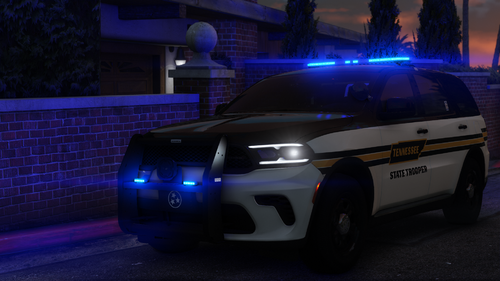 any way someone can make a lore version of this, els/hybrid perhaps too. would love to use this for my state trooper saturday videos
- 8 comments
- 1 review
-
-

- 1
-
-
yeah for some reason my plugins has another LSPDFR folder in it so i usualy just install anything new into both of those folders, but i installed eup 8.2 and my game works fine now it hasnt (thankfully) crashed since
-
i managed to get an hour in and i think i caused a crash by searching a suspect that i already called pt for but its never happened again RagePluginHook.log
-
the game runs fine for 20 minutes then while responding to a call i hit a car and got shot at, while returning fire my rage shut down my game :/ had to scrap my 20 minutes of footage RagePluginHook.log
-
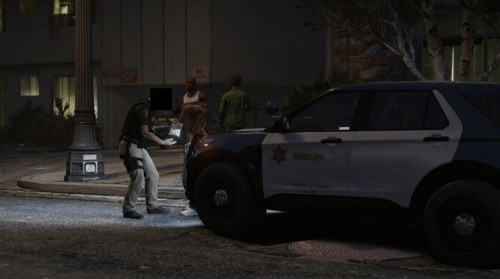 these are perfect i wish someone did this for lapd/lspd i barely have any city cars
 -
 aw dammit, ive been using your stuff since i started lspdfr almost 2 years. thank you for everything.
 -
potentially an update to your beautiful fhp packs with the additions of the durangos and the stealth ciu black liverys??
-
 I fear installing RDE was a mistake. I noticed it wasn't letting me play missions even with the latest versions, so I decided to delete it. My game was crashing on startup after that happened. I deleted my mods folder, OpenIV, uninstalled the game, as well as the OpenIV ASI files. I downloaded the necessary adjusters I normally never have a problem with and have moved and tested my DLC pack files, and the issue still persists. Spawning in the torrence, stainer, buffalo, all lightbars don't work, yet taillights flash and siren works, no reflections off the ground as well. I moved my openiv, dinput8, and renamed my mods file and launched, and the lights and sirens work. I can't play LSPDFR without lights, and I've tried every method I could, even asking ChatGPT. Help would be very much appreciated
- 1,524 comments
- 85 reviews
-
I fear installing RDE was a mistake. I noticed it wasn't letting me play missions even with the latest versions, so I decided to delete it. My game was crashing on startup after that happened. I deleted my mods folder, OpenIV, uninstalled the game, as well as the OpenIV ASI files. I downloaded the necessary adjusters I normally never have a problem with and have moved and tested my DLC pack files, and the issue still persists. Spawning in the torrence, stainer, buffalo, all lightbars don't work, yet taillights flash and siren works, no reflections off the ground as well. I moved my openiv, dinput8, and renamed my mods file and launched, and the lights and sirens work. I can't play LSPDFR without lights, and I've tried every method I could, even asking ChatGPT. Help would be very much appreciated
-
i appreciate the help, ill probably be back to it when i finish replaying story again
-
yeah keeps crashing, ive given up already when i had all my lspdfr stuff in i didnt have any of my gun mods and all my dlc cars didnt work. with all lspdfr and plugins gone now everything works fine. eventually when they stop updating gta 5 ill get back into lspdfr someday
-
just getting back into a fresh lspdfr restart after last updates mystery prevented me from launching. now having an issue loading into duty from the story mode screen. RagePluginHook_25062026_062256.log
-
it does not.
-
trying to run rph it gets stuck on opening gta and doesnt generate a log or even a crash report
-
my most recent log is from 2/25
-
i had only reinstalled the new lspdfr, rage and scripthook and now it seems my whole everything is broken
-
the game without rage does the first 5 seconds of loading then goes into a black screen. RagePluginHook.logRagePluginHook_22122025_061222.logRagePluginHook_22122025_061456.log I found my problem. the ivcars oiv was hiding in my repository, got rid of that and redid my LSPDFR and gameconfig, now the game's normal.
-
tried to install IVcars and vanillaworks along with a train addon and the game entirely pooped itself. tried replacing the gameconfig and still crashes along with restroing the orginal train.xml RagePluginHook_22122025_055752.log RagePluginHook_22122025_060713.log RagePluginHook_22122025_061222.log
-
its indeed trainer v, open the menu in game, go to options and the 2nd page then disable ''keybinds'' the only fix i have until they fix it themselves
-
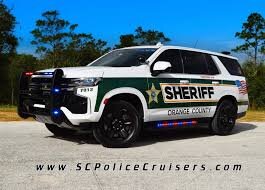
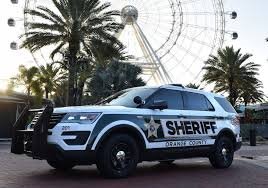
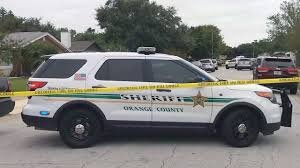
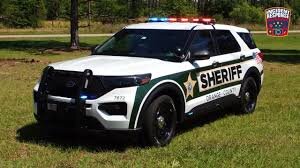
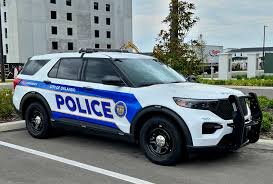
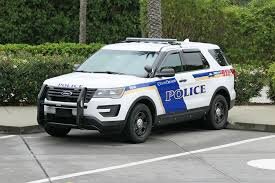
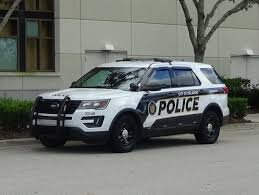
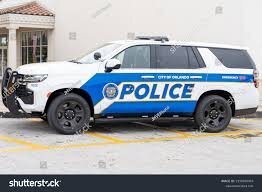
does anyone know where i can find a good pack or mini pack of Orange County Sheriff and Orlando police dept liveries for vehicles like the old and new scout and granger and such? I've searched numerous discords and websites to find one or something super similar but no luck at all. inspo/context
-
.thumb.png.69f541f5ea239013499a869869dccd5a.png) is there anyway to make this but for lore cars like the scout, buffalo and alamo??
is there anyway to make this but for lore cars like the scout, buffalo and alamo??- 10 comments
- 5 reviews
-
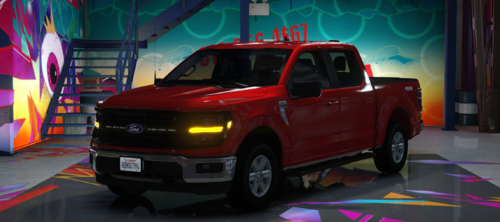 cant wait to test this will give my opinion when im done with a shift. edit: its amazing i love it
 -
Does anyone know a fix for my (JMsahp) cars spawning black? Specifically, the Alamo and the marked buffalo unit spawn black and sometimes normal, but with red wheels? if anyone has had similar or knows a fix that would be greatly appreciated
-
edit: i found where i screwed up i left a bit of the old lines in and forgot to put a single "\" in the lines
-
not sure why maybe could be an issue with the default regions, but heres the files file2.txt file1.txt

.thumb.png.69f541f5ea239013499a869869dccd5a.png)
