

rakheem
Members
-
Joined
-
Last visited
Everything posted by rakheem
-
Make sure your OS has an English Language Pack installed
-
Send your RagePluginHook.log file
-
Set your Plugin Threshold to 60000 in the Rage Plugin Hook Settings and turn off Custom Loading Screen and see if that works
-
Ensure you have an updated version of ScriptHookVDotNet which can be found here If you're still experiencing issues rename your mods folder to _mods and see if that works and if it works then you've installed something in your mods folder that is causing the crash so rename your mods folder back and gradually remove whatever you put in the mods folder and retry GTAV until it doesn't crash
-
You may need to download EUP Menu which can be found here then press F11 in-game and find the earpiece and vests by scrolling through the options and categories
-
Your files / folders are installed incorrectly, move NAudio from Grand Theft Auto V/Plugins to Grand Theft Auto V
-
You're missing a folder / file called dlGlobal which can be found in this mod
-
Hello @MrJohn111 I understand you're having problems and I am here to help you with assistance. Please follow the instructions below Try remove asiloader and attempt to run GTA V through Rage Plugin Hook and if it doesn't crash then it could be inflicting with the ELS Let me know if you're still experiencing issues and send and updated RagePluginHook.log if it does crash again
-
Could you send a screenshot of your error.
-
No problem just mark it as solved so the forum can close.
-
Hello @francescoP I understand you're having problems and I am here to help you with assistance. Please follow the instructions below If you have ScriptHookVDotNet in your GTA V File Directory Folder, temporarily remove it and if that solves your issue and you need ScriptHookVDotNet you can try installing a pre-release but this is not guaranteed to work and you may simply have to remove it all together.
-
Hello @RobTheBob12346 I understand you're having problems and I am here to help you with assistance. Please follow the instructions below Your error is simply being caused by a mod called ALPR+ please remove it and re-run GTA V with Rage Plugin Hook → Available Alternative: Callout Interface or ALPR Lite If you're still experiencing issues please let me know.
-
Hello @idk0000 I don't think you're having issues unless you've noticed a change in tone, volume, or something else.
-
Hello @WrierKibbles I understand you're having problems and I am here to help you with assistance. Please follow the instructions below You're missing a required file / folder by the name of Newtonsoft.Json which can be found in this mod You're missing a required file / folder by the name of NAudio The following plugins have available updates 686 Callouts Section136 Callouts Super Callouts The following plugins are also outdated and need to be removed When plugins aren't updated for the latest versions of LSPDFR, they may begin to cause issues For the smoothest experience, we recommend their removal More Radio Chatter → Available Alternative: XScanner The following plugins have been identified as having issues Please read the information below and consider their removal Automatic Siren Cutout → This plugin has been discontinued and may not work as intended.
-
Hello @Jafband I understand you're having problems and I am here to help you with assistance. Please follow the instructions below Update IPT.Common You're receiving an issue because something has been added to the GTA V File Directory twice e.g. Having a zone specified for two agencies in the Ultimate Backup Configuration Files These plugins have available updates SuperCallouts
-
No problem just mark the forum as solved in order for it to close.
-
Hello @Capitan I understand you're having problems and I am here to help you with assistance. Please follow the instructions below You're missing a required file / folder by the name Seatbelt so please attempt to re-install the seatbelt mod you downloaded and place it correctly in the GTA V File Directory The following plugins are also outdated and need to be removed When plugins aren't updated for the latest versions of LSPDFR, they may begin to cause issues For the smoothest experience, we recommend their removal Callout Manager → Available Alternative: Callout Interface
-
Hello @nowayitsnoe I understand you're having problems and I am here to help you with assistance. Please follow the instructions below You're experiencing a System Access Violation and this could be caused by a faulty mods folder Rename your mods folder in the GTA V File Directory to _mods and test it, if this works then attempt to revert any changes you made in the mods folder and rename the mods folder back
-
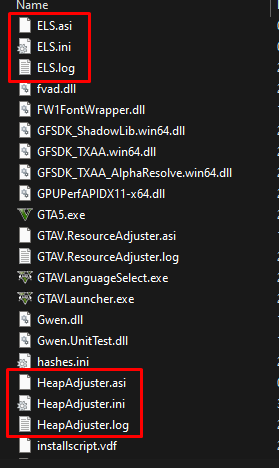
.ini files like these together, try deleting the whole thing that comes within the .ini files like an example shown below in your main GTA V File Directory Also check your plugins folder as there will be some in there too and test all of them to rule out which one is the problem
-
You're still persisting the same problem with one of the .ini files or the .xml files you need to delete any stuff you downloaded that contain a .ini file and gradually re-add them to see which one is causing the problem
-
Send your RagePluginHook.log
-
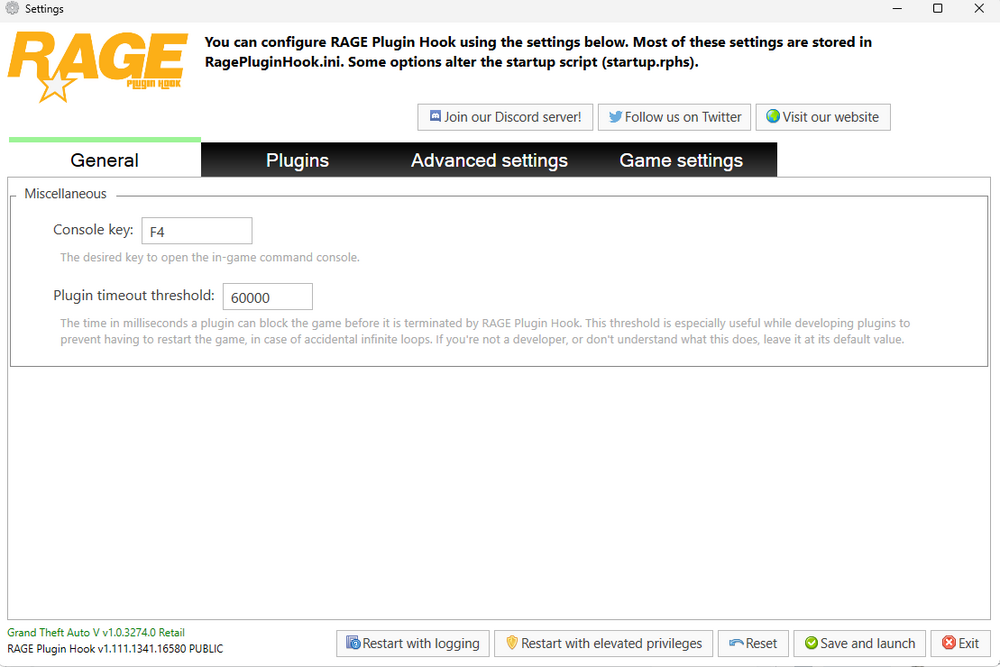
Click RagePluginHook and hold Shift on your keyboard and wait for the dashboard to open up and set the Plugin Timeout Threshold to 60000 Follow this next step if you have tried setting the Plugin Timeout Threshold to 60000 Go to Advanced Setttings and Disable Custom Loading Screen
-
Please send your most recent RagePluginHook.log as you've sent a lot I don't know which ones your most recent one
-
Hello @rovedx I understand you're having problems and I am here to help you with assistance. Please follow the instructions below Rename your mods folder in the GTA V File Directory to _mods and test it, ensure you have Heap Adjuster, Packfile Limit Adjuster and Custom Game Config and if it still causes you to crash revert any changes you made in the mods folder and rename the mods folder back Follow this next step if you have reverted mod changes and tested every single mod you've implemented and it is still causing you to crash Rename dinput8.dll in the GTA V File Directory to _dinput8.dll and test it, if this works then one of your .asi files are not working properly so you should rename dinput8.dll back and remove all .asi files and gradually re-add them & load GTA V to determine which is at fault Verify your GTA V game files
-
You edited one of your .ini files or one of your .xml files incorrectly which you can either undo the changes or re-install lspdfr as we can't determine which ones you've edited