


kurtstwin
Members
-
Joined
Everything posted by kurtstwin
-
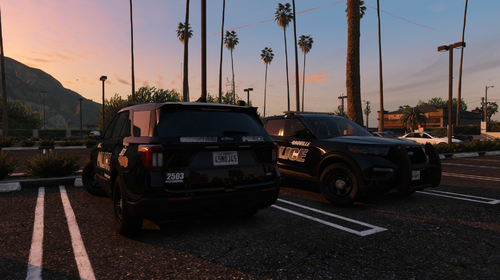 SSLA is required for the pack! I used over 20 sirens for each vehicle (mainly the sweeping pattern for TAs).
 -
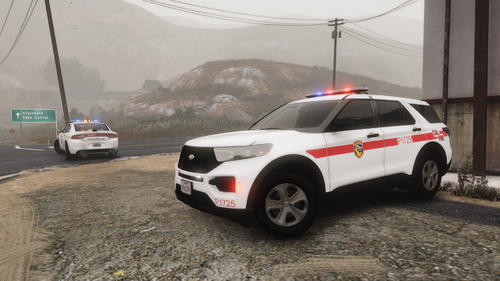 Based off the CalFire Fire Investigator/Law Enforcement 2020 FPIU! Its not a 1:1 spec as I have no interior pictures, I just used what CalFire seems to still use interior wise. I am also missing the rear portion window guards. Inspiration: https://www.youtube.com/watch?v=g52F9HWFz2s
- 7 comments
- 3 reviews
-
-

-

- 8
-
-
I'm using ELS Stages with "sirens" (what GTA uses for its vanilla lights)
-
2020-2025 Oroville Police FPIU Package For lore accurate liveries, they'll be in my livery pack. These are based on Oroville's 10 Vehicle fleet (not including their 2 ghosted vehicles). They've recently retired their 2013-2015 FPIUs. The 2016-2019 FPIUs have been retired for years. I do plan on adding the 2020 FPIU Patrol Operations & an unmarked. 1. Drag & Drop the "opdpiu" into your "dlcpacks" folder: \Grand Theft Auto V\mods\update\x64\dlcpacks 3. Locate your ELS > pack_default folder, and drag & drop the ELS.XML files. : \Grand Theft Auto V\ELS\pack_default 4. Go to your dlclist.xml, and add "<Item>dlcpacks:/opdpiu/</Item>" Located here: \Grand Theft Auto V\mods\update\update.rpf\common\data > XML text > dlclist.xml 5. Enjoy!
-
-
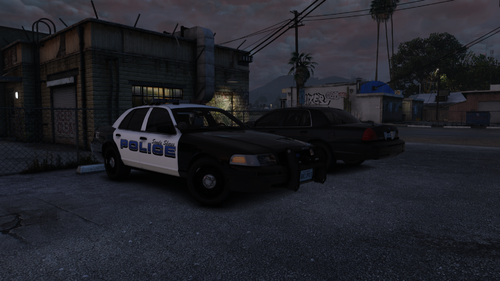 Fictional CVPI Package, CA spec lighting, based out of no where. Credits: Underwood for the CVPI model, Kane104 for the Liberty I, CJ24 for various interior & exterior parts, CEO for the IONs! 2011 Sandy Shores Police Crown Vic Police Interceptor Package: 3 PPV's RFR, fitted with various Whelen lighting. Free! This is probably the last project I'll be able to do for a couple weeks. Wanted to just release something and was wanting to do a vic! We'll see. ELS & SSLA required
- 7 comments
- 1 review
-
-
-
- 4
-
-
-
-
-
.thumb.png.5cf5796ed5e052d230fd2a5e47833118.png) The full Oroville police livery pack! I am too lazy to make their completely out of use liveries. These are their "newer" liveries. I do have Municipal LEO liveries too but I'll probably release those at a later date. This pack includes: 2020 FPIU versions: Kane & GM OPD for 2016 FPIU: Kane & GM 2025 FPIU: Kane LSPD: 2025 FPIU: Kane 2020 FPIU versions: Kane & GM 2016 for: Kane SSPD: 2025 FPIU: Kane 2020 FPIU versions: Kane & GM 2016 for: Kane 8 Marked Units, 1 Ghosted, 1 Unmarked! Still a WIP
The full Oroville police livery pack! I am too lazy to make their completely out of use liveries. These are their "newer" liveries. I do have Municipal LEO liveries too but I'll probably release those at a later date. This pack includes: 2020 FPIU versions: Kane & GM OPD for 2016 FPIU: Kane & GM 2025 FPIU: Kane LSPD: 2025 FPIU: Kane 2020 FPIU versions: Kane & GM 2016 for: Kane SSPD: 2025 FPIU: Kane 2020 FPIU versions: Kane & GM 2016 for: Kane 8 Marked Units, 1 Ghosted, 1 Unmarked! Still a WIP -
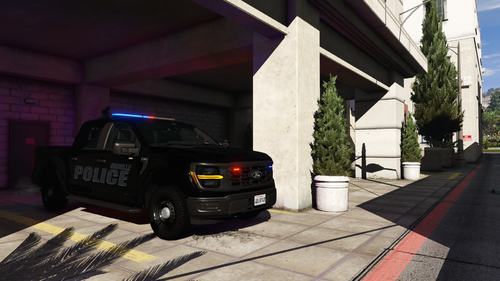 Oroville's newest vehicle to their fleet, a ghosted 2025 F150 Police Responder. This model has been seen around, and I decided to make a quick model of it for public. Please note this is a very low effort model, based off of 2 photos. I do not have interior pictures, proper light pattern (just an assumption), or proper parts. I've seen a couple photos of them rolling around with laptops now, instead of nothing. Still waiting on some references for both FPIU's and this F150. If anyone can help, would be a major bonus. I do plan on releasing a higher quality version in the future. Actively working on Oroville & butte county 1:1 vehicles. Currently completed per department: - Oroville: 518 (Old-Gen 2020 FPIU) 519 (Standard 2023 FPIU 1) - Antenna array 1 605 (Standard 2021 FPIU 2) - Antenna array 2 614 (New-Gen 2024 FPIU) - Butte: 2024 Tahoe PPV (New Antenna Array) 2011 CVPI The door ions do tend to clip here and there. I will fix it in the future. For any other problems, please let me know. You need SSLA 32 Siren script, please find an updated version. Use at your own will. This pack will work without ELS, but I recommend using ELS.
 -
.thumb.png.7bdf0066d86afe565fac5e2684baa3e8.png) update/install SSLA. I provided an updated version in the update. This addon file is installed like any other addon. just drag & drop in your dlcpacks, and put "<Item>dlcpacks:/um_by_asd/</Item>" into your dlc.rpf. ELS files go where ELS files go. pack_default. Sorry I took so long with an update. I've found ELS breaks with the latest windows update. My personal fix was updating my OS. SSLA is not officially updated, find a version YOU trust. I provided the update I've been using. All of my vehicles use SSLA, and the siren ID's I'm using are out of base GTA's range.
update/install SSLA. I provided an updated version in the update. This addon file is installed like any other addon. just drag & drop in your dlcpacks, and put "<Item>dlcpacks:/um_by_asd/</Item>" into your dlc.rpf. ELS files go where ELS files go. pack_default. Sorry I took so long with an update. I've found ELS breaks with the latest windows update. My personal fix was updating my OS. SSLA is not officially updated, find a version YOU trust. I provided the update I've been using. All of my vehicles use SSLA, and the siren ID's I'm using are out of base GTA's range. -
i'll talk to Raz3r about it, if its only the 2025/2026 base tahoe. I do plan on adding more onto the pack.
-
use Matts charger. I believe there's free parts you'll need on lspdfr/modding forum. If you want HQ parts (i would recommend after some practice), Georgie Moon sells a great charger, and Raz3r has an mPower other parts are here or there
-
I'd recommend messing around with free dev parts on zmodeler. McGinlay has some good tutorials on youtube
-
what graphics mods do you have. ie better radiance.. etc
-
Gonna start working on it now. track the progress in my discord, might take a while! https://discord.gg/AGH7HsPeY
-
I do not have a Jeep Gladiator. However I may be able to obtain one & add on into the future. I updated an attempted hotfix (as I do not have all the ELS addons)
-
Try these! um20exp.xmlum25z71.xmlum23z71.xmlum25dur.xml
-
more than likely any of your graphics mods. I'll try and find a compatible fix
-
I can make em when I make "CA-Spec" files.
-
correct um20exp.xmlum25z71.xmlum23z71.xmlum25dur.xml
-
While most of my vehicles require SSLA, this one was made using 20 or less.
-
I'll consider it. It won't be as quality as alex's
-
This is an ELS-HYBRID file. I do NOT use ELS for the emissives. The lights are sirens so there is color emitting properly from the sirens. Since I use ELS and not DLS for my LSPDFR, these files were made on an ELS base. For the ELS Files, if any color is emitting, but no lights are showing, you have done something wrong. If your lights are not working, PLEASE check your computer for WINDOWS UPDATES, make sure you are on the LATEST version of ELS. Update your version of SSLA/32-Siren Script. I will convert to DLS & ULC in the future. Any future updates will ONLY be adding on variations of the CURRENT models, or new models added to the pack. ELS works fine for me and countless others, if it does not work for you, figure it out. Please report ANY OTHER BUGS to me via discord. Known Issues: 2025 Tahoe Headlights clipping/mesh. This addon file is installed like any other addon. just drag & drop in your dlcpacks, and put "<Item>dlcpacks:/um_by_asd/</Item>" into your dlc.rpf. ELS files go where ELS files go. pack_default. To Be Added: 2016 FPIU 2023 Charger

.thumb.png.5cf5796ed5e052d230fd2a5e47833118.png)
.thumb.png.7bdf0066d86afe565fac5e2684baa3e8.png)