




CodeRepo
Members
-
Joined
-
Last visited
Everything posted by CodeRepo
-
Dear, David Patel I hope this email (message) finds you well, in regards to your previous message, I would like to make sure that you installed the ragenativeUI correctly, you dragged all the files into the base of your gta 5 installation and overwrote the existing files? Sincerely, CodeRepo
-
Update your ragenativeui https://github.com/alexguirre/RAGENativeUI/releases/download/1.9.2/RAGENativeUI.zip
-
Send a full screenshot of everything in your base folder
-
Did you accidentally install any mods into the actual game folder instead of the mods folder? Have you tried uninstalling LSPDFR and reinstalling it, disabling anti virus temporarily
-
Try taking away any custom / additional run parameters and just launching LSPDFR through ragepluginhook
-
Use the search feature in openiv, search something like "phoenix.yft"
-
Rename your mods folder to _mods If the above works then you need to delete your mods folder and start over again with your mods
-
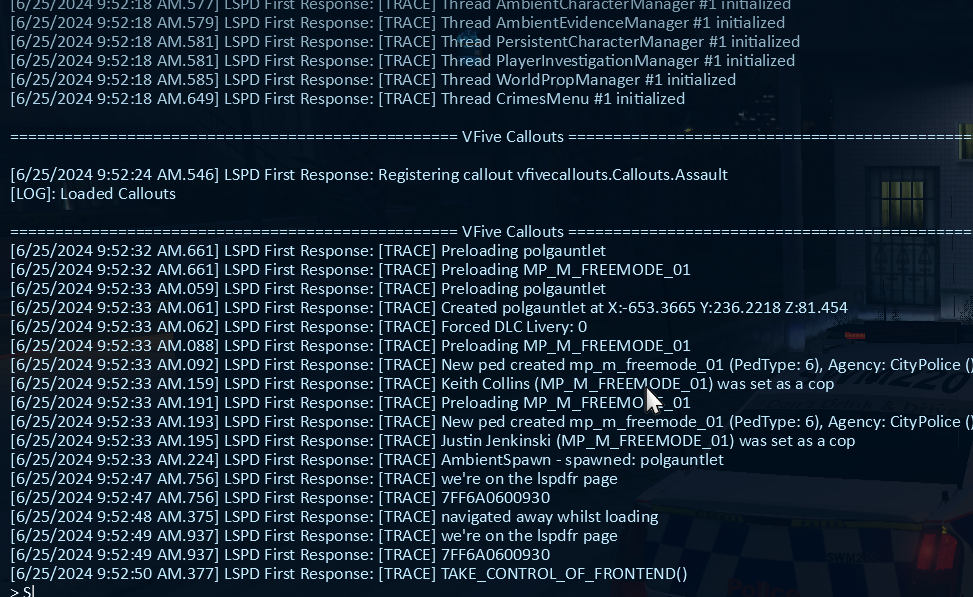
Send your ragepluginhook.log from the base directory of your GTA 5
-
Send your ragepluginhook.log from the bas of your gta 5 folder
-
Hello, Can you upload your Ragepluginhook.log from your base directory of GTA 5 Hallo, können Sie Ihre Ragepluginhook.log aus Ihrem Basisverzeichnis von GTA 5 hochladen
-
If some of your plugins require ScripthookV, it just updated so get a new version of SHV ScriptHookV -> http://dev-c.com/gtav/scripthookv/
-
You need to wait for LSPDFR and ragepluginhook to update https://www.lcpdfr.com/wiki/gta5/modding-after-title-update/
-
I have tried both of the following code snippets and neither have worked, 2 things happen with this; 1. the attacker continues to chase the victim 2. the attacker becomes glitched and stands still in a T pose position _Attacker.Tasks.ClearImmediately(); _Attacker.Tasks.FightAgainst(Game.LocalPlayer.Character); _Attacker.Tasks.Clear(); _Attacker.Tasks.FightAgainst(Game.LocalPlayer.Character);
-
Verify your GTA 5 game files How do I verify game files in the Epic Games Launcher? Verify Integrity of Game Files - Steam How to verify game files in the Rockstar Games Launcher This is most likely happening because of corrupted mods folder
-
Have you installed any custom guns, vehicle? Anything that you would have to edit model files 1. Please load GTAV story mode without RAGEPluginHook. If that works, load RAGEPluginHook. Otherwise, try each step & test GTAV story mode. 2. Rename your mods folder to _mods. If this works, ensure you have a Heap Adjuster, Packfile Limit Adjuster & custom gameconfig. If that doesn't work, revert your recent mods folder changes. 3. Rename dinput8.dll to _dinput8.dll. If this works, one of your .asi files is at fault. Rename dinput8 back and remove all your .asi files. Gradually re-add them & load GTAV to determine which is at fault. 4. Rename vfs.dll to _vfs.dll. If this works, the issue lies with Lenny's Mod Loader. Verify your game files.
-
1. Open the RAGEPluginHook settings menu (hold down SHIFT immediately after clicking RPH) 2. Increase 'Plugin timeout threshold' to a higher value (e.g. 60000) 3. Save and Launch
-
You probably are missing a required file for the callout to work, send your ragepluginhook.log file or uninstall the callout pack
-
The issue was I was creating a ped after making the attacker fight the ped (which didnt exist except for the variable)
-
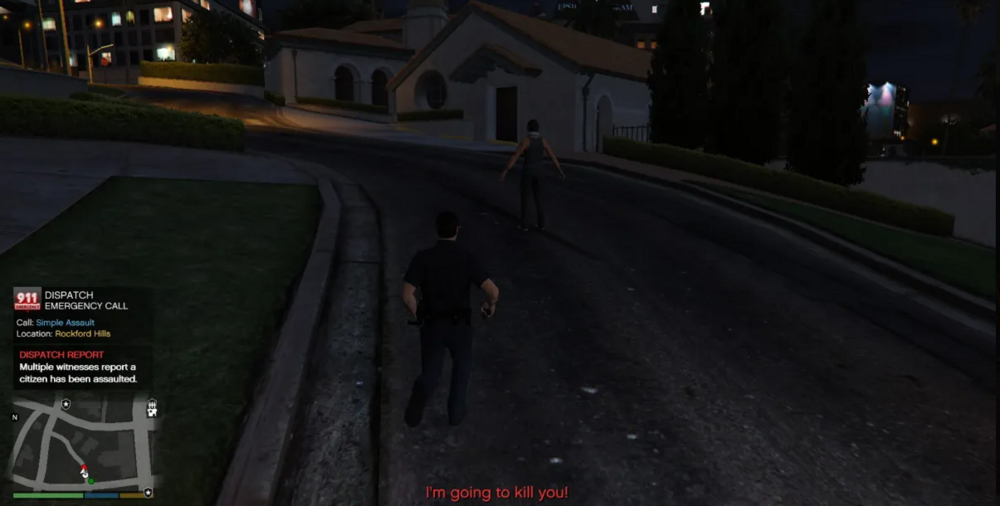
When using that before the attacker seems to continue chasing the victim ped until I do something to knock them over by shooting their leg, tapping them with the car etc if (checker == true && Game.LocalPlayer.Character.DistanceTo(_Attacker) < 20f) { _Attacker.Tasks.Wander(); _Attacker.Tasks.FightAgainst(Game.LocalPlayer.Character); Game.DisplaySubtitle("~r~~bold~I'm going to kill you!", 2); checker = false; }
-
The attacker ped does not attack me, I want the attacker ped to attack me when I get in range (20f) public class Assault : Callout { // vehicles peds declare here for callout private Ped _Attacker, _Victim; private Vector3 _Spawnpoint; private Blip _AttackerBlip, _VictimBlip; public override bool OnBeforeCalloutDisplayed() { _Spawnpoint = World.GetNextPositionOnStreet(Game.LocalPlayer.Character.Position.Around(300f, 3000f)); ShowCalloutAreaBlipBeforeAccepting(_Spawnpoint, 30f); AddMinimumDistanceCheck(30f, _Spawnpoint); CalloutMessage = "Simple Assault"; CalloutPosition = _Spawnpoint; Functions.PlayScannerAudioUsingPosition("ATTENTION_ALL_UNITS_01 WE_HAVE_01 CITIZENS_REPORT_02 CRIME_DISTURBING_THE_PEACE_01 IN_OR_ON_POSITION", CalloutPosition); return base.OnBeforeCalloutDisplayed(); } public override bool OnCalloutAccepted() { Game.DisplayNotification("~bold~~r~DISPATCH REPORT\n~w~Multiple witnesses report a citizen has been assaulted."); _Attacker = new Ped(); _Victim = new Ped(); _Attacker.Position = _Spawnpoint; _Attacker.IsPersistent = true; _AttackerBlip = new Blip(_Attacker) { Name = "Attacker", Color = Color.Red, Scale = 0.8f }; _Attacker.Inventory.GiveNewWeapon("WEAPON_KNIFE", 1, false); //StopThePed.API.Functions.setPedAlcoholOverLimit(_Attacker, true); StopThePed.API.Functions.setPedUnderDrugsInfluence(_Attacker, true); StopThePed.API.Functions.injectPedSearchItems(_Attacker); _Attacker.Tasks.FightAgainst(_Victim); // Make the attacker fight the victim _Victim.Position = _Spawnpoint; _Victim.IsPersistent = true; _Victim.BlockPermanentEvents = true; _Victim.Tasks.ReactAndFlee(_Attacker); // Make the victim run away from the attacker _Victim.KeepTasks = true; _Victim.Health = 300; _VictimBlip = new Blip(_Victim) { Name = "Victim", Color = Color.Green, Scale = 0.8f, IsRouteEnabled = true }; _VictimBlip.EnableRoute(Color.Yellow); return base.OnCalloutAccepted(); } private bool checker = true; public override void Process() { if (!_Victim || !_Attacker) { Game.DisplaySubtitle("~b~~bold~VFC - Required peds do not exist, Ending."); End(); } if (_Attacker.IsCuffed || _Attacker.IsDead) { End(); } // the victim stops running when youre close /*if (_Victim.IsFleeing && Game.LocalPlayer.Character.DistanceTo(_Victim) < 20f) { _Victim.Tasks.ClearImmediately(); }*/ if (checker == true && Game.LocalPlayer.Character.DistanceTo(_Attacker) < 20f) { _Attacker.Tasks.Wander(); _Attacker.RelationshipGroup = RelationshipGroup.HatesPlayer; _Attacker.Tasks.FightAgainstClosestHatedTarget(25f); Game.DisplaySubtitle("~r~~bold~I'm going to kill you!", 2); checker = false; } base.Process(); } public override void End() { if (_Victim) _Victim.Dismiss(); if (_Attacker) _Attacker.Dismiss(); if (_AttackerBlip) _AttackerBlip.Delete(); if (_VictimBlip) _VictimBlip.Delete(); Game.DisplaySubtitle("VFC - Simple Assault ended and cleaned."); base.End(); } }
-
Send your ragepluginhook.log file
-
I know the error, apparently the ped doesnt exist I was creating the victim ped after making them fight
-
So right now im making a simple assault callout, attacker is chasing after the victim after being attacked, but when I make the attacker actually attack the callout ends public class Assault : Callout { // vehicles peds declare here for callout private Ped _Attacker, _Victim; private Vector3 _Spawnpoint; private Blip _AttackerBlip, _VictimBlip; public override bool OnBeforeCalloutDisplayed() { _Spawnpoint = World.GetNextPositionOnStreet(Game.LocalPlayer.Character.Position.Around(100f, 200f)); ShowCalloutAreaBlipBeforeAccepting(_Spawnpoint, 30f); AddMinimumDistanceCheck(30f, _Spawnpoint); CalloutMessage = "Simple Assault"; CalloutPosition = _Spawnpoint; Functions.PlayScannerAudioUsingPosition("ATTENTION_ALL_UNITS_01 WE_HAVE_01 CITIZENS_REPORT_02 CRIME_DISTURBING_THE_PEACE_01 IN_OR_ON_POSITION", CalloutPosition); return base.OnBeforeCalloutDisplayed(); } public override bool OnCalloutAccepted() { Game.DisplayNotification("~bold~~r~DISPATCH REPORT\n~w~Multiple witnesses report a citizen has been assaulted."); _Attacker = new Ped(); _Attacker.Position = _Spawnpoint; _Attacker.IsPersistent = true; _Attacker.BlockPermanentEvents = true; _Attacker.KeepTasks = true; _AttackerBlip = new Blip(_Attacker) { Name = "Attacker", Color = Color.Red, Scale = 0.8f }; _Attacker.Inventory.GiveNewWeapon("WEAPON_KNIFE", 1, false); //StopThePed.API.Functions.setPedAlcoholOverLimit(_Attacker, true); StopThePed.API.Functions.setPedUnderDrugsInfluence(_Attacker, true); StopThePed.API.Functions.injectPedSearchItems(_Attacker); //_Attacker.Tasks.FightAgainst(_Victim); // Make the attacker fight the victim _Victim = new Ped(); _Victim.Position = _Spawnpoint; _Victim.IsPersistent = true; _Victim.BlockPermanentEvents = true; _Victim.Tasks.ReactAndFlee(_Attacker); // Make the victim run away from the attacker _Victim.KeepTasks = true; _Victim.Health = 300; _VictimBlip = new Blip(_Victim) { Name = "Victim", Color = Color.Green, Scale = 0.8f, IsRouteEnabled = true }; _VictimBlip.EnableRoute(Color.Yellow); return base.OnCalloutAccepted(); } public override void Process() { if (!_Victim || !_Attacker) { Game.DisplaySubtitle("VFC - Required peds do not exist, Ending."); End(); } if (_Attacker.IsCuffed || _Attacker.IsDead) { End(); } // the victim stops running when youre close /*if (_Victim.IsFleeing && Game.LocalPlayer.Character.DistanceTo(_Victim) < 20f) { _Victim.Tasks.ClearImmediately(); }*/ base.Process(); } public override void End() { if (_Victim) _Victim.Dismiss(); if (_Attacker) _Attacker.Dismiss(); if (_AttackerBlip) _AttackerBlip.Delete(); if (_VictimBlip) _VictimBlip.Delete(); Game.DisplaySubtitle("VFC - Simple Assault ended and cleaned."); base.End(); } } Uncommenting the code below makes the callout instantly end _Attacker.Tasks.FightAgainst(_Victim);
-
It has worked Its not letting me mark solution, but I want this to be marked as solution
-
ive been yet to test it, will update when I do (pls help im being forced to play siege)



