


SkylineGTRFreak
Members
-
Joined
-
Last visited
Everything posted by SkylineGTRFreak
-
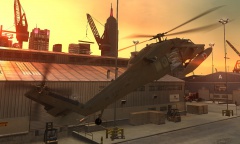
From the album: WIPs
Medevac version of the Black Hawk with medical equipment, optional fuel tanks and sliding rear doors. -
-
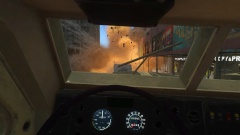
From the album: Military Stuff
An M1114 HMMWV getting destroyed by an IED as seen from an MRAP. -
 Btw, Skyline, I hope you someday go back to the military mods;) Funny you mention it, almost done with a new Cougar MRAP :D
 -
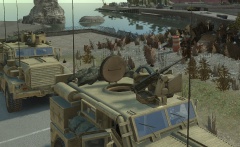
From the album: Military Stuff
Two Cougars scanning the area while holding position. Cougar in the front with opened hatch on top. -
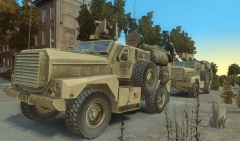
From the album: Military Stuff
Two Cougars scanning the area while holding position. -
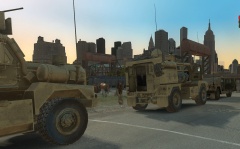
From the album: Military Stuff
Convoy with 1 unarmed HMMWV and 2 Cougar MRAPs with RC controlled turret waiting to recieve orders. -
From the album: Military Stuff
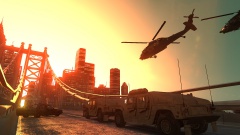
A convoy of Humvees on route into Algonquin with 2 MH-60L Black Hawks flying nearby. -
-
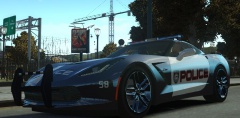
From the album: WIPs
Coming soon (I guess?) -
(import:) well, the easiest way would be to export all single textures tp .png or .dds in the same folder where the model is located. When you import a file, it will have the "Preferable Textures" Option, where you can choose png, dds or tga format. Select the format you have exported your textures in and you're good to go. However, most vehicles use textures of the "veh_share.wtd", so you're going to need the textures of that archive aswell. As for the no modifications visible part, I don't really have an answer for that. Did you try to rebuild the archive?
-
Got two (three) new V vehicles. First one is the unique Space Docker, which you recieve upon collecting all 50 spaceship parts. The 2nd is the Seminole and the 3rd is a mapped police version I have made for fun to replace the older North Yankton Ranchers. It has the NY lightbar and I've created a quick skin for testing purposes.
-
just copy the credits of the Readme. Incase of the Stanier and Interceptor Yohsuke and M4k3 get the credits, too, because I didn't extract the models myself back then. The rest of the models are actually only my work with the handling made by someone else. Also, I'm stepping away a little from V models to finish up a few military things I had started (like the Seaknight) Shouldn't take more than 2 days though. One of them:
-
it could be possible with EPM. Attach it to the frontlights and put an object with non-lightsemissive shader infront of it so it's blocked. Make that object a door with custom rotation axis. When pressing "H" (or whatever activates the high beams) the object (door) opens (you have to set the axis, so it will go somewhere where you won't see it) and the polies with lightsemissive shader can be seen as being on. Then again, either the boot or one of the doors can't be opened anymore. And it seems like too much of a hassle.
-
-
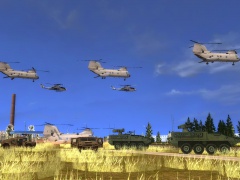 Reminds me of ArmA II somehow :D
 -
I have uploaded an unlocked version of it at my newly created modding thread at LCPD:FR :P
-
Thanks for the welcome! :) About the V vehicles, I will probably release the Seminole next. I'm planning on making a North Yankton State Trooper version out of it. I think the model is fitting for a NY Trooper. The CH-46D is done and can be downloaded in the first post via Mediafire or on 4-Mods. Oh and I'm sure many or all of you saw it already, but Netman released a modified LCPD and NOOSE version of my 2nd Gen Stanier
-
-
Okay, so a quick introduction for those who don't know me (that well). I have started modding GTA in 2010 with San Andreas with a focus on aircraft and military equipment (you'll still find some cars, peds, trucks here and there). You can actually see all of my SA work here: http://acfreakssanandreasmods.blogspot.com/ Many links are down, but all of my work is available on GTAInside. So, in 2011 I have made first steps in IV, as I wanted to bring some of my helicopters to Liberty City. In 2012 I have improved my IV mods and also released military ground vehicles and cars. So now we're here and I will start with my most recent work: GTA V Vehicle converts for IV's PC version. As you can find pictures on the mod page aswell, I will post the already available ones as GTA4-Mods links ONLY for now, so I don't have to re-up them all one by one. The next mods will also get a Mediafire link. Please note: Some files have an alternate link to an unlocked model file. You can modify and release those as you wish, as long as the credits of the original Readme are added. You can release them unlocked at LCPD:FR ONLY, not on 4-mods, GTAInside or any other GTA file hosting website. Thanks. Military CH-46D Seaknight: http://www.mediafire.com/download/8u6nyp4egl3cke7/CH46D_Seaknight_IV.RAR Emergency/Service LSPD Police Cruiser: http://www.gta4-mods.com/vehicles/gta-v-police-cruiser-non-els-f25504 unlocked: http://www.mediafire.com/download/asy0rpje3pfl2ke/police.wft LSPD Bravado Buffalo: http://www.gta4-mods.com/vehicles/gta-v-police-buffalo-non-els-f25509 unlocked: http://www.mediafire.com/download/ufm7e504okkeef0/police3.wft LSPD Unmarked Cruiser: http://www.gta4-mods.com/vehicles/gta-v-unmarked-cruiser-non-els-f25513 unlocked: http://www.mediafire.com/download/2uuqgd5d7pw7dwk/fbi.wft Vapid 2nd Gen Stanier Taxi: http://www.gta4-mods.com/vehicles/gta-v-2nd-gen-vapid-as-lcc-taxi-f25532 LSPD Vapid Interceptor: http://www.gta4-mods.com/vehicles/gta-v-vapid-police-interceptor-non-els-f25540 unlocked: http://www.mediafire.com/download/k3rc042x9cko5h2/police2.wft Blaine County Park Ranger: http://www.gta4-mods.com/vehicles/gta-v-park-ranger-non-els-f25545 unlocked Sheriff, FIB: Park Granger: http://www.mediafire.com/download/z04fa3ihfh79l9c/Grangers.RAR FIB Granger: http://www.gta4-mods.com/vehicles/gta-v-fib-granger-non-els-f25547 Sheriff Granger: http://www.gta4-mods.com/vehicles/gta-v-sheriff-granger-non-els-f25579 Lifeguard Granger: http://www.gta4-mods.com/vehicles/gta-v-ls-lifeguard-non-els-f25642 Police Maverick: http://www.gta4-mods.com/vehicles/gta-v-police-maverick-f25649 Cars Civilian Granger: http://www.gta4-mods.com/vehicles/gta-v-declasse-ranger-f25627 Obey 9F: http://www.gta4-mods.com/vehicles/gta-v-obey-9f-updated-f25575 Pegassi Infernus: http://www.gta4-mods.com/vehicles/gta-v-infernus-f25593 Annis Elegy RH8: http://www.gta4-mods.com/vehicles/gta-v-elegy-rh8-tuneable-f25624 Bravado Buffalo 2 (Unlocked): https://www.mediafire.com/?lligbh42erlr19i
-
Yea, the glass bug is really annoying. Problem is, I have no clue how to fix it, I have asked a few people and noone seems to be able to help. My AS-350 and some other helis suffer from the same problem. The template I have made isn't the greatest, I have done a lot better, but it does its job... And I think the LCPD livery came out kind of nice. About peds, there is also a video tut out there, but at the moment I'm not in the mood to learn something "new" at all, so someone else will have to cope with that.
-
well, the requests here are more or less the vehicles I had in mind anymore (note that I don't know how to make peds for IV, so scrap the LS officers for now :/). But the guys at 4-mods annoy me because they post the same shit under each mod without even reading the replies (or descriptions) for that matter.
-
well, if you don't want to, I can do it, but you have to wait a few days then and you can modify it. @The Loot: Yea, maybe, I'll think about it. I'm actually not the personal thread kinda guy, though it would keep things more organized... As for the Granger and optimized. Do you mean the sirens or what else? I'm certain an ELS will be out soon, so that should work with the FBI
-
Go for it https://www.mediafire.com/?al8z563kffq7gbz
-
He has never made anything himself, just showing off videos. Yet, many people still think he makes everything himself :P


