RusLanParty
Members (New)
-
Joined
-
Last visited
Everything posted by RusLanParty
-
-
 I need to take a look at your logs, would you mind DMing me on Discord? Username: ruslanparty.
- 57 comments
- 3 reviews
-
Sorry to hear about what happened to your accounts, but the Mod Manager never asks for your password or personal information. Authentication is handled through the official Discord/Google OAuth flow, which takes place outside the Mod Manager. The Mod Manager only receives an authentication token from our servers, with the permissions explicitly shown to you during the authorization process. The VirusTotal scan on the download page is always for the current build, and you can compare the file hash to confirm what you downloaded is what was scanned. Did you install the requirements - ScriptHookV, SHDNV Enhanced?
- 57 comments
- 3 reviews
-
-
Thanks for letting me know. I don't remember overriding animations at all, but this could be a leftover from the old ViewPointV, since I do remember playing around with animations. I will see what I can do. You don't need the ini file to configure the mod. Everything is configured via the menu in game, including key binds. In case you still want to tweak it manually for whatever reason: To see the settings files and JSON presets, simply go into the VIEWPOINT folder that is located inside your scripts folder, and you will see a shortcut there, to where everything is stored. The reason it's located in your appdata instead of your GTA folder is so that you can share settings between Legacy and Enhanced. Let me know if you need more help.
- 57 comments
- 3 reviews
-
It seems that you didn't copy the Overlay folder into your scripts folder. The AXON logo is located inside. This is what the path should look like: scripts\Overlay\logo.png I suspect that others who had the problem of the camera getting stuck also didn't notice the Overlay folder.
- 57 comments
- 3 reviews
-
This version is not supposed to have bugs. ViewPointV just has more cameras and a menu to customize them. Can you show me your ScriptHookDotNet.log located in your GTA directory? It seems like the mod crashes for you, and this is why you can't switch back.
- 57 comments
- 3 reviews
-
That is good to know since we talked about it with Venoxity, the creator of SimpleHUD, and it looks like I misunderstood him and replaced the wrong font. I will fix it
- 57 comments
- 3 reviews
-
-

- 2
-
-
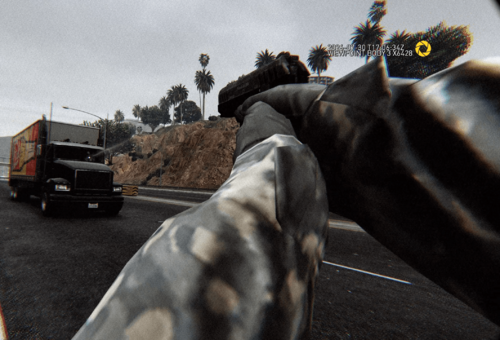
Showcase of the Lite version: Free GTA 5 Camera Mod - VIEWPOINT Lite | Third Person and Bodycam showcase VIEWPOINT Lite is the free version of VIEWPOINT, a camera system that adds deeply customizable, dynamic cameras to GTA V. This is a complete rebuild: rewritten from scratch on the current VIEWPOINT engine over the past year, replacing the old Lite entirely. The issues reported on previous versions (menu crash on open, minimap not restoring, camera flying skyward when aiming) are gone with the rebuild. Overlays, fonts, shaders, and UI are all rendered by the mod itself, no GTA files are modified. CONTROLS (defaults, change via the Main Menu -> Keybinds) Tap V - switch view Hold V - open camera wheel Tap F5 - open current camera settings Hold F5 - open main menu Q/E - switch tabs in the menus Hold ALT - activate mouse mode, you can drag and drop the menu, and scroll and click settings using your mouse cursor. Double click the header of the menu to restore to default position CAMERAS Bodycam - a body-mounted camera you can attach to any ped bone, then freely position and rotate to build your own rigs. Ships with 3 presets: Helmet Cam, Shoulder Cam, and Chest Cam. Works on foot and in vehicles. Third Person - a rebuilt on-foot third person camera with procedural weapon recoil, animation-driven head bobbing, scroll zoom, and shoulder swap. FEEL & REALISM Head bobbing engine - driven by the ped's actual skeleton bones, not pre animated shake. Tune feel, speed response, limits, and texture, a comfort indicator warns you before a preset gets nauseating. Procedural recoil - recoil is generated on the go, and is deeply customizable. You can override it per weapon or per weapon class (pistols, SMGs, rifles, snipers...). Aim smoothing - configurable input smoothing and mouse acceleration while aiming, tuned per preset. Bodycam overlay - customizable HUD overlay (logo, timestamp, text elements) you can edit in-game. Drop your custom PNG logos, and they will auto load to the list of availble in the menu. SWITCHING & UI Camera Wheel - hold V to open the wheel: move the mouse to pick a camera, scroll to cycle its presets. Tap V to quick-cycle cameras. In-game menu - tap F5 for the active camera's settings, hold F5 for the main menu. A frosted-glass UI with selectable accent colors (including a dynamic mode that adapts to the scene), drag-to-reposition, and full mouse control (hold Alt to point, click and scroll). Full controller support - navigate every menu, summon and spin the wheel, and switch cameras from the couch. Every action is rebindable on both keyboard and controller: QWERTY/AZERTY/QWERTZ layouts are auto-detected. Built-in tutorials - non-blocking checklists teach each camera the first time you use it, plus occasional gameplay tips (both can be turned off). PRESETS & TECH Presets - every camera setting lives in JSON preset files that persist across Legacy and Enhanced. Clone a default, tweak it, share the file with other players. Shaders - built-in shader effects designed for the cameras: motion blur, scanlines, film grain, vignette, chromatic aberration, dynamic borders, speed lines, and more, all tunable per preset. Both DX11 (Legacy) and DX12 (Enhanced) are supported. Widescreen ready - UI renders correctly on 16:9, ultrawide, and super-ultrawide. INSTALLATION Copy VIEWPOINT-Lite.dll and the VIEWPOINT folder into your "scripts" folder Copy EntropicLibraryLite.asi into your GTA V root directory (next to GTA5.exe) REQUIREMENTS ScriptHookV: https://www.dev-c.com/gtav/scripthookv/ Script Hook V .NET Enhanced: https://www.gta5-mods.com/tools/script-hook-v-net-enhanced More cameras and features are available in the full version: Read full description and see it in action on our website You can try the full version for free, no Patreon needed.
- 57 comments
- 3 reviews
-
-
-

- 13
-