
gewoonyani
Members
-
Joined
-
Last visited
Everything posted by gewoonyani
-
 let me know what you think about it! it is as advertised. some callouts don't work that well becaus it doesn't get the full backstory but you can add rules for callouts
- 9 comments
- 2 reviews
-
-
It will not interfere with an mod/callout that already gave the npc a story. It will only give npc's a story if none is provided by the callout I am about to add callout interface functionality, so npc's know more about what is happening so stay tuned for that!
- 9 comments
- 2 reviews
-
-

- 2
-
-
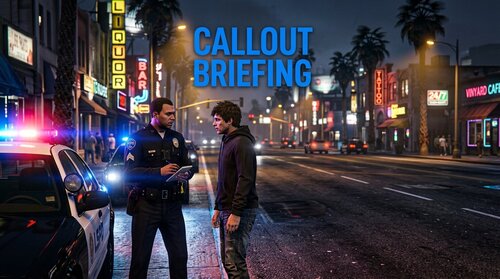
NPCI and Los Santos Alive both give your peds a voice but they dont actualy no whats going on in the callout your responding too, they just say stuff like "an officer is talking to me". Callout Briefing fixes that. It reads whatever callout is currently running and tells every person in it what the call is aobut and what there own role is - suspect, victim or witness - straight through NPCI's api or Los Santos Alive's own role system, whichever one you got installed (got both? it briefs both, no setup needed). So when you ask the suspect why hes being arrested he actualy has a answer ready ("it was an accident, the engine just caught fire" etc) instead of acting like he has no idea whats happening. No code per callout pack, it just reads the callout thats running, so it works with ANY pack, even ones that come out later. About 40 story sets are built in (robbery, domestic, pursuit, accident, fire, medical, welfare check, gang, kidnapping, terrorism and more), each with a few diffrent variants so two suspects in the same callout dont say the exact same thing. Also found out NPCI seems to forget a persons backround the moment it opens a fresh conversation with them agian, noticed this after a pursuit/takedown ended (suspect had zero memory of what he did). Fixed that too - the plugin now keeps resending the same story every 20 sec so its always fresh, plus right away after an arrest or when a pursuit ends. If a callout ever gets missread you can just add your own story for it in a simple xml file (MyRules.xml), it never gets overwriten by updates. Plays nice with pdComp's own callout narration too (the "NPCAI callout scene bridge") - leaves a ped alone by default if pdComp already gave them a backround, so they dont fight over the same person. Also now works togheter with Callout Interface (BenH/Opus49) if you happen to have that installed - not required at all, it just adds whatever its MDT already knows about a person and there vehicle (prior citations, warrants, the vehicle make/model/plate, expired insurance/registration etc) the moment you run a check. If you dont have Callout Interface the plugin just skips that part and works like normal. Never touches how a person acts in the game, only what they know to talk about - none of Los Santos Alive's other role behaviors (accomplice, gang member etc) ever get triggerd by this, just the conversation itself. Requires NPCI (NPCAI) 3.1.2+ and/or Los Santos Alive 0.2.1+, doesnt work with neither installed. Let me know in the comments if you run into a callout that doesnt get briefed right, ill add a rule for it.
- 9 comments
- 2 reviews
-
-
-

- 2
-
-
-
hi austin tech, do you still want a new version off this? becaus I wanted one to and I started working on one. if you would like a new version message me please!
-
 just tested it, I am uploading version 1.3 and it works for me with the polmav helicopter, let me know if you have issues
- 6 comments
- 1 review
-
-
- 1
-
-
The update is now live! Please let me know about any issues (I do not have a helicopter myself to test)
- 6 comments
- 1 review
-
I will look into the helicopters today thank you for bringing it to my attention!
- 6 comments
- 1 review
-
-
- 1
-
-
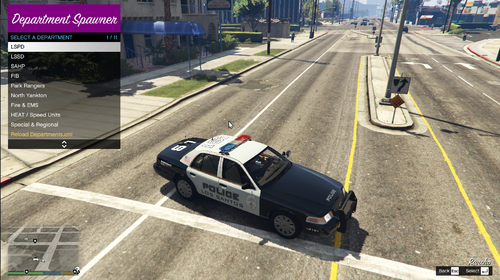
Department Spawner 1.3 A ELS vehicle spawner organised by department, made becuase i wanted more control over how i spawn my vehicles instead of just one giant list. Instead of a flat list, you pick a department first, then a vehicle. When you select one you spawn right into it in preview mode - you can browse other vehicles in the same department and cycle trough liveries with left/right before you actually comit to it. You can also toggle any extras the vehcile has (roof racks, push bars, ect) right there in the same menu. Once your happy with it, hit Confirm and its yours. Right click if you dont want it after all and it deletes the preview car for you, no harm done. Theres also a Upgrade menu so you can max engine/brakes/transmission/suspension/armor, toggle turbo and bulletproof tires, and repair+clean, all from the same place. Everything is fully configurable - the departments and vehicles are just a plain xml file you can edit yourself (add/remove as much as you want, no limit on departments), and Settings.ini lets you change the menu key, spawn distance, and even the menu color. Features: - Organise vehicles into as many departments as you want - Live preview before you comit - browse vehicles/liverys and toggle extras - Confirm to keep it, right click to cancel - Upgrade menu (engine, brakes, transmission, suspension, armor, turbo, bulletproof tires, repair) - Fully configurable trough Departments.xml and Settings.ini - Custamizable menu color - Works anywhere, not tied to being on duty Requirements: - RAGE Plugin Hook - RAGENativeUI - Whatever ELS vehicle pack you want to spawn (this file doesnt include any vehicles itself, you add your own in Departments.xml) Default key is F6 to open the menu, changeable in the ini if it conflicts with somthing else you got installed.
- 6 comments
- 1 review
-
if I load my lspdfr and eup menu everything is fine but if I take 1 step my game crashes