Lucien
Members
-
Joined
-
Last visited
Everything posted by Lucien
-
It can run normally without any additional dependencies. I recommend that you update the game to the latest version and test it with a clean build. Then you just need to put the required files into the game root directory following the instructions. The software is standalone and can be placed anywhere. After that, you can download and run mods in lml format from the website, or create your own lml-format mods by referring to its wiki tutorials.
-
 It's just to prove that this tool really works. It's a groundbreaking tool, at least in SP mode. For those who claimed in reviews that this tool doesn't work, I think the barrier to entry for this tool is quite high, and the wiki documentation is not very detailed. I have been using it for two or three years. Ever since I found out about it, I rarely use openiv.asi to load mods anymore, though the two can be used together. It is far more convenient than traditional mod loading methods. I don't have to hunt for files inside messy rpf archives, nor do I lose track of which files I replaced after installing a bunch of oiv packages. It works right out of the box. Its loading method is just as perfect as FiveM's. This tool has always worked great for me, and I use it on build 3889 as well. What's more, it does not require RagePluginHook! The only downside is the lack of detailed instructions for each feature. Even though there are several tutorials on the wiki, they are still too basic for average users to understand, and most people still cannot figure out how to operate it. I spent a long time figuring it out on my own when I first started using it.
- 339 comments
- 20 reviews
-
-
-
First, close BE. No other files are needed. The latest LML can run perfectly in the latest games.
- 339 comments
- 20 reviews
-
After closing BE, for me, it's sufficient to directly use the latest version of lml. There's no need for RPH, and it runs perfectly fine.
-
Currently, every time the lml program is opened, it has the default window size and position. Is it possible to add a function to save custom sizes? This would be much more convenient because the default window is too small. When I install a large number of mods, I have to manually maximize the program window every time. For example, after I adjust the size of the lml.exe program, when I close the program, it will automatically record the current window size, and the next time I run it, it can operate with the size I adjusted previously.
-
LML can run normally in the latest game without the need for RPH. The reason I said it couldn't run before was that I was using an old version of LML. A few days ago, I accidentally found out that I was using the 2023 version. After switching to the latest version, it can run normally.
- 339 comments
- 20 reviews
-
 <Resources> <Resource name="Gameconfig for GTA v3570" scriptName="gameconfig_3407"> <FileReplacement> <GamePath>update:/common/data/gameconfig.xml</GamePath> <FilePath>versions/3570/gameconfig.xml</FilePath> </FileReplacement> </Resource> <Resource name="Gameconfig for GTA v3407" scriptName="gameconfig_3407"> <FileReplacement> <GamePath>update:/common/data/gameconfig.xml</GamePath> <FilePath>versions/3407/gameconfig.xml</FilePath> </FileReplacement> </Resource> Error on line 107
 -
I tried it according to your method, and opened rph when the game entered the selection interface. The current game version has no response when running with lml installed, so I had to delete lml's version.dll file first, then install version.dll, and finally click on the story mode, but only rph is loaded, not lml. I have used lml for a long time. Before 3504, lml can run independently without rph, and it must be loaded when the game starts, just like openiv.asi, it will load the loaded module into the game, and it should not be able to run if it is loaded later. I wonder how you do it
- 339 comments
- 20 reviews
-
-

- 1
-
-
After installing LML, the game doesn't respond at all. I have to remove the version.dll file to make the game run, but then LML won't be loaded either. How do you operate?
- 339 comments
- 20 reviews
-
-

- 1
-
-
So, now we must use RPH to load LML? Can't LML run independently like before? I rarely play LSPRFR, but almost all mods are loaded using LML. Can LML be updated separately to be compatible with the latest game? I just tried the RPH method you mentioned, but after installing LML, the game couldn't start. Only the following log was generated: 2025-06-28 16:04:07 TRACE D:\GTA V\vfs\vfs\vfs\PackfileHooks.cpp:2245: Log initialized 2025-06-28 16:04:07 TRACE D:\GTA V\vfs\vfs\vfs\PackfileHooks.cpp:2246: Lenny's Mod Loader Beta Test Version 0.4.8564.36916 - Compiled on Jun 13 2023 20:30:33 2025-06-28 16:04:07 TRACE D:\GTA V\vfs\vfs\vfs\PackfileHooks.cpp:2197: InitializeSafe 2025-06-28 16:04:08 TRACE D:\GTA V\vfs\vfs\vfs\PackfileHooks.cpp:2259: HookFunction::RunAll(): done
-
lml is outdated, and the module cannot be loaded since the 3504 update. Can the official update be done?
- 339 comments
- 20 reviews
-
-
- 1
-
-
2025-06-26 21:02:49 TRACE D:\GTA V\vfs\vfs\vfs\PackfileHooks.cpp:2245: Log initialized 2025-06-26 21:02:49 TRACE D:\GTA V\vfs\vfs\vfs\PackfileHooks.cpp:2246: Lenny's Mod Loader Beta Test Version 0.4.8564.36916 - Compiled on Jun 13 2023 20:30:33 2025-06-26 21:02:49 TRACE D:\GTA V\vfs\vfs\vfs\PackfileHooks.cpp:2197: InitializeSafe 2025-06-26 21:02:50 TRACE D:\GTA V\vfs\vfs\vfs\PackfileHooks.cpp:2259: HookFunction::RunAll(): done
-
lml has not been able to run properly since GTAV update 3504. When will lml be updated to adapt to the latest game? 2025.07.04: The latest version of LML can run normally on 3570 without the need for RPH. I found that the version of LML I installed was too low.
-
Replaced audio file addonDLC:/downloader/audio/sound/vehicles.awc Does vfs.log having this mean that the replacement is successful? 2025-03-04 11:43:44 WARN D:\GTA V\vfs\vfs\vfs\StreamingFilesLoader.cpp:372: Failed to find strStreamingModule for addonDLC:/downloader/worldtravel/audio/audioconfig.dat4.rel This means that the replacement has failed?
-
I'd like to ask about the dlc: Can setup2.xml and content.xml in mpheist4 be replaced using the following method: <Resources> <Resource> <FileReplacement> <GamePath>dlc_mpheist4:/setup2.xml</GamePath> <FilePath>replace/setup2.xml</FilePath> </FileReplacement> <FileReplacement> <GamePath>dlc_mpheist4:/content.xml</GamePath> <FilePath>replace/content.xml</FilePath> </FileReplacement> </Resource> </Resources> I tried it but it didn't work @LMSSorry to disturb you, but I really want to understand this problem.
-
be worth the wait
-
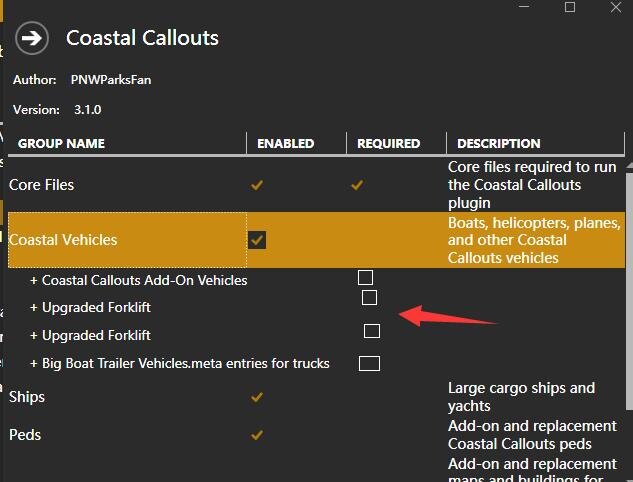
like this mod,I added four new frames using PS,It means that you can group again in the group, but there is no checkbox,Can Iadd a checkbox function to the group inside the group
-
look down
-
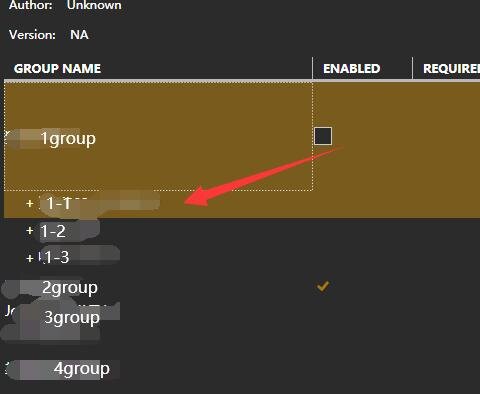
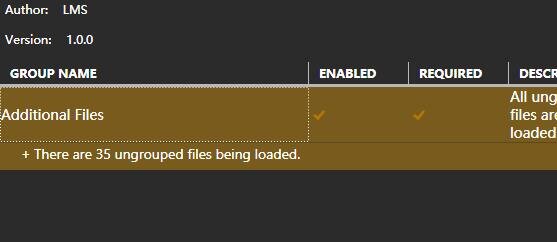
lml is a very useful mod loader. Since I knew that gtav has this software, I can't leave it. Because there is no need to replace the original game files, the game will not be so chaotic, and you can stop loading mod at any time. This is the best mod loader in my opinion. There are several functions that the author can consider adding. Just like this example, I created 4 groups. Can I also set a checkbox under each group's branch, such as 1-1, 1-2, and 1-3? The second suggestion is to display the number of loaded files in groups. If the grouping function is used, it will not be possible to display the number of loaded files like the picture below. This is very useful for judging whether all mod are loaded correctly. hope to add
-
What should I write if I want to install an addon combination peds? The tutorial is all about replaceable peds.
-
I forgot to delete the comment. I tried the stream and path replacement methods to no avail. Regarding dlc_mpbiker, I mean do I need to add the ":/" symbol as I see inside your tutorial document <FileReplacement> <GamePath>dlc_patchDay3NG/x64/levels/gta5/vehicles/police2_hi.yft</GamePath> <FilePath>replace/police2_hi.yft</FilePath> </FileReplacement> No ":/" is used between dlc_patchDay3NG/x64,Does "dlc_patchDay*NG" do not require ":/", or does "dlc_mp**" require ":/"
-
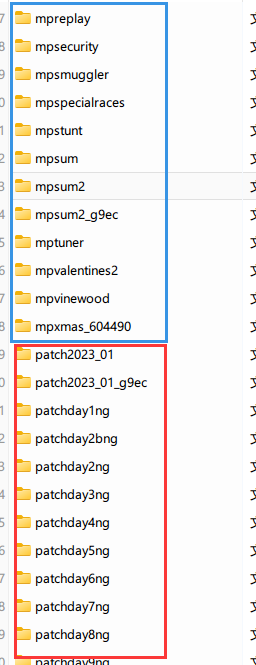
ok.thanks,Do all dlc packages starting with mp use the format "dlc_mp**:/", and dlc packages starting with patch use the format "dlc_patchDay*NG/". Another question, I used the following method to replace rope.ytd of x64a.rpf/textures/rope.ytd, but it seems to have no effect.But others such as hud.ytd and minimap.ytd were successfully replaced. Can you see what the problem is rope.ytd?
-
Different DLC upgrade packages in the game directory have different pickups.meta files. How should I write the code if I want to replace the mpbikerdlc package separately. I saw this example in the tutorial: <FileReplacement> <GamePath>dlc_patchDay3NG/x64/levels/gta5/vehicles/police2_hi.yft</GamePath> <FilePath>replace/police2_hi.yft</FilePath> </FileReplacement> If it is a dlc package for mpbiker, how should I write the beginning? I tried to use dlc_mpbiker/common/data/pickups.meta. But it seems to have no effect, I am using this module https://www.gta5-mods.com/scripts/pickups