


Andrew.
Members
-
Joined
-
Last visited
Everything posted by Andrew.
-
That made me laugh^
-
Bahaha that man me laugh like hell!^
-
The 49ers knew they wouldn't win the game, so they cut the power off to delay the game and to keep the Ravens from getting their Super Bowl rings. Conspiracy. Go Ravens!
-
Day 1 - Alaska State Troopers http://www.youtube.com/watch?v=6yQBZzrS2vM&feature=youtu.be This is going to be my new series as i said in the beginning. I will post all videos to this series in this topic so keep up to date on it! What State should i do next? Comment below!
-
Well, we do crash, but when i was in the clan ALL of us had the EXACT same mods, no graphic mods or enbs were allowed
-
109 to be exact, broke the record! That was an amazing return, then half the lights go out in the stadium xD
-
so far were kicking ass!
-
Its almost then end of the 1st half, ravens are winning! 21-3. Who do you hope wins? Ravens or the 49ers
-
Hello Everyone, Last night i was thinking about starting a state patrol series, or something similar to that. What do you guy suggest me to do? Open to everything and anything!
-
Do you not know how to be civil? Instead you give the kid an attitude. Why dont you try giving him suggestions next time? That sounds better. You could of said it this way "Good Job at your first skin! I believe that NJSP doesnt have red text but atleast you tried!" I swear arrogant people these days.
- 7 comments
- 3 reviews
-
-

- 1
-
-
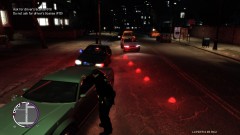 2 things: 1. How did you get the "flares"? 2. Why would you have them on a traffic stop?? -_-
 -
-
Alright, my graphics are disappearing for an unknown reason. Operating System: Windows 7 Ultimate 64-bit Processor: Intel® Core i5-2500K CPU @ 3.30GHz (4 CPUs), ~3.6GHz Memory: 8192MB RAM Available OS Memory: 8176MB RAM Card name: AMD Radeon HD 6900 Series Display Memory: 4079 MB and i only have the police cars modded! Can someone help me
-
Yes!
-
http://www.youtube.com/watch?v=6mLInOEZSGc&feature=youtu.be I hate the way the AI's drive...
-
-
https://www.youtube.com/watch?v=-1oYrSRkKoA Trooper Andrew tried stopping a white and red 2 door croquet. The suspect failed to yield for the Trooper. Trooper Andrew then initiated pursuit also calling in 10-32 x1 (Assistant x1 Officers). A few minutes after Trooper Andrew initiated pursuit, the suspect crashed their vehicle after a P.I.T. (Precision Immobilization Technique) maneuver.
-
Damn your good TarGeeT! Yes it is a CHP model that is here in the downloads section
- 6 comments
- 5 reviews
-
-
Alright well, i kinda have alot of requests to do right now, Tomorrow when i wake up, i will start on it
-
http://farm3.static.flickr.com/2385/2087748106_140fc10204.jpg That version?
-
Added: Liberty County Sheriff W.I.P.: Philadelphia Police Pack If you have any requests, please feel free to request them here. I cant do anything like Washington D.C. Police as im still learning the Pen tool
-
Liberty County Sheriff Skin based off of Napa County Sheriff, CA. Do Not edit or Re-upload without permission.
- 6 comments
- 5 reviews
-
"Based off of City of Alexandria Police." The car is used in a clan and i cant give it out unless its already released to the public, I dont know if it is or not, it should work with any CVPI
- 3 comments
- 4 reviews
-
Well, ive been creating alot of skins lately so i figured im gonna put them all in one thread! Im not that good at skinning but i try my best, If you have any requests (Simple design, nothing like Washington D.C. Design) feel free to PM me with a few pictures! Philadelphia Police (Pack Coming soon): City of Liberty Police: New York Police Department (NYPD): Ashland Police Department, Virginia: Liberty County Sheriff:

