


PonceDeLeon
Members
-
Joined
-
Last visited
Everything posted by PonceDeLeon
-
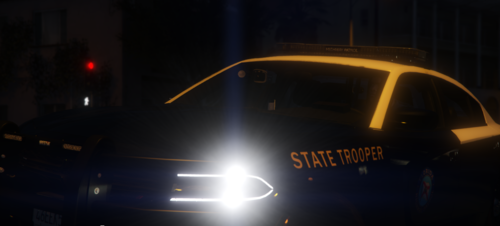 hi, i noticed the cars seem to be using police 2 &3 mainly. is there a way i can change it to where every car in the game would be FHP? like all the police models, sheriff models, and FIB models? is it as simple as changing the filename to police instead of police2?
- 138 comments
- 6 reviews
-
My game was working recently, and then the last few days it seems that Rage will crash upon startup. No loading screens. Once it launches, it sticks to a black screen for a few seconds and Rage crashes. Not sure whats causing it out of the blue. RagePluginHook.log
-
Pretty much. I know the plugin is loaded and it tells me to open Computer+ for more info about the call, etc. etc. but e does nothing. It does some sort of mini pause stutter when i try it. I've seen other people have my same problem but no one ever replies to them.
-
I don't know how I miss it but I could've sworn I had advancedhookv.dll or maybe it was advancedhook.dll and i think i deleted it and couldnt find the advancedhookv? But ELS works now. I'm trying to figure out why Computer+ isn't working now tho.
-
I've looked through pages and pages of similar problems to mine and youtube videos and I'm at a loss. I have everything required for ELS, I have ELS enabled vehicles. I have all the VCF's for my ELS vehicles however I think the problem is for some reason ELS is not loading. j k l and 1-6 don't do anything. ctrl p does not bring up the menu. scroll lock is not locking ELS. only my tail lights flicker when I turn on the siren. I really hope you can figure this one out Kallus
-
It'd be neat if someone could make els v8 Polk County, FL sheriff cars. '> '> '> https://www.youtube.com/watch?v=-gj9dkoqGRE&list=UU9A_wj7G-zjcyELg32NVntw Video of the car and lights.
-
Let me rephrase, I meant when you go to check the officers condition as the callout says to do. I don't revive him, I check his condition, kneeling down and pressing E by the downed officer. It then crashes LCPDFR. The frisk error was something else, I had tried to frisk a suspect before heading to the officer down but the person walked away, thus bugging the frisk and showing that error.
-
-
Dude, i love you. have my babies. seriously. thank you so much. <3
-
So, here's my situation. I can run GTA IV fine. It launches fine. In my GTA IV directory, the files from LCPD FR .90 are in there and in my programs list from control panel, it shows up there too. Except when i'm in the game, i hit alt + P repeatedly, or even just hold it down and nothing happens. I don't spawn to the police department as expected. My alt key isn't broken or anything btw. I have the latest versions of Microsoft Visual C++ 2010 Redistributable Package and Microsoft .NET Framework 4. I would run the diagnostics tool but i cannot find it anywhere in your stickies. It does not show up either when i try to use the search. Even better, if i try to download it from your downloads page, the download link goes to a broken page. The only thing im not sure of is if i have xlive or dsound.dll I'm using version .90 because it's the only one that will actually install correctly. The .91 and .95 beta versions say its not a valid win32 application. I use windows 7 64 bit. Any help or suggestions? I've looked all over the forums and even in past threads and even resulted to google and youtube tutorials but still no luck. /: Help would be appreciated.
