
SpiritualWolf38
Members
-
Joined
-
Last visited
Everything posted by SpiritualWolf38
-
From the album: KNW30
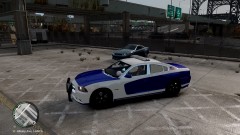
Okay lets get this straight. Do not ask me about the spotlight i already know about it. i probably have exported this car too many times and it messed up the spotlight light texture. all i did was repaint the wheel. the paintjob is for show right now. -
there are other vehicles that have less lights and i'm not here to please everyone . some like alot of lights and some don't
- 16 comments
- 11 reviews
-
-
-
-
what enb did you install
-
From the album: KNW30
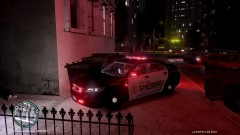
remember this skin it was on one of BPM models that i did. but it deserve a better place on this car. Without the 2013 ford Taurus beening unlock this will have to do -
From the album: NLA/NA
-
-
-
-
-
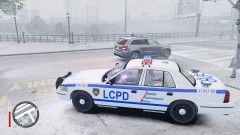
Credits: Model is Ford Crown Victoria from Driver SF, converted to GTA IV by F5544, Modified and enhanced by Tim98. Equipment: MX7000 Custom by this light bar was put together with different parts from Bxbugs123 whelen justice and 00stevo code 3. Code 3 XT6 Series by Bxbugs123 Go Rhino Push bar by Bxbugs123 Setina The Bodyguard Partition by Bxbugs123 Antennas by PriMan ALPR by Martin Stainman Decatur Genesis I Radar by Bxbugs123 Skin made by me Can Be used for any vehicle. if you have trouble just contact me. Note: The Running Bar at the bottom of the Car is code 3 not EVI model. This car only use less parts to make everything to work. All Lighting equipment is custom fitted. Use At your own Risk if there is anything that is wrong with this model you can reach me on LCPDFR Knownwolf30 or you can add me on MSN the address is on my profile if you have any question about the model. Hanling is from Sgt Kanyo if i spelled it right. Disclaimer: Please do not upload this to any other website. this is only going to be uploaded to GTA Modding Chest and LCPDFR.com . In case of damage to the game make sure you backup your files first. Contact: LCPDFR - Knownwolf30 GTA Modding Chest - KNWINC http://www.youtube.com/watch?v=gyKtIEWXW0I
- 16 comments
- 11 reviews
-
there is a light - bar on top. Just click on the picture and you see it. I didn't do a close up of the car.
- 11 comments
- 3 reviews
-
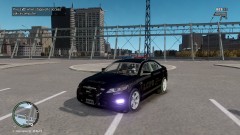
This is the 2010 Taurus Version 1 there was a version 2 but i removed it because i might change some things on it. If i Miss anybody in the credits parts let me know and i change it. Information about the light-bar is in the credit readme. Equipment: Code 3 XT6 Series - Bxbugs123 Go Rhino Pushbar - Bxbugs123 Decatur Genesis I Radar - Bxbugs123 Rockwell Collins Laptop - Bxbugs123 Spotlight made by Cj24. Setina The Bodyguard Partition - Bxbugs123 Antenns by PriMan Skins never changed Note; If I miss anything let me know or send me a Private message. http://www.youtube.com/watch?v=0PN2eUw5Qo0&feature=player_embedded
- 11 comments
- 3 reviews
-
From the album: NLA/NA
-
that is so funny great job i would join but my live subscription is out
-
i have an alienware but i got mine for 700 dollars it was one of the cheapest one i could afford. But those are very good specs.
-
i just removed all of it and i don't get the out of memory message anymore.
-
ik it sucks but i went here and remove all of it
-
i see i'm not the only one i also get it too and i have 8gb of ram also this only happen when i install the Policing tool but im uninstalling it.
-
can any other scripts can interfere with this because each time i start my game i get an error but the only thing that works is the spotlight.
-
i have 2 more left
-
im going to wait until E3 and see what all they have to offer and what they change before i choose. But all my friends are on xbox.
-
From the album: KNW30
http://www.youtube.com/watch?v=yDSDBLaebZ8&feature=youtu.be