Skip to content
View in the app

A better way to browse. Learn more.

LCPDFR.com

A full-screen app on your home screen with push notifications, badges and more.

To install this app on iOS and iPadOS
  1. Tap the Share icon in Safari
  2. Scroll the menu and tap Add to Home Screen.
  3. Tap Add in the top-right corner.
To install this app on Android
  1. Tap the 3-dot menu (⋮) in the top-right corner of the browser.
  2. Tap Add to Home screen or Install app.
  3. Confirm by tapping Install.

ManWithSack

Members
  • Joined

  • Last visited

Everything posted by ManWithSack

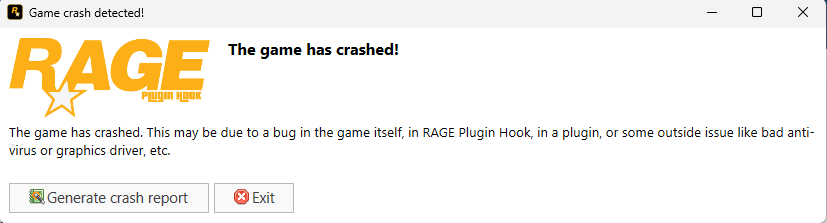
  1. My game keeps crashing while in the loading screen and shows me this error is the screen shot. RagePluginHook_10102023_163401.log I have also made sure that all my files are up to date, i have the better gameconfig, heap adjuster etc. Lspdfr and rph launches fine without mods folder
  2. RPH

    ManWithSack replied to twon305's topic in Legacy
    open windows security, go to virus and threat protection, then manage settings, and turn off real time protection.
  3. I deleted an awc file "Vehicles.awc" from my mods folder trying to remove a siren that i added through an oiv file so i was deleting the file it was in like usual and now i need to get the file back into my mods folder if someone can help.
Account

Navigation

Search

Search

Configure browser push notifications

Chrome (Android)
  1. Tap the lock icon next to the address bar.
  2. Tap Permissions → Notifications.
  3. Adjust your preference.
Chrome (Desktop)
  1. Click the padlock icon in the address bar.
  2. Select Site settings.
  3. Find Notifications and adjust your preference.