



.png.21c42c10539be5c9a4695b9f1f08fd95.png)
cherryaerie
Members
-
Joined
Everything posted by cherryaerie
-
Unfortunately, as I told someone else the other day, there are not many great "mega" packs for LSPD, it's usually just an assortment of vehicles. Though I'll recommend some that I've used that have ALPR's 🙂 ELS-Hybrid [DLC Addon] LSPD Legacy Pack - Currently the one I am using, a variety of vehicles, ELS, has ALPRs as an optional extra you can toggle. ELS [Replace] LSPD Valor Pack - Ripple has some good ELS packs. Has 7 vehicles with ALPR's on all of them. ELS [Replace Addon] Legacy LSPD - Used this for a short time, enough that I can confidently recommend it to some people, it is added to your game like an addon, but it will replace the vehicles in your game as well. ALPRs are also toggle-able with this one.
-
Most will recommend creating a new GTAV folder by renaming your LPSDFR folder to something like "LSPDFR - Grand Theft Auto V" and then either duplicating that folder (via copy-paste) and verifying your game files to remove modded files, or installing it fresh from Steam/Epic. Steam/Epic will only look for and load the "Grand Theft Auto V" folder. If you have "LSPDFR - Grand Theft Auto V" you can keep it on the side, and your chosen loader will not even look at it. When you want to return to LSPDFR, rename your FiveM folder to "FiveM - Grand Theft Auto V" and your LSPDFR folder to "Grand Theft Auto V".
-
Could you translate what it says or provide me with the entire log? I don't understand Turkish, and I'm not even remotely able to make that out.
-
I only have a few to recommend to you, as I don't frequently change my PD vehicles and don't want to recommend anything that is going to break or is straight unusable that I haven't used. I also don't know of many Impala packs, unfortunately. You can always visit the vehicle models download page and search LSPD if you don't happen to like any of these. ELS [DLC Addon/Replace] Houston PD Black/White - Has a marked/unmarked CVPI available, along with a variety of others. ELS-Hybrid [DLC Addon] LSPD Legacy Pack - Currently I use this one, has a variety of vehicles, but no CVPI. Non ELS [DLC Addon] LSPD Metropolitan Pack - Used this for a while, some people like the rotator look, others don't. ELS [DLC Addon] Asheville LSPD - Last one I used before switching, this has a CVPI with it as well.
-
Please provide your RagePluginHook.log - a .txt (text) file in your main game folder - in a reply so I can look at it for you.
-
Rename your mods folder to _mods. If this works, there is an issue with your mods folder somewhere. I'd start by removing the sirens you installed and see if that does anything, though I doubt that will do anything. It is nearly impossible for me to tell you otherwise what the issue is via a mods folder. An unhandled exception error is something I can find out via a log. Please provide your RagePluginHook.log - a .txt (text) file in your main game folder - in a reply so I can look at it for you.
-
I've replied to solve your solution via your other post already, please refer to the answer I provided there -
-
Your vehicles should be in the latest available patch day DLC via your mods folder, and they should be named to replace the vehicles (ex. police2)
-
Install RageNativeUI (v1.9.2) to your main game folder.
-
Drag and drop your RagePluginHook.log - a .txt (text) file in your main game folder - in a reply. Include screenshots of your main game folder as well.
-
Nie można załadować pliku lub zestawu 'Traffic Policer, Version=6.14.0.1, Culture=neutral, PublicKeyToken=null' lub jednej z jego zależności. Nie można odnaleźć określonego pliku. Remove Traffic Policer as it is outdated and no longer supported as of 2021 according to the download page.
-
I would love to do this for you at some point. I am currently working on an update for my other packs, one being large and the other quite minor... in addition to working on other liveries as well. The moral of the story, I can get this done for you, but depending on the amount of vehicles you want, I have no idea when I will be done with it. Otherwise, I do have other questions; Any chance you know what is on the roof of the vehicles? Is it the unit number or department abbreviation (ex LSPD)? I don't typically add unit numbers to my vehicles, as it just doesn't make sense to have two unit 34s, etc. Do you just want the 18 explorers like in the pictures you added, or do you want other vehicles like a charger as well?
-
Via a quick Google search 🙂
-
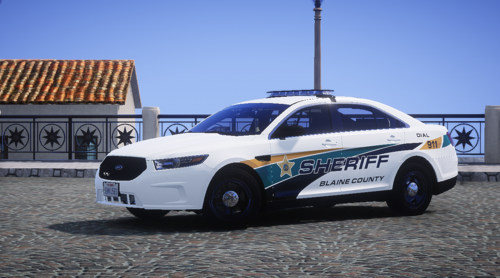 Yes, when I release the Mustang (hopefully), I will add GM's charger (and whatever other common bases I have cars for) to this pack. Thanks for using them, glad you like them!
 -
I would suggest this to the StopThePed Developer, via whatever form of contact he has on his site, not the LCPDFR forums, as LCPDFR doesn't own StopThePed.
-
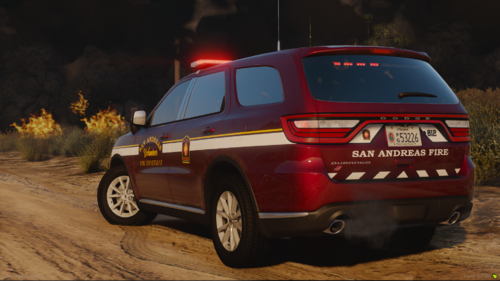 Who's base/vehicle did you use?
 -
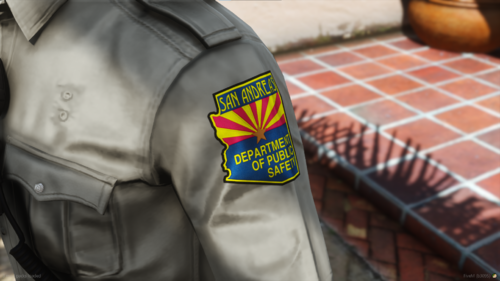 I've been working on an Arizona DPS department for my game, for quite some time actually. I am glad I don't have to make both the liveries and EUP myself when I can just use this (and you included a female version instead of paywalling it or never adding it, that's just bonus points from me).
- 5 comments
- 1 review
-
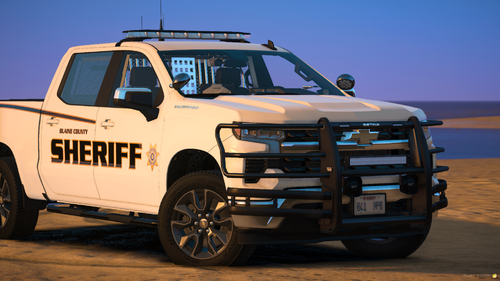 Love just about every aspect of this pack (excluding some of the wrap-around for some vehicles, I just do not think that they belong on some cars, but that's a personal opinion, and that option is removable, so it's nothing to affect my rating over). In addition to this being non-ELS, that's just bonus points from me. Will continue to use this for my game going forward and more liveries (seeing you took the opportunity to add a 21 Tahoe).
 -
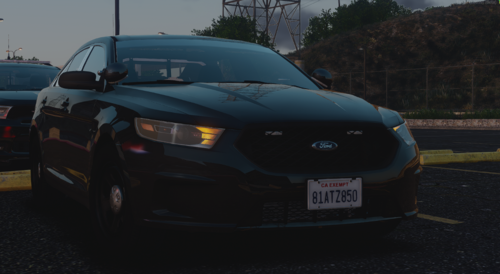 I have a soft spot for the Taurus... this is very well done. Not much to say beyond that. 🙂
 -
 If you're talking about the new update to SimpleHUD, I am not sure as I have yet to test it myself. I have been away for a while so I haven't touched my game to test it, though I doubt there is any conflict there like there is with the new plugin release alongside SimpleHUD/CTRL. In regards to your message specifically, and to what you're quoting, I am unsure of the exact list of conflicts, but I am aware that mods that control your seatbelt (i.e. trainers with god mode controlling such and Faya's seatbelt mod) conflict with SimpleCTRL's ability to "check" that.
- 446 comments
- 16 reviews
-
Use a trainer, SImpleTrainer has an option via vehicle options. I believe this is a god mode option, in which case enable vehicle god mode and visit the god mode options, though I am sure it is a separate option.
-
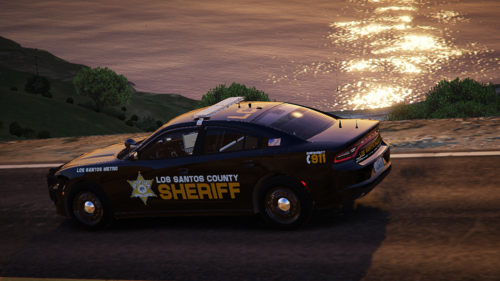 Ghosted is being worked on and planned for the next update. The issue with reflective is that I can easily make the textures reflective-worthy (literally, just make them transparent). Still, I couldn't guarantee that they are reflective on a provided model, as each author specifically needs to choose what part of their vehicles' skin is reflective, so I can't just make the texture and expect it to be reflective on all cars sort of deal. I'll probably end up providing such textures regardless in the end, I just can't guarantee they will always work.
 -
What do you mean by addon police cars? The new ones that were added not too long ago? Do you have a screenshot of which car(s)? Addons are typically ones you add to the game yourself and not ones that rockstar adds.
-
Your game looks to be all over the place. Reinstall EUPMenu. Drag and drop the EUPMenu.dll file from the download into the pathway: GTAV/plugins Do not install the RageNativeUI from the download. Install RageNativeUI to your main game directory, not your plugins folder. Remove OutfitToggler temporarily
-
Install RageNativeUI to your main game directory.
.thumb.png.2dde6de0042b025b695ed82f6d2c1e50.png)


