.png.9d028fa8f4d82fd871df370f7842b787.png)
TheMagentaButterfly
Members
-
Joined
-
Last visited
Everything posted by TheMagentaButterfly
-
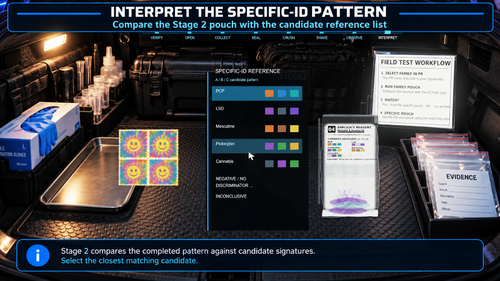 Doesn't work with custom drug items. Says it's a "UNSUPPORTED_EVIDENCE_MORPHOLOGY" and that there is "no explicit physical profile for PR evidence text".
- 17 comments
- 1 review
-
-

- 1
-
-
 I won't stress! If you want to contribute to this project, feel free to do so! I want it to be LSPDFR of the EMS world. Thanks for your kind words, feel free to also join the discord server for bug reports, suggestions and other neat things. ^^
- 63 comments
- 2 reviews
-
Terribly sorry for the inconvenience, I don't know how this happened. I thought i had tested it enough. It's fixed now!
- 63 comments
- 2 reviews
-
 No, no, totally understand. It's immersion breaking for many different cars to have the same exact horn.
- 78 comments
- 4 reviews
-
Yes. However I'm not quite sure if it'll work correctly as I haven't fully finished the air horn replacement. Let me know if anything else comes up tho.
- 78 comments
- 4 reviews
-
If you use the patch Vcfs button it doesn't patch the air or in the els vcfs. That's by design, you'd have to manually disable it.
- 78 comments
- 4 reviews
-
-
-
If you could elaborate your issues with this mod I'd be happy to improve it. I've stated multiple times that this mod isn't finished and you should expect bugs (see the description). I value every piece of feedback I can get. Please let me know!
- 63 comments
- 2 reviews
-
-
I'll be overhauling the callouts and medic system again once I shift over to the new UI pipeline.
- 63 comments
- 2 reviews
-
-
The max size depends on how much your system can spare under load and how much total RAM you have. I cannot tell you that number as it's different from system to system
- 78 comments
- 4 reviews
-
CES loads the audio files into memory for quick access. Maybe your ram is overloaded or the file too large?
- 78 comments
- 4 reviews
-
Tried reloading the plugin? If that doesn't work, something is wrong with your file.
- 78 comments
- 4 reviews
-
Make sure you're pressing the correct key. If you changed the default key, please make sure it's a valid key (Microsoft Forms Key Enum) and make sure you're actually pressing it as the Key Enums varry from QWERTY to other keyboard layouts.
- 78 comments
- 4 reviews
-
-
Start the game, load my plugin, bring up the menu and press the patch vcfs button. Then restart your game.
- 78 comments
- 4 reviews
-
Alright I'll take a look myself, it might take until tomorrow until I've found a fix. I'll do my best to get a fix out today but I can't promise anything. Sorry for the inconvenience D:
- 78 comments
- 4 reviews
-
-

- 1
-
-
Alright, that really is weird ;-; Have you made sure you're using the NAudio files shipped with my plugin?
- 78 comments
- 4 reviews
-
-
-
Unfortunately, muting the airhorn in the ELS VCFs doesn't stop it from playing in game. You'd have to drop a muted horn audio file in your Resident.rpf. I'll have a look into the hybrid ELS vehicles. Button remapping will be coming at some point, as well as controller support.
- 78 comments
- 4 reviews
-
-
-
- 2
-
-
Please read the description first. You have to mute the ELS sirens in their vehicles ELS VCF. I'll have a look at the other points you've mentioned but this mod isn't my priority as I more or less uploaded it for fun. I don't plan on the plugin accessing internal rof files as that is way to complex and I'm pretty sure it's not even possible (correct me if I'm wrong). The solution of dropping the WAV files in the folder is the easiest and most user friendly solution.
- 78 comments
- 4 reviews
-
-
- 1
-
-
.thumb.png.f6ac323806974bae6b70677161884c73.png)