


Hendrik3812
Members
-
Joined
-
Last visited
Everything posted by Hendrik3812
-
LSPDFR crashed because it failed to load an invalid vehicle model (model name: policeold1). This could potentially be caused by making a mistake when editing the vehicles.meta file from my experience.
-
That's a good question... I think you're confusing things here. RPH and LSPDFR are totally unrelated to Discord.com. You could launch RPH without a internet connection, too (iirc). I'm also having issues with using the Discord client on my PC at the moment. I also get the "Sorry, you have been blocked. You are unable to access discord.com" message when launching Discord. That's because there are issues with the Discord API at the moment: https://discordstatus.com/ But I'm still able to launch RPH and play LSPDFR. So it has nothing to do with each other.
-
Yes, all of these ScriptHookVDotNet files in your GTA V folder together form the complete installation of SHVDN (excluding its dependencies). SHVDN causing these random crashes at startup (if you use it alongside RPH plugins at the same time) has been a known issue for a while now. The devs are working on a fix for this but it's not officially released yet. Be aware that the scripts in your scripts folder won't work without SHVDN. If you want to continue using them, you can try using the following "pre-release" (untested) version of SHVDN. It should fix the crash issue at startup you had. https://github.com/scripthookvdotnet/scripthookvdotnet/actions/runs/6263270547 You need to be signed in with a GitHub account to be able to actually click on the SHVDN in the "Artifacts" section to download it.
-
If you have ScriptHookVDotNet (SHVDN) installed, remove it temporarily and try loading the game again. Let me know if it works or not (because I want to tell you the next steps). If you don't have SHVDN installed, please attach your asiloader.log. This is also a text file in your main GTA V folder.
-
It still crashed because of PoliceSmartRadio. If you reinstalled the latest version properly (replacing all previous files and folders), try whether you can load LSPDFR without PoliceSmartRadio (remove the files from your /plugins/lspdfr folder).
-
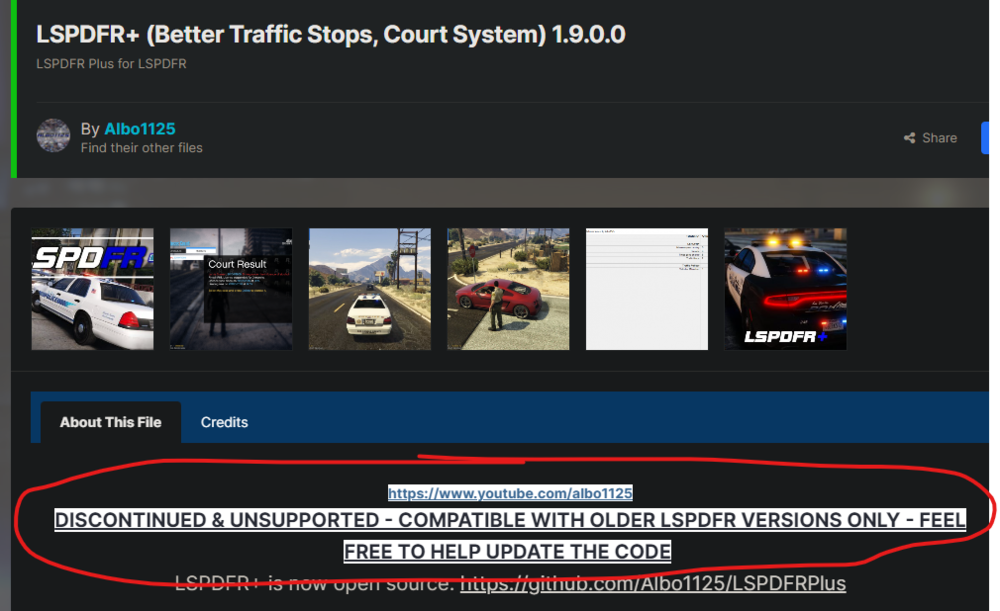
The LSPDFR+ plugin is also quite outdated. As state on its download page: If you want to continue using LSPDFR+, use the version that was updated by Aschtar on GitHub: https://github.com/Aschtar/LSPDFRPlus/releases/latest (although this might still not be 100% stable) You should also update RageNativeUI: https://github.com/alexguirre/RAGENativeUI/releases Use the files in the downloaded zip to replace the RageNativeUI files in your main GTA V folder to update them.
-
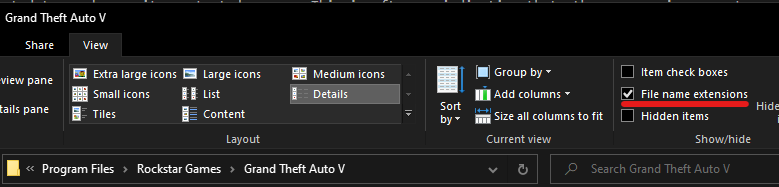
That's because you have file name extensions disabled in your File Explorer view options. This is how you enable them (I strongly recommend that): To fix your LSPDFR issue you need to update RageNativeUI: Download it from GitHub: https://github.com/alexguirre/RAGENativeUI/releases/download/1.9.2/RAGENativeUI.zip Open the .zip, drag and drop the RageNativeUI.dll and RageNativeUI.xml into your main GTA V folder, replacing the existing files. Some LSPDFR plugins come with outdated versions of RageNativeUI. Don't use them and make sure to always keep the latest version installed in the future.
-
Hi, I see multiple issues in your attached RPH log: The CalloutInterface plugin was installed incorrectly. The file RawCanvasUI.dll is missing in your main GTA V folder. Please don't leave out any files that are included in the plugin download. You need them all. There's a texture-related issue with the PoliceSmartRadio plugin. Did you install custom textures for this recently? In any case, try reinstalling the updated version of PoliceSmartRadio. You can get it here: https://github.com/Aschtar/PoliceSmartRadio/releases/latest Open the downloaded zip, drag and drop all contents from the Grand Theft Auto V folder in the zip into your Grand Theft Auto V folder. Replace existing files. Update the following plugins: DeadlyWeapons, AssortedCallouts (use the link provided here, it's the updated version from Aschtar's GitHub), TrafficPolicer (use the link provided here, it's the updated version from Aschtar's GitHub) If your game still doesn't work after doing the first three steps above, I recommend removing the following unstable/outdated plugins: CodeRedCallouts CountyCalls MoreRadioChatter Pragmatic_Callouts redCallouts tacco_highway_callouts TrafficCallouts Wilderness Callouts
-
Please post your asiloader.log and els.log (upload them as file attachments). Both are text files in your main GTA V folder. The els.log might be missing but please check whether you have it.
-
The log you sent is an older, archived one. If you need help with the issue in your latest game session, upload the latest RagePluginHook.log (without a date at the end) please. It's in your main GTA V folder, not the logs folder (see the attached screenshot).

-
Hi, the reason why it crashed is that you didn't install GrammarPolice correctly. The files IPT.Common.dll and CalloutInterfaceAPI.dll that were included in its download should be placed in your main GTA V folder, not in the GTA V/plugins folder. Move them from the plugins folder into your main GTA V folder.
-
PSA: This issue has been resolved somewhere else. OP posted it in multiple different spots at once. The issue was a broken save game. Kop56211 saved the game while being on duty in LSPDFR (which is something you shouldn't do). Installing a 100% save game was the solution.
-
Correct, I did. But under totally different circumstances.
-
Their crash report shows that there is no OpenIV.asi file installed in their GTA V folder (not even an asiloader). That means a mods folder can't be the issue because it couldn't be loaded. I suggest trying the following: Open the commandline.txt file in your main GTA V folder using any text editor (like Notepad). Delete all the text inside of it and replace it with -windowed Then save and close the file. Launch regular GTA V without RPH first and load story mode. Wait until you're at the point where you can move your character around. Then use ALT+TAB to tab out of the game and launch RPH while story mode is already running in the background.
-
I can't see how any of this (see quote above) is related to the log they attached and the behavior they described. There's no error about AmbientGameBlipHiding in the log. The plugin was not terminated because it caused the game to freeze (low timeout threshold). Rage.Native.NativeFunction is not the same as RAGENativeUI. Rage.Native.NativeFunction is something a RPH plugin calls when trying to access native features/functions of the RAGE game engine (Rockstar's Advanced Game Engine). In simple terms, I guess you could also say RPH is trying to access the base game files (like .rpf packages). If there are errors about it in the log, it's usually caused by someone's mods folder. The log you attached is an archived, older log. It doesn't show what happened in your most recent game session. The "RagePluginHook.log" file in your main GTA V folder is the one you should attach (without a date at the end of the file name). But assuming the log shows a recent previous attempt to load LSPDFR that failed for the same reason as the latest attempt, try the following: Rename the mods folder to "_mods", then try launching the game again. If your game works without crashes after you renamed it, it would mean that something in your mods folder caused the crash earlier. Possibly the NVE installation.
-
Why do you keep telling people to "disable" (whatever this is supposed to mean) all of the plugins in your list even if they could simply download and install their latest versions if there are updates available (like it is the case with SuperCallouts and DeadlyWeapons for example)?
-
The log you sent is an older, archived one. If you need help with the issue in your latest game session, upload the latest RagePluginHook.log (without a date at the end) please. It's in your main GTA V folder, not the logs folder (see the attached screenshot).
-
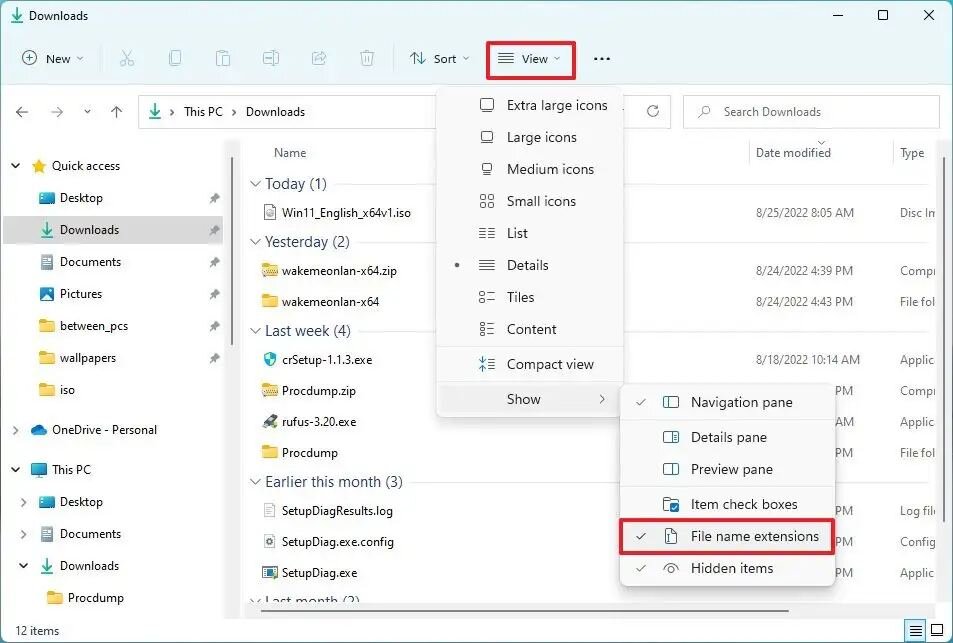
I don't know how to say this respectfully and friendly but... dude, your GTA V folder is a real mess. About one third of all files and folders are not supposed to be there. There's so much stuff installed wrong. Listing all of this would take too long. I strongly recommend cleaning your folder (remove all third-party files that aren't part of the original GTA V folder). I also recommend enabling file name extensions in your File Explorer view options. This will make it much easier to identify certain files and it will make communcation with tech support easier and clearer: Other than that you could try disabling LML, too. Rename the vfs.dll to _vfs.dll, then try loading the game again.
-
Lenny's Mod Loader. Move your mouse on the dotted-underlined word "LML" and it will tell you what the abbreviation stands for. Try whether verifying your game files integrity using your game launcher (Steam, Rockstar, Epic) helps: Steam: Steam Library > Right click GTA V > Properties > Local Files > Verify Integrity Rockstar (Retail): Rockstar Games Launcher > Click GTA V > Click Settings > Verify Epic: Go to your Epic Games Library > GTA V > click the three little dots > Manage > Verify If it still crashes after the verifying process has finished completely and you attempted to load LSPDFR again, attach your RPH log again and send screenshots of the entire list of files in your main GTA V folder please.
-
Did you install LML?
-
CalloutInterface doesn't work because you didn't install all of its requirements correctly. The file IPT.Common.dll in your main GTA V folder is outdated. You need to replace it with the IPT.Common version that is included with the latest CalloutInterface download. I also recommend removing the BaitCar plugin. It's outdated and unstable and will make your LSPDFR crash eventually (from my experience).
-
LSPDFR crashed because it couldn't load an invalid weapon asset. Do you have a mods folder in your main GTA V folder? If yes, rename it to "_mods" and try loading the game again. It will temporarily disable your mods folder. It's a troubleshooting step to figure out if it's the reason for the crash.
-
Please attach your RPH log again (if you launched RPH before it crashed). Also, show me your list of files in the main GTA V folder, please. Take screenshots (sorted by name, A-Z).
-
Alright, as I already told you: Renaming the mods folder disables it and it looks like something in your mods folder caused the crash. There's no logging for the loading of mods so there's no way for me to tell you which part of your mods folder is the issue. If you installed a car pack or add-on recently, make sure you also have a modified gameconfig, HeapLimitAdjuster and PackfileLimitAdjuster installed. Otherwise, try removing the mod you added most recently. Or start over with a new, clean mods folder. Don't re-add all your mods at once but one by one. Launch your game after installing every single one and try if your game still works. This is the only way you can find out which mod is breaking your game.
-
Yep, that's the latest log, thanks. If you have mods folder, rename it to "_mods" and try loading the game again. It will temporarily disable your mods folder. It's a troubleshooting step to figure out if it's the reason for the crash.




