


Hendrik3812
Members
-
Joined
-
Last visited
Everything posted by Hendrik3812
-
Remove the firetruk.xml file from your ELS folder. It's faulty. Then retry (with the latest AdvancedHookV installed).
-
Could you please provide screenshots of - the content of your commandline.txt file located in your main GTA folder - the list of files and folders in your main GTA folder?
-
If it only crashes with AdvancedHookV being installed (without SHV showing an error about ELS and AHV) it's most likely a faulty ELS vcf causing the crash imo. @Stine57 In addition to the updated RagePluginHook.log please also attach the asiloader.log and els.log (two other text files in your main GTA folder).
-
@Cosmicwdwd There won't be a RPH.log if RPH is stuck at "Launching Game..." though. RPH will only start generating this log if it was able to launch without issues (so if it says "Enjoy..." and minimizes). @MZabo I have a few more suggestions you can try: Open the commandline.txt in your main GTA folder and replace all the text inside with the flag -windowed (that should be the only thing in the file). Save and close the file. Ensure that neither the GTA5.exe nor the PlayGTAV.exe in your main GTA folder is set to "Run as administrator". Go to the properties -> compatibility tab -> ensure the "run as administrator" option is not enabled. In contrast to the previous point and to UnknownBastion's post, in my experience, it's better to run the RagePluginHook.exe as administrator (repeat the same steps as above but add the checkmark). Although it's technically not about your error specifically, try following the instructions in the official RagePluginHook FAQ on pages 3-6: add your GTA V folder as an exception to your antivirus settings make sure no in-game overlays are active set the permissions aka. security properties of some files and the GTA folder
-
Regarding the AdvancedHookV.dll update, Wouldn't it also make sense to include the new AdvancedHookV file in the regular ELS_V1.05 download? If new users want to install ELS for the first time, they'd need to download both the "ELS_V1.05.rar" and "AdvancedHookV_b3258.zip" and install them in the correct order. Which seems unnecessarily complicated to me.
-
You're supposed to open your own support thread for your own issues.
-
Please attach your asiloader.log and els.log (if you installed ELS). These are text files in your main GTA folder. I'd appreciate if you could add the actual files attachments instead of copy&pasting their content here.
-
No, no, you misread that. I was replying to Chris's comment there. Only the lower part of my reply is directed to you.
-
Excuse me, but what are you even doing here? This looks like you copied a Discord bot response to this forum without even making the effort to adjust the formatting and make it work for this forum. And you're doing it over and over again? Not just here...? This is barely readable. The most important thing you should do is update LSPDFR to the latest version using the manual install. And yes, remove the outdated/unstable plugins.
-
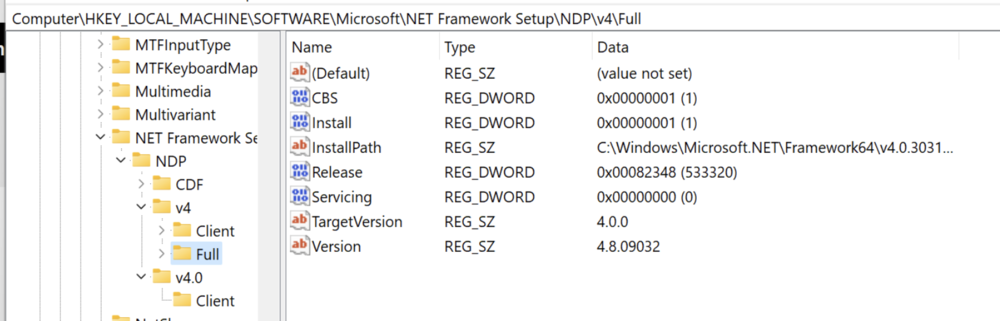
Okay, the .NET Framework doesn't seem to be visible here. Let's try another way to figure out which version you have installed. Press Windows Key + R, type "regedit" and press Enter In the Registry Editor navigate to the following path: HKEY_LOCAL_MACHINE/SOFTWARE/Microsoft/NET Framework Setup/NDP Send a screenshot from your computer that looks similar to the following: Next, I recommend removing these Visual C++ installations from your computer: 1. Uninstall them completely. 2. Restart your computer 3. Then reinstall the Visual C++ 2015 redist_x64.exe that you can get from this download page: https://www.microsoft.com/en-us/download/details.aspx?id=52685

-
It's recommended to use the LSPDFR manual_install instead of the automatic setup.exe installer. Then try disabling loading LSPDFR automatically at startup (configure this in the RPH settings) and then load it manually using the RPH console once story mode was fully loaded. The console command is LoadPlugin "LSPD First Response.dll"
-
Yes, many RPH users have to launch it like this. It's not a big deal imo.
-
Try launching regular GTA V without RagePluginHook first. Load story mode, then launch RagePluginHook while story mode is already running in the background.
-
@RedAISkye What happened when you reinstalled the above requirements? Did it tell you that you already have a newer version of it installed for example? Can you please send screenshots of the exact versions of Visual C++ and .NET Framework you have installed on your computer?
-
Can you send screenshots of the list of files in the GTA folder where you installed RPH & LSPDFR? You can take proper screenshots by pressing Windows Key + Shift + S or the PrintScreen key. The screenshots will be copied to your clipboard and then you can simply paste them here.
-
Yes, correct.

-
Looks like you posted this twice for some reason. I answered properly here:
-
It looks like you didn't copy and paste the entire crash report here. But instead of posting the crash report, please just attach the RagePluginHook.log file to your message here (drag and drop or click on "choose files" below the text area). The RagePluginHook.log can be found in your main GTA folder, not in your logs folder. It's a text file called RagePluginHook and doesn't have a date at the end of the file name. .

-
You're using a very outdated version of RPH that isn't supported anymore. Reinstall LSPDFR using the latest LSPDFR manual install (this includes the latest RagePluginHook version). Open the downloaded .zip, drag and drop all files and folders into your main GTA V folder. Select "replace" when prompted. Then launch the RagePluginHook.exe (app) directly from your main GTA folder, don't use a shortcut (for now) and don't move the .exe somewhere else.
-
LSPDFR crashed because it couldn't spawn a vehicle. This is possibly a mods folder issue. If you have a mods folder, rename it to _mods and try to load LSPDFR again. This will disable the mods folder temporarily. It's a troubleshooting step to figure out whether something in your mods folder is causing the issue.
-
You should update GTA V, RPH and LSPDFR. All of them are currently outdated according to your log. You can trigger a GTA update manually by deleting the GTA5.exe (app) in your main GTA V folder and then starting the "Verify game files" process in your game launcher (Steam, Rockstar, Epic). This should re-download the latest versions of the game files. To update RPH and LSPDFR, download the latest LSPDFR manual install (this includes the latest RagePluginHook version). Open the downloaded .zip, drag and drop all files and folders into your main GTA V folder. Select "replace" when prompted.
-
You installed it incorrectly. It's a LSPDFR plugin, so the GrammarPolice files should be placed in your GTA V/plugins/lspdfr folder, not your GTA V/plugins folder. Make sure to read the included installation instructions carefully. There are also files that should be placed in your main GTA V folder.
-
The crash was caused by an issue with the CheepCallouts plugin. I recommend removing it, it's outdated anyway. Besides this issue there also seems to be an issue with the amount of available memory (RAM) on your system. Try freeing some memory up by closing as many apps and background processes as possible before launching the game and RPH.
-
Please upload the latest RagePluginHook.log (text file) after LSPDFR crashed in your latest game session. You can find the file in your main GTA V folder, not the logs folder (see the attached screenshot).
-
You need to reinstall ExternalPoliceComputer. It crashed because it failed to find the file Grand Theft Auto V\EPC\data\worldPeds.data






