


Owen.butler17
Members
-
Joined
-
Last visited
Everything posted by Owen.butler17
-
@UnknownBastioni didn't do anything
-
 /////////INPORTANT NOTICE I am currently working on cleaning up some errors I have found in the base mod and in the callouts so please expect some bugs or fps loss
 -
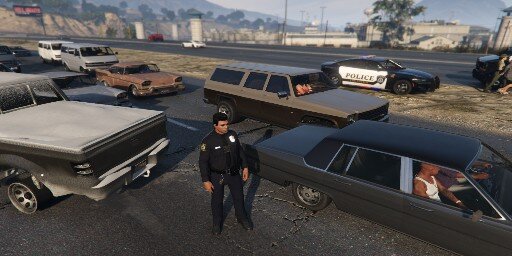
HEY everyone just to let you know that all the tow trucks are now working again i have attached a video as i have discovered this after calling for a tow truck and selecting small tow truck
-
@Charlie686Never mind I figured it out hopefully it works
-
@Charlie686I just want to clarify when you say At the top of your class, you can add: private bool IsPursuitRunning = false; where do put this as it caused errors in my code And when you create a pursuit, you can set IsPursuitRunning = true; Then in your if statement, change it to include your boolean check: if (!IsPursuitRunning && Game.LocalPlayer.Character.Position.DistanceTo(SpawnPoint) <= 100f)
-
.thumb.png.54c06eaaf86957cad8ad4654d0b2599d.png) @.Django.this link to vehicles is brokenhttps://modification-universe.com/forums/index.php?/files/file/204-els-vg-e-one-fire-truck-pack/
@.Django.this link to vehicles is brokenhttps://modification-universe.com/forums/index.php?/files/file/204-els-vg-e-one-fire-truck-pack/- 7 comments
- 1 review
-
-

- 1
-
-
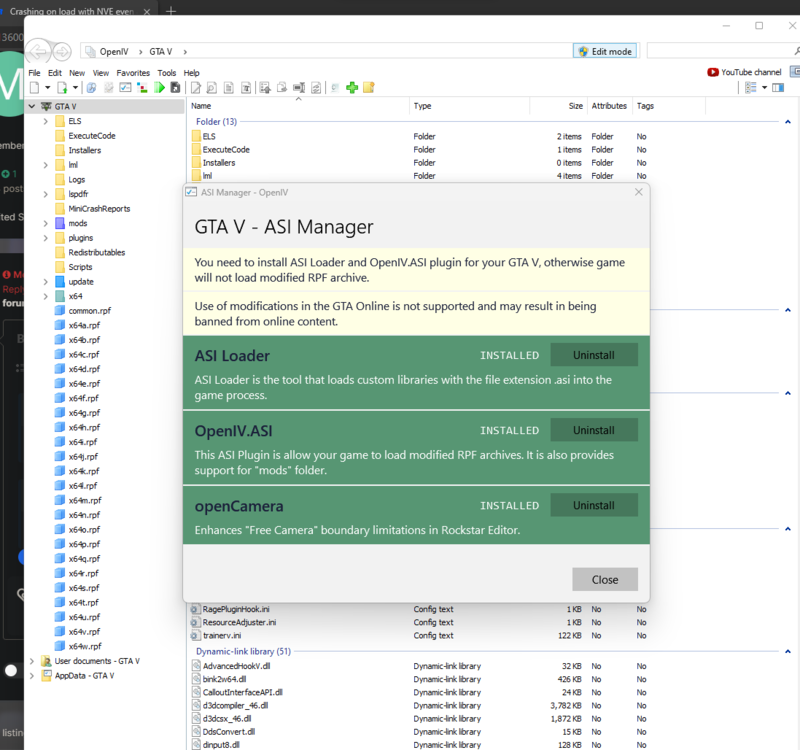
@memeladBEFORE READING THE BELOW IF YOU DIDNT BACKUP YOUR GAME BEFORE INSTALLING NVE YOU WILL NEED TO UNISTALL GTA V AND DELTE ITS FOLDER THEN REINSTALL i would agree delete your current mods folder and uninstall the three things in Openiv asi manger I have include a screenshot of the asi manger the reinstall the three things in openiv asi manger to create a new mods folder and then copy and paste the update and x64
-
@trainguy gamingthe xml has been removed as I personally found a bug as I tested myself and I am working on correcting the bug
-
hi everyone I am currently developing a callout pack for my mod Security+ REVAMPED 1.3.2 but I am getting the following after accepting the only callout which is a pursuit in progress my game spawns in a lot of backup and then crashes i have included RagePluginHook.logmy rage log and have included the code from my callout
-
@Elizabeth Grantdo you have the following two things installed HeapAdjuster - GTA5-Mods.com and Packfile Limit Adjuster - GTA5-Mods.com as you nay be exceeding the amount of dlcpacks the game can load I have my Packfile limit in my gameconfig.xml set to <ArchiveCount value="23568"/> and my heap adjuster is set to 2000 but the heap size depends on the amount of ram you have
-
add your entire gta v directory to your exclusions list for Avast free antivirus also add it to the exclusions for Microsoft defender antivirus @Brodacz997i am assuming you are on windows lspdfr can be flagged as a false positive by some antivirus
-
@Brodacz997what antivirus software are you running?
-
it would of been computer+ most likely since you need LSPDFR+ by @Albo1125 and lspdfr+ has been DISCONTINUED & UNSUPPORTED - COMPATIBLE WITH OLDER LSPDFR VERSIONS ONLY - FEEL FREE TO HELP UPDATE THE CODE is not compatible with newer versions of lspdfr albo correct me if I am wrong
-
the update is complete and the file is awaiting approval
-
ok that is a very odd crash the game did that to me once and to fix it set my RPH to load the game in forced Fullscreen mode the same crash was caused by Community Script Hook V .NET you can read about the issue with it here : Usage of fibers causes random .NET runtime crashes · Issue #976 · scripthookvdotnet/scripthookvdotnet (github.com) if you have Community Script Hook V .NET remove the following files ScriptHookVDotNet.asi, ScriptHookVDotNet2.dll and ScriptHookVDotNet3.dll files from your game directory.
-
i can concur with @unitedOrange66on this one
-
THE TXT file is wrong whoever the epic games version is correct and is the most up to date version maybe try replicating the issue and uploading a mp4 clip so I can better understand the issue you are having I have discovered your error in your log file @Utya227[1/26/2024 11:37:56 PM.482] LSPD First Response: [FATAL] Forced termination [1/26/2024 11:37:56 PM.505] LSPD First Response: [INFO] LSPDFR has shut down [1/26/2024 11:37:56 PM.531] Plugin at path "E:\Games\GTAV\Plugins\LSPD First Response.dll" states that it prefers only a single instance of it to be running at a time. [1/26/2024 11:37:56 PM.531] To force this plugin to load multiple times set the force parameter to true. as will not run if attempted to load multiple times
-
@Utya227What version of gta v are you running?
-
do you have Community Script Hook V .NET installed?
-
@Utya227I don't suppose you have Community Script Hook V .NET as this can cause random crashes in gta v while playing lspdfr if you do have it installed remove the following files ScriptHookVDotNet.asi, ScriptHookVDotNet2.dll and ScriptHookVDotNet3.dll
-
i am working on the update but it is taking longer than I anticipated
-
hi there @Shazza88 your problem seems to be with these certain lines in your rph.log and when you installed eup you definitely installed it to your mods folder
-
hi there have you tried the fix suggested by @Charlie686
-
 hi infamousnathan I would advise you that due too the fact the game just recently got updated that lml would need updating to work with the new version however i am not the creator of that mod so I would strongly advise as i am sure that the lcpdfr.com staff team would agree that you should look at the following these to links for any updates I would check these links that i have included in this comment lLSPDFR WEBSITE LINKS TO HELPFUL INFO.txt
- 339 comments
- 20 reviews
-
!!!!!due to user comments, I recommend downloading the 1.3.1 file HEY GUYS JUST TO INFORM YOU THAT DUE TO PERSONAL ISSUES I WILL NOT ADDING ANY MORE INTENSIVE FEATURES TO THIS MOD AT THIS TIME AS IT TIME AND A LOT OF EFFORT I WILL AT SOME POINT ADD MORE THINGS POSSIBLY MORE VEHICLES AND CUSTOM SKINS/PEDS, CUSTOM INTERIORS FOR THE UNIVERSTY CAMPUS I DO NOT KNOW WHEN THAT WILL HAPPEN THOUGH, PLEASE DO NOT ASK FOR An EXPLANATION.!!!


.thumb.png.54c06eaaf86957cad8ad4654d0b2599d.png)


