


MZabo
Members
-
Joined
-
Last visited
Everything posted by MZabo
-
Hello, sorry for the late reply. So I tried @Hendrik3812's suggestions and nothing changed. I am really not sure at what is happening.
-
Yes, ofcourse. Multiple times
-
Already has been a suggestion as said by @UnknownBastion, didn’t work……. A big problem I think is that RPH seems to not believe that GTAV is running. Because with GTA already running when I go to run RPH it goes to open Epic Games and start another instance of GTA, even though it is already running
-
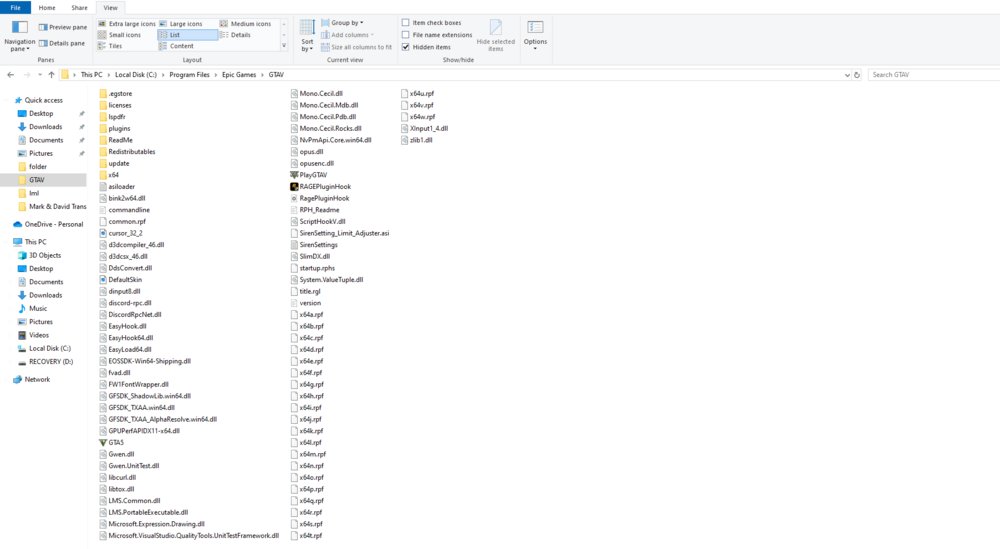
-
I have tried through both ways. As Admin, and without. Same outcome……..
-
Sorry but I’m not sure you fully understood what I fully said or I have said it wrong. But that is the method that I have always been starting RPH well because, I have the Epic version. I have also tried starting it just by clicking RPH and same problem occurs
-
As I said, I’ve already tried running the game and then starting RPH and all it does is it tries to run GTA through Epic again. the weird thing is this used to not be an issue. I have been off LSPDFR for a month because I had other things to attend too. And so I decided to do a new reinstall of GTA. And before I decided to take a break I was playing LSPDFR just fine though Epic
-
Hello so I am trying to get RPH started but whenever I start it. The game opens and RPH seems normal but once GTAV is up and running RPH is just stuck on the "Launching game" message instead of hooking the instance how i know its supposed to. And this is with a re-installed, clean GTAV, no mods, no nothing. And Anti-virus is not the issue. I have also tried running GTA first and then starting RPH. But it then open Epic and tries to run GTA again even though its already running. Please help, just want to play some LSPDFR 🙂
