
Skip to content
View in the app

A better way to browse. Learn more.

LCPDFR.com

A full-screen app on your home screen with push notifications, badges and more.

To install this app on iOS and iPadOS
  1. Tap the Share icon in Safari
  2. Scroll the menu and tap Add to Home Screen.
  3. Tap Add in the top-right corner.
To install this app on Android
  1. Tap the 3-dot menu (⋮) in the top-right corner of the browser.
  2. Tap Add to Home screen or Install app.
  3. Confirm by tapping Install.

Kingsnake82

Members
  • Joined

  • Last visited

Everything posted by Kingsnake82

  1. thinking the same. may be quant v and another visual mod combined
  2. this is the issue, in the weather is duplicate reflections. not sure if it's a hudson visual issue or quantv?
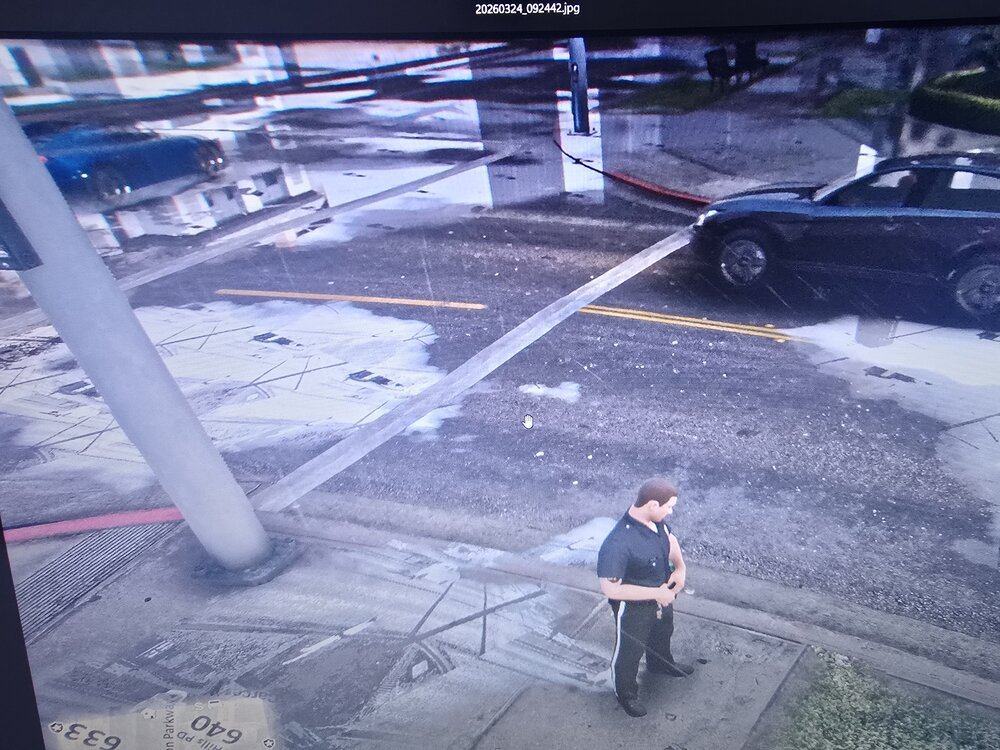
  3. ok, i will do just that. i appreciate your help. lets see
  4. RagePluginHook.zipis this the one?
  5. https://www.dropbox.com/scl/fi/r5ik94vprzzpcz1hndqta/CrashReport_NCG_639098687993326321.rcr?rlkey=18vyxdwcd0oii7eztxa6j3zyn&st=b7eyd77l&dl=0
  6. any other way to send it? it's 6.34mb
  7. i will have to look into how this is done,but i am sure willing to give any ideas a try.
  8. i am in need of help from anyone who can look over my crash report and advise me of what i need to do in order to get my game corrected. i have a texture loss issue and i'm not sure the cause and or what is the main issues at fault. *says file (report)is too large to import?

Account

Navigation

Search

Search

Configure browser push notifications

Chrome (Android)
  1. Tap the lock icon next to the address bar.
  2. Tap Permissions → Notifications.
  3. Adjust your preference.
Chrome (Desktop)
  1. Click the padlock icon in the address bar.
  2. Select Site settings.
  3. Find Notifications and adjust your preference.