Gamer111232
Members
-
Joined
-
Last visited
Everything posted by Gamer111232
-
So, can is there any modifications in that I can open the door while driving, but not make my char fall out of car? Like that: YT video (can't load it here cause too big bruh)
-
-
So, I got the weird stuff on the car roof: Stuff pic, can't load img because straight away cause it's "too heavy" bruh. So, how do I "install it" on car manually, through the trainerV?
-
So, when I replaced one DLC cars (from LAPD FPIS to unmarked tahoe 2014, and 2019), I also have replaced their meta. And right now, game count those car as "civilian". (Trouble is in replaced meta, I am sure for 300%). (TrainerV shows it as "obey [name of car] sportcar). While I try to pull over anyone, or use MDT, it doesn't really work. How to fix that trouble?
-
Epic games. It didn't run through RPH. I have reinstalled, and deleted the folder (rockstar games) before reinstalling, but It doesn't really help.
-
Why when I launch GTA V the game whines: "Failed to launch the game, please try reinstalling the game."
-
Have anybody try that combination, is it conflicting?
-
So, I want to add some cars to additional UB units.
-
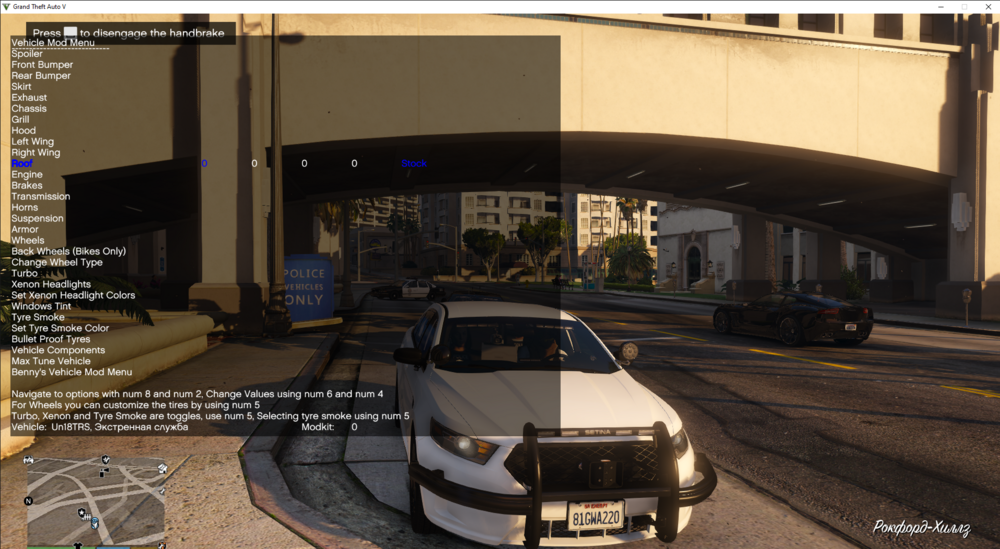
How to actually open the circle? How to change parameters from 0?
-
I found the solution... LOL.
-
So, I replace car in DLC and rename it (in vehicles.meta and carcols.meta), after that.. My PPV came that weird color: https://ibb.co/XbcbpZC How can I change car color to normal black?
-
How to make ELS for cars, that have no ELS file?
-
Thanks.. I will try it again, but not sure
-
I turn replace car into DLC car just replacing the models inside the DLC. But can anyone suggest me how to change car name properly (to make it work in trainerV, and don't let LSPDFR crush)? And.. how to add new cars in code?
-
Nah, that stuff is installed for long time ago. The trouble is I can't find in FIB wardrobe that one skin: Also, in EUP "free search" it wasn't found by me. Menyoo skin color change also don't help. (It's FBI SWAT, as I see). By the way, the FBI didn't have those uniforms until the LSPDFR plugin crush.
.thumb.png.6e44c02d7717f299ee1c9223e6200479.png)
-
(Or is it unavailable in EUP?)
-
Have anybody EUP pack about civilian clothing? Like sweaters, hoodies, t-shirt, or a sweater with a shirt underneath, also as an example, etc.
-
Have anybody California State Police uniform pack?
-
Nawhhh I want to replace CIVILIAN cars 💀 💀 💀 Now I understand how to replace the civilian cars, but the only question is what are the names of the files that need to be replaced
-
Why use the MODDING folder from Albo, and how can I find the transport that is specified in those 2 files?
-
I mean, how to replace the models of citizens' cars so that the replaced models drive on the map.
-
Can you tell me the reason why this modification is not working? I press the button (which I assigned) sitting in the car and pointing the camera towards the criminal's car, when the chase is not marked but the criminal drives away from me, but I still don't “join in”
-
-
Some time before, I already has named mods folder as _mods. What is outcome? Game don't even read the mods. Yeah, the game is not crushes. But mods also doesn't load.
-
When I play, the games closes after 1-2 mins. I see that stop the ped reports me about some conflict with any mods.. I've delete the PoliceSmartRadio. Simple callouts and also TrafficPolicier wasn't even installed.

.png.14d5304605534b397a19e598aa7925c0.png)