


bullsey83
Members
-
Joined
-
Last visited
Everything posted by bullsey83
-
I tried it again and it worked. I think the problem was I didn´t turned beside close enough to the vessel. The entering of the armed boats is a bit tricky sometimes, maybe because you can also mount the turret. But it workes most of the times. So no problems after all and i can really enjoy this great mod, Cheers to you Sir 😃👍 Does anyone know an addon for CompuLite with citations for the boat inspection stuff? Like missing of fire extinguisher and lifesavers?
-
@VireoWalang anuman 😉 Go to your GTAV folder, in there the path is plugins- lspdfr- costal callouts. Simply doubleclick the config file named vehiclespawnmenu.
-
Overall the mod works perfect but i have two issues. At first the boat questioning doesn´t work. When i press Q nothing happens. Does it collide with stop the ped? Do i need to leave my boat and climb on the suspects boat? And second i can´t enter the armed 45ft response boat medium. When i spawn it from the Costal Callout menu i´m behind the wheel. But when i exit it and want to enter again or when i find one at the stations i can´t enter. My guy just keeps running to the sides and stumble back. The problem does not occure with the unarmed version though. I think it´s this
-
 Thank you so much for this great mod! Had some problems with the keys in the begining as i´m using a german keyboard and it doesn´t have the ] as a single key. Took a while to figure this out 🤣 but the boat question key doesn´t work. It doesn´t do anything, no menu shows up after i stopped a boat. Does it collide with Stop The Ped? And i can´t enter the big armed boat, sorry i forgot the name of it. I can spawn it and steer, but when i exit and want to enter again, my guy just runs to the wall and stops. It does work with the unarmed version though.
- 503 comments
- 33 reviews
-
 I've just played the Covid 19 self isolation violation (nice idea!!), but after handing the suspect the ticket I entered my car to bring him back home and he didn't get in. I tried every key but nothing worked. Guess he wanted to stay outside 😜 Is it a bug or do I miss something?
- 422 comments
- 25 reviews
-
-

- 1
-
-
 Great mod, but the trucks and busses still don't get out of my way. I installed everything in the folder, is there something else i have to do? I have watched a video and there it worked fine. But the guy did nothing different. Edit: It's working now, I accidently overwrote the vehicles.meta with another one that came witch a new replacement car.
- 366 comments
- 32 reviews
-
 Hi, i suffered a crash during the callout "possible violation of protective order". After arriving on the scene and talking to the victim the screen faded to black (that's intended i guess) but then lspdfr crashed and a loading screen appeared. After a while i tried to reload all plugins with the console. But nothing happened and i had to shut gta down. RagePluginHook.log
 -
 Hey everyone, maybe you're able to help me with my question. I don't quite know how to put it in proper english terms and I can't find anything related by googleing. So I was wondering if it's possible to bind two functions to a single key. It will be activating ELS lighting stage 3 and simultaneous perform a traffic stop by the lspdfr config. I hope you can understand what i mean. Until now i have to activate the lights and afterwards press LeftShift to signal a traffic stop. But this causes all vehicles in front of my car to immediately slam their brakes and me crashing in the one i want to stop. Then it takes forever for the guy to accelerate i bit and then find a spot to hold. I think it would be really nice to do both with a single key. 😜 I found out, that it also works the other way around, first blip the car and then activate the lights. So that works fine for me, no further solution necessary 👍
- 2,699 comments
- 240 reviews
-
 Hey Charlie, thank u so much for implementing my suggestion🥰. Haven't played for a while but i gotta check it out asap! 😃
- 319 comments
- 62 reviews
-
-

- 1
-
-
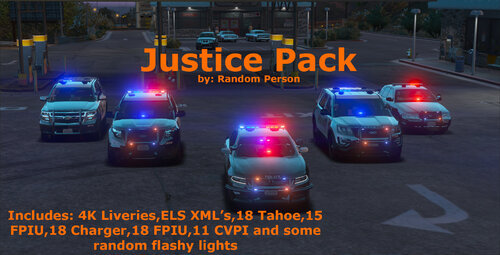 A nice replace vehicle collection. Files are not to big so it won't slow down the game to much. I didn't notice any texture failures. Fully recommended 👍
- 8 comments
- 1 review
-
I understand thats a problem. So maybe give the owner a phonecall? Don't know if that's possible? But the callout somehow feels not really ended if you know what i mean 😉
- 319 comments
- 62 reviews
-
Sounds great 👍 I have one more suggestion as i just played the stolen item callout. It would be cool if you could get in touch with the owner after chasing down the suspect. And to add the stolen item to the suspects inventory or car. So maybe deliver it back to the owner?
- 319 comments
- 62 reviews
-
-
- 1
-
-
Hey Charlie, at first i have to thank you for a really nice callout collection, it's a lot of fun to play them. Is it possible to not let the callouts end automatically after arresting the suspect? I like to do some further interacting with them like pad down and stuff. And bring them to prison by myself. But since the callout already ended i get new requests before i'm finished. I didn't see that in the configs? Greetings Phil
- 319 comments
- 62 reviews
-
 It's really a great mod but somehow it doesn't recognise my voise anymore. I get the radio noise but nothing happens. Windows can understand me and i didn't make any changes to the .ini since the problem first appear 🤔
- 1,365 comments
- 87 reviews
-
 Hey, nice callouts, but i have run into an issue in one of the mafia scenarios. There seems to be a problem with the backup, sorry i don't remember the notification word by word. I have installed grammar police and ultimate backup. When arriving at the casino the message appears and the chosen backup doesn't appear nor do the mafia guys react to me. The red circle around the area stays but the callout isn't active any more. Edit: I just read another comment with the same problem. So it has to do with ultimate backup. I will wait for further updates with these callouts 👍
- 1,032 comments
- 65 reviews
-
 Hi, I really like this mod but it crashs after the last update of GTA and RPH. RPUI also got updated. Will there be an update for this mod too?
- 200 comments
- 22 reviews
-
So far so good. After updating ragepluginUI as well as stop the ped and grammar police it seems to work. The game quit to desktop on the first try but loaded without problems after that. Time will tell but it seems to work. Thanks a lot man 😊
-
Seems a lot of people have this issue including myself. Updating ragepluginUI seems to help often but I couldn't do it yet cause I'm at work. Maybe try this and tell me if it helped
-
I have the same problem. I have been told to update ragepluginUI but I'm at work, so maybe try it and tell me if it works
-
Thanks, I'll try that later today. 🙂
-
Oh sorry, didn't see that. My bad 😃
-
The log is a text document located beneath the RagePluginHook.exe. It is overwritten every time you start RagePluginHook
-
Hi, the log ist located in the main directory if GTA V beneath the RagePluginHook.exe. It's a text document that is created on every fresh start, so it shows only the latest log.
-
Hi there, since i installed the new version of LSPDFR it keeps crashing when going on duty. I did a completely fresh installation including a fresh download of GTA. I installed the newer version of LSPDFR with the latest RagePluginHook and the latest ScriptHookV. Besides that all mods are the same as they were before. I have attached the RagePluginHook log. I hope i wrote everything right, Greetings from Germany RagePluginHook.log
-
 Yeah, i know that and it works fine. But don´t you think normal acceleration is quite too slow? I can barely clear an intersection befor red again. And staying in race mode all time somehow makes the mod useless. Just a little more throttle would be fine but i can´t figure out how to change that. If it´s even possible.
- 330 comments
- 24 reviews
