Darkangel
Members
-
Joined
-
Last visited
Everything posted by Darkangel
-
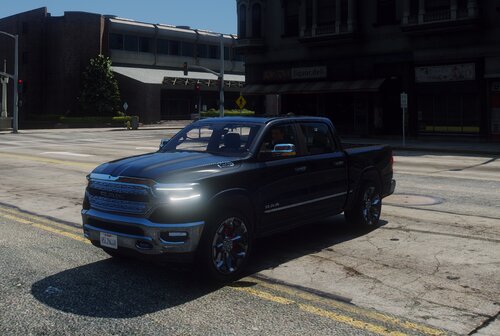 Hello, This is my first public release. I made this for my server, but we decided to go a different direction. So instead of deleting it, I will release it to you guys. It is Non-ELS and no I will not convert to ELS for you. No I won't add or change anything for you. I will not answer questions for you. This vehicle is made for FiveM, you can use it in SP, just need to do whatever you need to do to make it work in SP. This is FiveM ready, meaning all you need to do is drag it into your server resources and start it. The YTD file was compressed so you won't go over streaming limits. Something majority of people who say "FiveM ready" don't do. I don't take requests, I only make vehicles for my FiveM role play server. If you want more information about that, see my profile. If you want to edit light pattern or ground effect color here is the light guide Red are even siren number Blue are odd siren number 1-6 are the front lights 7-8 are the head lights 9-12 are rear lights 13-14 are Pside lights 15-16 are Dside lights 17-18 are tail lights. Here is a full show case of the lights: https://i.gyazo.com/3754271e169d1bfc9ba23501518ef0ad.mp4
 -
-
-
-
-
-
-
-
-
-
-
-
-
-
-
-
-
-
-
-
-
-
-
-