


.png.54ecd2cecbdbad94930ad7746eb96dac.png.e081ea7d323261a5381466b0ae81b9de.png)

q57
Members
-
Joined
-
Last visited
Everything posted by q57
-
the RPH game revert function has been broken for years, id recommend you to not use it and update your game. by broken, the function itself likely isnt broken, but rockstar social club breaks it from working correctly
-
yes, all asis and all the inis go into the main directory
-
files.zipinstall this and try again, i have a feeling it is your asi configs that are doing this
-
What are the vehicle packs you're using? try linking them please.
-
Nevermind thank you, I found what the problem was, Apparently my old deleted characters were still synced somehow and I had max characters synced. Now it works.
-
@Cyanbecause im pretty sure youre a sync developer
-
-
Go into your RPH settings and untick "ExemptPlates" from your loadlist, it's still trying to load it.
-
RPH Delete Vehicle for some reason conflicts with Charlie686 Callouts and crashes the game. Delete one or the other and try again.
-
I'm pretty sure just looking at the website you can find the answer.
-
what do you mean by "caused computer card to die"?
-
bump
-
can you send more screenshots on the issue?
-
the vehicle maker likely didn't make any of it's surfaces collidable because rockstar already set policet's collision box, and he didnt intend for it to be an addon
-
this is not texture loss or any graphical issue, the problem seems to be you failed to replace the +hi/-hi files, and gta 5 is loading the vanilla files as well as the modded ones at the same time. Try reinstalling the vehicles making sure it installs correctly this time.
-
Huh...this is strange. nothing seems to be working Have you tried turning off your firewall and real-time protection?
-
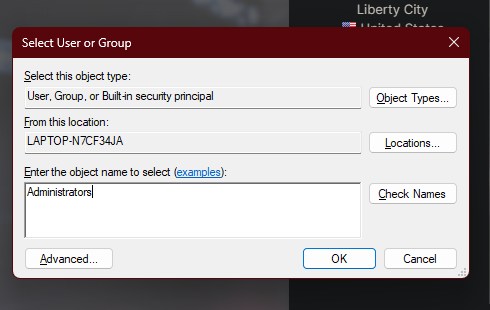
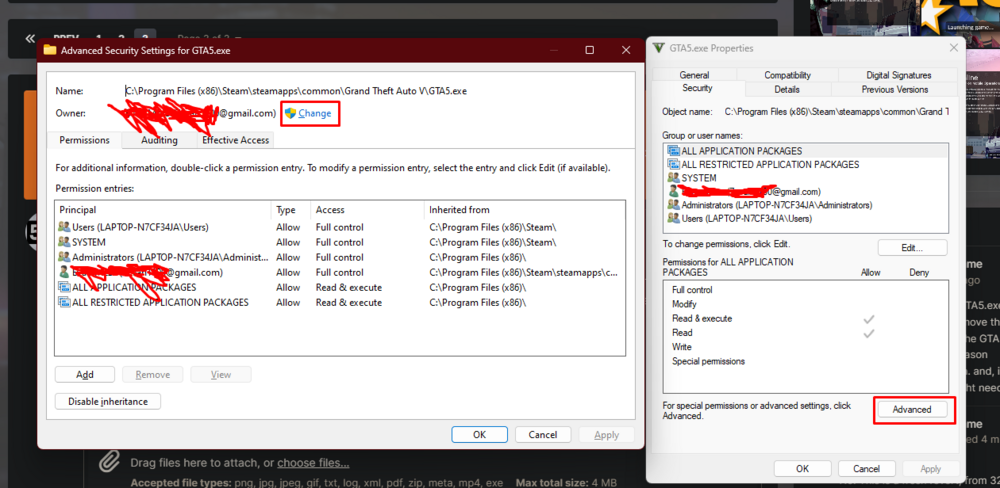
its not hard to understand, just click the buttons that are red and type in your user account name, it isnt hard at all. just make sure to look at the pictures this time.... its litteraly 6 clicks in total, it isnt hard.... youre likely overthinking it.
-
just open the security tab and press advanced then change owner, then type your windows accounts name in OR "Administrators" and then launch rph as an administrator follow the pictures for more instruction Then apply it with inheritance enabled and run rph as an administrator Then apply and make sure to turn off "read-only"
-
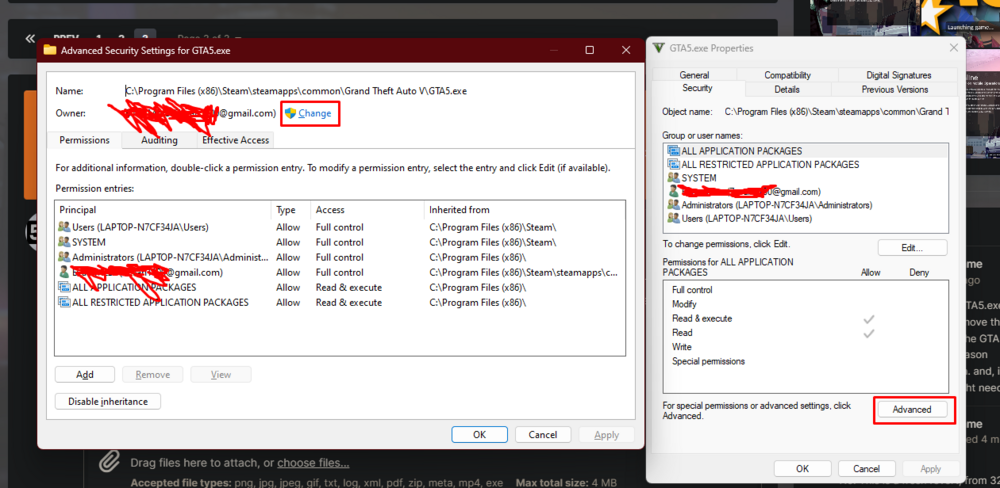
Go to the properties of the ENTIRE GTAV folder and turn off read-only, then in the security tab click advanced, and change the owner of the folder, in the box that comes up type in your user accounts name OR "Administrators" then try running rph as administrator. I have a feeling this is a permissions issue where rph doesnt have the permissions to do things it needs to do. and make sure to enable inheritance and apply attributes to all child folders. Also, if you have a antivirus with a firewall, try temporarily disabling it, someone else had the same problem and this was a fix.
-
Check the properties of GTA5.exe, > Compatibility > Please remove the "run as admin" property from the GTA5.exe if it is on. this can be one reason why RPH is not able to run. and, if you have an antivirus, you might need to turn off real-time protection when running rph, it might not be enough to exclude it.
-
do you have scripthookV and or ELS? Check the properties of GTA5.exe, > Compatibility > Please remove the "run as admin" property from the GTA5.exe. this can be one reason why RPH is not able to run.
-
then recreate the crash..? and send them here....
-
once again, can you please send the logs?
-
Can you send your RagePluginHook.log, ELS.log, asiloader.log, and scripthookV.log? all should be in your main directory if you have them.
-
what mods did you install


