


Medicmojo
Members
-
Joined
-
Last visited
Everything posted by Medicmojo
-
LOL.....yeah, that was an essay!! Like I said, I was trying to give as much info as possible right from the start, and reduce the back and forth questions as much as possible. Hopefully the length of the read didn't turn people off.....? I appreciate your reply. To answer a couple of your points, though...... The reason the log only picks up those 5 plugins, is because those are the only 5 I have installed currently - basically only enough to test for the issue still occurring on the fresh download/install of GTA V and LSPDFR. Was not expecting the problem to persist after completely nuking the previous install and starting over from scratch. But, I wanted to take it step by step, and test along the way. So, yeah.......pretty bare bones game right now, with no other plugins installed. Also, as I mentioned, this is occurring with clean downloads/installs (direct from his webpage) of Bejoijo's plugins yesterday - even updated to the "Death Penalty" version of CompuLite he put out the other day. Everything on the list at the end of my initial post was fresh downloads - not something I had saved, where I could have messed up a setting somewhere. That is the part that I truly cannot understand. If I had f*&ked something up along the way before, fine. My fault. I learn from it (hopefully), and put in the work to rebuilding the game again. This just doesn't make any sense to me. I will definitely look into that phone setting for notifications thing you mentioned - though, again, with a clean install, you wouldn't think it would be turned off by default. And, why do some notificiations come through, but not others (of which many seem to be specfically related to STP?). The audio point is interesting as well - not sure where I will have to look for that, though. Again, weird how some audio replies come through fine, but others do not. And, the lack of audio occurs the same, no matter whether I am using earbuds or just through my laptop speakers.
-
I would certainly be interested in this feature - any chance you could reload your pictures? I am sure the animations would look great. Would be fantastic if the action would lead to an effect (or, at least a chance of) on the AI. I know the one through the Main menu seems to have a variable effect - or is that just random? You know how sometimes the driver refuses to get out of the vehicle, you ask again, maybe one more time......then the message pops up about trying something else? I have had some success with the "intimidate" menu option.
-
*** EDIT *** -->> SOLUTION FOUND!! thanks to @Jeffdadawg, pointed me towards checking my "phone notifications" setting. Had to look around for that - it is located in the in-game PAUSE menu, under "SETTINGS" / "NOTIFICATIONS" / "PHONE". This option can be toggled ON or OFF - apparently, helpful in the regular GTA V, as it can incessantly spam your character's phone messages or other notifications. Players wanted a way to turn that off. However, some LSPDFR menus and plugins use that feature to display the info we WANT to have in game - callouts loading in, dispatch callout info, ped checks, etc. Every issue I mention in my long "essay" post below was fixed, by simply turning the Phone Notifications back "ON". Somehow, this must have been toggled off (by me, or whatever.....I don't know) - and weirdly perisisted through reloads of previous save games and even fresh installs. **** Figured it was time to come on here, and ask the experts for some help with this. Asked the same thing in one of the Facebook groups I am with, but only got a couple of suggestions....which haven't help. Overall, I think this is an LSPDFR issue, versus GTAV - so, I hope I have picked the right support forum. If I had to narrow it down to one or two issues - the problem seems to be centered around parts of Stop The Ped and the left side of my screen (where the usual notification texts show above the mini-map)......I will explain that more down below. This will end up being a long post, I apologize in advance - but, I want to give the LSPDFR gurus as much info as possible. ***** TL;DR summary: had an issue suddenly crop up in my working game build this week. While going on-duty (either by "ForceDuty" or via Police Locker Room) the usual chain of mods/plugins that always spool up the left side of the screen, won't appear (with a couple exceptions) But, it looks like everything seems to load in properly via the ingame RPH console. All those mods/callouts/etc work in game. Except, noticed issues with Stop The Ped - where the typical information notes that appear just above the minimap don't show up for ped checks, along with the audio back from dispatch. Vehicle plate checks seem to function normally. Also, no information appears during ped/veh searches, breathalyzer/drug/field sobriety test, observations on contact. All other functions of STP work. This issue has persisted - despite reloading backup "save games", AND, now even with a completely fresh install of everything!! If interested, keep reading below for more details......thanks! ***** After the Contract update in mid-December, I waited a few weeks to update to the new LSPDFR (build 8037) for GTAV v2545. Had a few laptop upgrades (internal SSD, increased RAM) as Christmas gifts, time committments, etc. I started with a new game build in the first week of January. I debated on just updating the game I had on the go, versus a fresh build. Based on the comments of a few of the YouTubers I follow and like.......decided to go for a complete rebuild from scratch. Downloaded everything new and fresh, and through the month of January, worked my way through buildiing my game back up. Took it slow - adding a few things, then loading/checking the game, then adding a few more. Keep a handwritten log of what/when I add things, to help work my way back when I run into a problem. I only got into LSPDFR last summer, but learned to get into the habit of making "save games" during the build process. After making a number of changes/mods, if things are running smoothly, I stop and make a copy of the entire GTA V folder from my SteamLibrary/steamapps/common, and save/date/number it onto an external HDD. Try to keep the last 2 functioning saves, plus a complete clean copy of GTA V and the first save game (major function mods), available for me to use. That brings us to last Sunday. I was feeling pretty good about my game build - seemed to be working well and running smoothly, with not too many crashes. I hadn't gotten all the way back up to where I was in December, before the update - had most of the common major mods in, changed some audio (sirens, weapon sounds) and some other minor mods, as well as some of the smaller random mods that I like (I am in Canada, so having Tim Hortons coffee cup props is pretty cool!), 6 or 7 callout packs, and changed out most of the default emergency vehicles. Hadn't yet done any significant map mods (Joshua Road or Sandy Shores Remastered, City Lights, etc) that were on my list, was only using the EUP pack included uniforms, and did not have any DLC addon vehicle packs loaded. Also, I have never installed any graphic (NVE, Reshade, etc) mods. Played for a couple hours on Sunday - as I said, things were running well......figured it was a great time to make a save game point - that was #6 for this build. On Monday and Tuesday, I didn't have any time to actually play - but I did tinker around in the game a bit. Made a couple of adjustments to the in-game graphics settings - trying to squeeze out a few more FPS! (may not sound too great, but I am happy with a steady average 30 - 40 FPS). Cautiously edited a few of the .xml files in CompuLite (Charges/Citations), some of the Custom Questions/Answers.......and, maybe experimented with a few new skins and vehicle models to match those. (I know the obvious answer is that I messed something up......but, wait for it......). Wednesday, I had time to play. Loaded up the game - no issues or delays with the load of GTA V Story Mode, the RP hook, LSPDFR. All the main plugins showed up fine on the loading screen. No indications there would be any problem. Until I went "on Duty". Yes, I usually use the RPH console and "ForceDuty" (but, I did confirm that this happens through the Police Locker Room "Go on Duty" option as well). That is when I got the first inkling that something was off. You know how when you go on duty, there is usually that chain of mods/plug-ins/whathaveyou spooling up the left side of the screen, just above the minimap? Many come in a big rush - Stop The Ped, Ultimate Backup, HeliAssist, the callout packs, etc - then a pause, then a couple more, pause, then the last couple. Yeah, well.......that didn't happen. Only 4 items popped up (if it matters, those were: OCSprayed!, HeliAssist, Normal Callouts, and Custom Pullover). I checked through the RPH console - and, to my admittedly unpracticed eye, it seemed like everything else had loaded in........all the Callout packs were in there "loaded successfully", with no obvious failure messages that I could see. OK, weird......but, figured I would still go ahead and play. Went out on patrol, everything seemed to be fine. My replacement vehicles were there, with the new skins. Checked CompuLite - my edited Charges were there. I could access all the Callouts through Callout Interface - could force a callout from that. If not, random callouts would pop up as per usual. The Stop The Ped menus (context and main) both worked, Ultimate Backup worked, EUP worked, etc. I think a couple of times, I noticed having problems "accepting" a call - but, nothing consistent. The other, bigger issue, was when I went to interact with people at the calls or on a traffic stop...... I began noticing that a lot of the usual notification text or information messages that usually appear above the minimap weren't there. For example - using STP, I would first go to "request a vehicle/plate check". The text of me requesting that from dispatch would show, and then after a couple seconds, the text with the Dispatch answer (no flags, or expired insurance, etc), along with the audio report, would come back. OK, no worries there - just like normal. As I approach and walk up to the veh - the information text to "use STP to question from either side" appears. Cool. Once at the side of the veh, I can open up the STP menu like normal - all the options are listed. I ask the driver for "all documents" or whatever. The animations all play, as they hand me the papers - but, nothing pops up as a notification.......no DL, Reg, or Ins info. I then use the STP menu to "request ped check from dispatch" - again, the text of me asking for it shows up...........but then there is absolutely no response back from dispatch. Nothing. No audio. No information text spools up above the minimap either. In the past, if I missed something, or when it came to writing up charges later, I would go into the Pause menu - click on the Brief/Notification tabs, and all that info is in there, right? Well, not for me anymore. The only text in there will be my requests to dispatch. However, CompuLite does show the information - about the ped or the veh. Then, I noticed similar problems when it came to searches of peds or vehicles. I could select either option via the STP menus, the animations would happen as per usual, but no information results would show above the minimap. Would have no idea of what was found. (*** as a side note - with more experimentation the past few days, I have noticed a few other things with the searches and other information notifications. First, if I have the "large screen/pause game" version for search results selected in the .ini file, it DOES show up. But, only if I do the search - if I get "my buddy" to do the pat down, nothing shows. Also, I have noticed that the same lack of information appearing seems to be with almost everything else you would expect to appear above the minimap - breathalyzer or drug swabs results, narcotic IDs or weapon serial checks, field sobriety results, etc. And, while I get the sound "bong" that indicates an observation made (red eyes, shaking, etc) on initial contact with a ped, no information appears ***). Just to be clear - this happens on both ped vehicle stops and ped foot stops. So, that brings us to Wednesday when it first started happening. I restarted the game a few times, restarted my laptop a couple times. No change. Finally, I figured it was time to make use of the save game, right? Thought maybe I somehow messed something up the past couple of days tinkering around........too bad, my loss. So, I deleted that active game folder, and pasted in/installed my save game #6. Pain in the ass, but has always worked before for me. Not this time. Same problem. Okaaaaay........I went back to save game #5. Nope - nothing changed. What the hell? After some more frustration on Thursday, I said to hell with it. Deleted that game, and went with my "save game #1", from the first week of January - basically the fresh install, with only the major function mods installed (LSPDFR, ScriptHookV, ScriptHookVDotNet, RageNativeUI, Simple Trainer, OpenIV, and a couple others). Yep.......you guessed it. Same problem persisted!!!!!!!!!!!!!!!!! What. The. Actual. F&*k. Asked around a bit yesterday on Facebook.....tried a couple of things. Nothing changed. So.......last night, after a big sigh of resignation........I deleted everything. Might as well start from scratch. (since I am posting tonight.............you can probably guess where that got me) Last night, I downloaded/installed a completely new copy of GTA V from Steam. Didn't even use my prior clean save copy. Confirmed I could load into the game/Story Mode - drove around a bit with Franklin, wreaked some havoc, etc.......everything looked good. Downloaded/installed a new copy of LSPDFR 0.4.9 (build 8037). Created a "mods" folder - copy/pasted the "update", "x64", and the "x64a - w.rpf" files into it. Downloaded/installed new copies of: RageNativeUI (v1.8.2, dated Dec 19th); Simple Trainer; ScriptHookV (v1.0.2545.0); ScriptHookVDotNet (v3.3.2 initially, but have now changed to v3.4.0); and the SkipIntro/Load Game Faster mod. From there, I first went back to Steam, and confirmed I could still load into regular GTA V Story Mode. Then, I loaded into LSPDFR via Rage - stopped the RPH loadin to get to the settings, and adjusted the timeout to 60000, ensured the PlugIns were checked off, made a backup, saved/launched from there. No apparent issues. No delays loading, and came into the LSPDFR mod of the game. Created my character, and went "on-duty" for the first time. OK - nothing else spooled up the side of the screen, but I wasn't too worried - because I didn't really have any other mods installed yet that I would expect to show up. Hopped in a car, drove around - confirmed I could pull vehs over, get dispatched on the vanilla calls, etc. Made some basic changes in Simple Trainer for font colours, weapon load out, etc. Drove around a bit. Everything looked good. Closed out of the game. Figured I would get ahead of the curve for the mods I had planned - downloaded/installed new copies of Gameconfig 1.0.2545 v27, PackFile Limit Adjuster, and Heap Adjuster. Loaded in and checked the game. No problems I could see at this point. Feeling pretty confident, you know? I mean, common.........a totally fresh install of everything is a real pain, but worth it if it gets rid of the issue. Then........then, I go to Bejoijo's website, and download fresh copies of StopThe Ped (v4.9.5.1) and Ultimate Backup (v1.8.7.0). Also, his "FreeGTAMemory" plugin (which I have had before with no issues). Fired up the game, made sure FreeGTA was checked off in Rage. No issues loading. But......sure enough. Same problems as soon as I went "On Duty" - none of the plugins showed loading up, via the chain spooling up on the left side. But, RPH console showed all loaded successfully (I think). Went out on patrol, same problems with traffic/ped stops and searches as described earlier. Throughout the day today, I have tried a couple of things, with no results. Avoided making any changes to .ini files if possible, except for a couple key conflicts. Added in CompuLite and a couple callout packs - "Normal Callouts" will have the info show up when I go on duty, but nothing from SuperCallouts, Compulite, STP, or UB. Seriously? WTF?? How can that be? How can a problem that showed up suddenly, during a fairly well-functioning game, persist despite going with previous save games, and then even with a completely fresh download/install of everything? Am I missing something really easy here? Outside of LSPDFR and/or GTA V? I even made sure my Windows 10 was up to date. On the one hand, I CAN play the game without any crashes or errors (although, I haven't gone much longer than 15 or 20 mins the past few days) - but, the functionality is off, which takes away from the game. Anyone have any ideas? In summary, here is what I currently have loaded into the game. I have also attached the RPH, ScriptHookV, and ScriptHookVDotNet logs currently sitting in my game file, hoping that might give some clues...... - GTA V (v2545) - LSPDFR 0.4.9 (build 8037) - RagePluginHook (v1.90.1298.16281, dated Dec 31 - included with the LSPDFR download) - RageNativeUI (v1.8.2, dated Dec 19) - Simple Trainer (v14.1, dated Jan 08) - ScriptHookV (v1.0.2545.0, dated Dec 20) - ScriptHookVDotNet (v3.4.0, dated 20 days ago) - Skip Intro mod - Game Config (1.0.2545, v27, dated Dec 21) - Pack File Limit adjuster (v1.1, left at default of 5028 - had no issues with this before) - HeapAdjuster (v1.0 - increased from default 750 to 1000MB - had no issues with this before) - FreeGTAMemory - Stop The Ped (v4.9.5.1) - Ultimate Backup (v1.8.7.0) - CompuLite (v1.5.2.7) - Super Callouts 3.0 - Normal Callouts 1.0.1 Alright - if you have made it this far, thanks so much for sticking through a long read. Just wanted to paint as good of a picture as I could. I really appreciate your time, and hope can help me figure this out. RagePluginHook.log ScriptHookV.log ScriptHookVDotNet.log
-
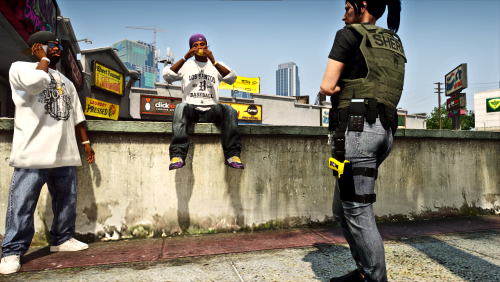 What a rip off!! LOL......thanks for checking into that, and confirming what I thought I had found/not found. I am still pretty new to all of this.......often get really lost searching through the EUP stuff! Weird that the standard male EUP doesn't have a drop leg taser, but the female does. I think I have seen some other EUP packs with male drop leg taser holsters.........I might poke around some more for those - might be able to add your texture to those. Let you know if I find anything......
 -
Thanks.....appreciate that!
-
Hey there - love the look of this mod!! Would be awesome for the "taskforce"-type patrols. I didn't even realize that the standard EUP had a drop leg holster for the Taser! Just looking to confirm the install path - is it the same for both male and female EUP? Because.......under the female bikerdlc folder, I found the "accs_014_u.ydd" right away - and the model shows a a green taser in a drop leg holster from one of the utility belts. Replaced the green ytd with your "accs_014_a_uni.ytd" file, no problems - now the model shows the yellow Taser. However, in the the male bikerdlc folder, there is no matching "accs_014_u".......???? I picked my way through all the other male EUP folders, couldn't find it. I also checked all the other male "accs" files I found, in case the male version had a different name......didn't stumble across the model anywhere else. I did install it in the folder you mentioned.......no luck so far finding it in the EUP 8.3 menu. Am I missing something easy?
-
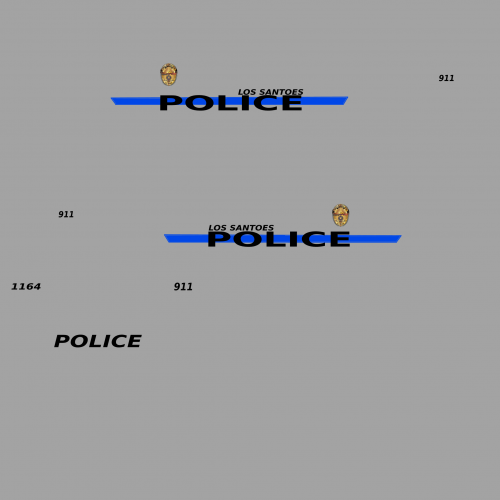 "Los Santoes" ?? Spelled wrong............should be "Los Santos", right?
 -
Sorry to bring this one up again, but.......found a solution, just in case anyone else ever searches it out. As I said above, the weapon wheel "failure" seemed to magically go away for a period of time. But, then it came back again a few days ago. Was wondering if it was some of the recent mods I had installed or what. Switched to a saved backup game file - where the problem hadn't been - and it persisted. WTF!! The mod that I last installed before the problem came up again was Stow That Weapon (Back Weapon).......did that do it? Nope. Ultimately - I figured out it was something that I was doing, slightly differently, when playing the game. For some reason, sometimes I was using the number row keys on keyboard to switch weapons "quickly" - say, from my carbine back to the pistol (by pressing the number "1" key) - rather that using the weapon wheel. I believe I noticed once in the default keybind listing that there are quick keys for Weapon Selection, for some of the weapons - like in many other games. While experimenting with Stow That Weapon, everytime I transitioned from the rifle or shotgun back to the pistol, the weapon wheel would not come up anymore. Until I would "Force Duty" again. Took me a few tries to figure that out for certain. Not sure if that is supposed to happen (once you use the number row, the weapon wheel doesn't come up anymore?), or not. But......whatever - avoiding the number row works for me!! Maybe this will help someone else down the road.............
-
Perfect - thanks so much! Thought that was the way to go, but with LSPDFR being so touchy sometimes........lol
-
Thanks for the reply! Just to be clear, though.........do you mean to delete the entire "CourtCases.db" file/folder itself? (If I do that, does a new .db folder get generated the next time I arrest and charge someone?) Or, do I open the .db file first, then delete the actual contents?
-
What is the best/easiest way to clean out or delete the list of "Court Cases" you see in-game when using CompuLite? I know in the actual CompuLite Plugin there is a "CourtCases.db" file. Do you just delete the entire .db folder, and then a new one is generated in the next game? Or, just open the folder and delete the contents? Would probably only do it every now and then, to get rid of the clutter on screen. Thanks in advance!
-
I will have this same issue sometimes - found that it seemss to happen if I haven't connected to Steam (independent of any game launch) in a bit. I don't have Steam set to launch on startup of my computer/laptop - so, sometimes those small/short Steam updates pile up over a few days. When that has happened, and launching Rage connects through to Steam.........which now has to do a bit longer update in the background, that Rage isn't willing to wait for........and it then gets stuck in the "launching game via Steam" loop. Not sure if it will solve your issue, but my work around is that - if I know it has been more than a couple days - make sure I connect through to Steam first, independently. Let the updates go through, and close back out of Steam once my home page comes up. Then, I launch Rage.
-
lol........I guess nobody else has ever had this issue before??? 😉 😅 Anyhow, thought I would let everyone know........Murphy's Law kicked in for me. Quite literally, the very next game after posting the topic a few nights ago - without having done anything different - I was able to play for a long period of time without the problem. And, it hasn't cropped up again........still weird.
-
Hey everyone - just got into LSPDFR this past summer. Enjoying the game itself, and the way the mods allow you to really personalize things - certainly some trial and error invovled! Learning lots from here and YouTube. Seems like a great community! Anyhow - had a strange problem crop up in game a couple weeks ago. Everything starts off fine for the game - all my plugins, mods, etc load, and I can start my patrol......but, after a period of time, the weapon selection HUD (? is that what it is called??) fails to pop up when I press the set keybind for it. At first, I though it was a time-based problem - say after 5 or 10 mins. But, now it feels more to be after I get involved in a situation of sort - either a traffic stop or a callout, etc. I've gotten in the habit of checking for the weapon wheel fairly often - fine, fine, fine, fine......gone. When that happens - I can still access the handgun, flashlight, and baton by using the number keys. But, can't get at the Taser or OC spray. As a work-around, I have figured out that if I "Force Duty" off, then back on again - the weapon wheel returns for a period of time, like normal.......then disappears again at some point. Not the process you want to go through in the middle of a gunfight! Not to mention that doing that process nukes the callout, partners, etc. But, better than exiting out completely. So, that is the problem. When did it start? Over the past few months, I have learned (the hard way, lol) to keep track of what mods I put in, check them, and then make save points/backup copies of the entire GTA V game folder when it seems "stable" and working. This problem came up after I added EUP Menu, EUP 8.2, and S&R 1.4 for the first time; a new siren; Cody Wynne's holster/belt/shoulder mic/body cam; and a new AI Cover Animation mod. I didn't add any EUP mods - just messed around with the basic choices. I am pretty sure all of those changes worked fine for a few days, before the weapon wheel issue came up. I can't imagine any of those changes would have any connection to the weapon wheel anyways, right? Around the same time, I was having problems with some of my laptop keyboard keys failing (which had been developing over a period of months) - to the point where I was having to change some keybinds. The standard "TAB" for the weapon wheel was one of those that failed - and I changed to another key. But, that alternate key would work for a bit before the problem happened. I decided to go back and reload my previous "stable" save game - annnnnnd.......the problem would still happen. Not cool. (I got my new keyboard today, by the way) I got to thinking.......is this an LSPDFR issue, or a GTA V main game issue? So, I did go and launch straight from Steam into GTA V - went into Story Mode, and started up with Franklin on some mission or other. Again, game loaded up fine - I kept checking the weapon wheel, and it was working - went to Simeon's place and got the repo mission. Went to the location.......got into a shootout......sure enough, the weapon wheel suddenly stopped popping up for me. I spent some time over the past couple weeks trying to find a solution - checked on Google, Reddit, and here.......couldn't really find a similar issue. The problem doesn't generate any crash or error logs that I am aware of - is there something I could post here to help narrow it down? Any suggestions? I do have a completely clean copy of GTA V. Is there maybe a specific file/folder from that, which controls the weapon wheel, that I could copy over into my current game save? Or, am I able to re-install the clean GTA V back on top of my current game save, without wrecking the LSPDFR mod side of it? Any other thoughts? Thanks for reading - a long post, but I wanted to provide as much info as I could. Thanks in advance for any help!

