
jamesjwardle286
Members
-
Joined
-
Last visited
Everything posted by jamesjwardle286
-
Potentially may be an issue with the fake traffic stop? It seems to shut down after that was aborted. I'm not 100% sure but could potentially be related to that and a modded vehicle you have that was spawned with the AI would be my best guess.
-
Make sure you have these installed if you have installed addon cars: https://github.com/pnwparksfan/gameconfig/releases https://www.gta5-mods.com/tools/heapadjuster https://www.gta5-mods.com/tools/packfile-limit-adjuster Also if its the outfits, try reinstalling EUP/EUP configs
-
You could try: 1. Running steam/GTA as admin also. 2. Launching GTA V then launching RPH. 3. Potentially may have to disable battleye if you haven't, although that would usually tell you I think. 4. Make sure you're using the version of rage provided with LSPDFR. Hopefully one of these may work.
-
Rename your mods folder to _mods and see if that works. If it does, try finding which mod is causing the issue. If you can't figure out which mod, I guess you could delete your mods folder and start over, installing each mod 1 by 1 and constantly testing to find which mod caused the issue. You can also try verifying your game files on steam. If all else fails you may have to reinstall your game.
-
I'm aware trainer v was recently updated, have you tried installing the latest one and replacing your .ini file? could you send the asiloader.log over?
-
Is this the rage plugin hook console? Try setting it to F4 (Default). You can also go to your rage plugin hook game settings and under command line switches, tick force windowed mode and also tick force DirectX 11.
-
Could be mods such as policesmartradio and other mods by Albo1125 as these haven't been updated since he retired. Try removing his mods and see if that would make a difference? Also try updating any out of date plugins/callout packs
-
I'm not exactly an expert but have you tried manually installing the L&O/S&R packs rather than using the .oiv? If not maybe try that as I've seen someone with a similar issue found one of the files was corrupted. If you use the betas, From my experience sometimes they may be a little buggy. Try installing the versions posted on LCPDFR instead.
-
This NYPD Pack contains an FPIU, apologies I am unaware of the year model 😕
-
Whilst I haven't seen any mods to make it less crazy, that may just be GTA Vs AI, I do know of a plugin to help with the damage to their vehicles. And for the issues of poor pathfinding at times, you can use menyoo to manually move their vehicles, at least that's how I usually handle that issue 🙂
-
Its definitely a possibility, Benzo gave me some numbers for my heap and packfile adjusters but they did nothing either. Apparently I shouldn't be anywhere near EUPs limit with 2 from what I can find. I guess I'll just have to keep trialling and erroring to see what can work.
-
Yeah that works fine. Whilst it's not a specific pack, it's when I have more than 2 of those EUP addons installed. If I play with any 2 it works fine, add in a third pack, no matter what pack, then I get the errors as soon as i open EUP. But it's 3+ only EUP addons specifically, as I've installed extra DLCs for cars to see if they'll work and the game works fine, once I take those out and add in a third EUP one it crashes.
-
Ahh still getting the same errors after doing so. I'm not 100% sure what this means or if it is relevant, but my RPH log keeps saying system.accessviolationexception. and attemping to read or write protected memory for EUP. I do already have my gta v folder 'read only' as unchecked if that makes a difference after seeing some people mention that for similar errors.
-
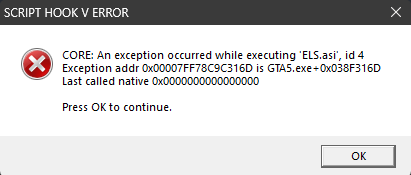
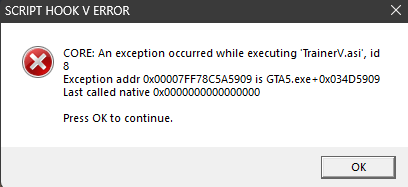
So I got to the point where I no longer have any xml's in the folder, and I'm still getting the same ELS error, just not the trainer V error of course as I've removed that mod.
-
Just installed that scripthookv.net and still getting the errors. As soon as I open the EUP menu that ELS one pops up, and once I press OK it takes me to the TrainerV one, then it crashes.
-
I've had a look through last night, I didn't see much but I'm also no expert. asiloader.log ELS.log
-
So I already have those configs and adjusters installed. And its not one specific pack. I have 3 EUP addons and any combination of 2 of them works, it's just when I have 3 installed at once. It crashes saying .asi exceptions for ELS and TrainerV, if I remove them it crashes with something about a zlib.call. I've not ran into an issue like this in 7 years of LSPDFR and I'm honestly out of solutions I think.
-
So I installed an EUP addon pack from Thin Line Sanctuary and It worked fine. I installed another from there and now when I open the EUP menu the game crashes saying that an unexpected exception has occurred with ELS.asi and TrainerV.asi. If I remove any of my addon packs it works, but with all three of my EUP addons the game crashes upon opening the menu, it is no specific one. I have updated to EUP 9.10, used 9.9 and 9.3 and still the same issue with all of them. I also have the proper game configs and adjusters installed. My rage log is attached. I spoke to Benzo (Blueline Vibes) me and him are both at a loss for what to do. Any help is hugely appreciated. RagePluginHook.log
-
Rage Plugin Hook keeps crashing every time i am on GTA V. I get no more than 30 Minuets before it crashes Can anyone tell me why? I have provided my crash report with this. Any help is much appreciated. Rage Crash Report.txt