


Hilth0
Members
-
Joined
-
Last visited
Everything posted by Hilth0
-
I know i made a while ago without caring so im fixing it will be reuploaded soon sorry.
- 20 comments
- 21 reviews
-
I never said it was a good thing either.......... What are they going to ban people that are pirating games that have an account with lcpdfr? Like really come on.
-
Why do you guys act like torrents are a bad thing?
-
-
Hilth0 Presents LAPD-Pack_V.1 -Including - _________ CVPI IMPALA LENCO BEARCAT TAHOE SUBURBAN CHARGER Expedition F-150 _________ ALL TEXTURES BY HILTH0, Have Fun!
- 20 comments
- 21 reviews
-
So for this is what I've got CVPI Lenco Bearcat Tahoe Suburban Impala Charger F-150 I still need to take some pics it will be relesed by the end of the week. -Hilth0
-
-
I don't see what they are talking about...Different numbers fonts and badge....Okay skin 3/5
- 8 comments
- 13 reviews
-
No atleast get an AMD FX-4100 and an amd graphics like an amd radeon 6670 and maybe a lil bit more ram. The processor is NOT the most important part the graphics card would be and then the CPU yes an i5 would work but I'd suggest AMD much cheaper and near the same performance. Id suggest the AMD Radeon 7770 if you are on a budget like I am, pm me for any more help. The site i made this on is Newegg.com BTW i updated my build a bit!
-
well i might be getting 50 more dollars to upgrade This is the highest i can go i really dont care about upgrading i just need a new pc 600 Watts - Corsair CMPSU-600CXV2 Builder Series CX600 V2 80 Plus Certified Power Supply
-
 Hey would a AMD Radeon HD 7770 run an enb such as this one?
 -
Ok i made a custom computer that is very cheap and i have already checked and it can run many games on ultra-Medium --Ultra-- Battlefield 3 Skyrim GTA IV Crysis 2 ArmA II + ArmA: Operation Arrowhead --High-- Planetside 2 --Meduim-- Farcry 3 Specs: OS: None CASE: Rosewill CHALLENGER Black Gaming ATX Mid Tower Computer Case, comes with Three Fans-1x GPU: SAPPHIRE Radeon HD 7770 GHz Edition 1GB 128-bit GDDR5 PCI Express 3.0 x16 CrossFireX Support Video Card CPU: AMD FX-6100 Zambezi 3.3GHz Socket AM3+ 95W Six-Core Desktop Processor FD6100WMGUSBX MotherBoard: ASUS M5A97 R2.0 AM3+ AMD 970 SATA 6Gb/s USB 3.0 ATX AMD Motherboard with UEFI BIOS HeatSink: Rosewill RCX-Z1 Long life ball bearing for over 45,000/hrs CPU Cooler Memory: CORSAIR Vengeance 8GB 240-Pin DDR3 SDRAM DDR3 1600 (PC3 12800) Desktop Memory HDD: Seagate Barracuda 1TB 7200 RPM SATA 6.0Gb/s 3.5" Internal Hard Drive -Bare Drive PSU: COOLER MASTER eXtreme Power RS600-PCARE3-US 600W ATX12V V2.3 SLI Ready CrossFire Ready Power Supply Optical Drive: ASUS DRW-24B1ST/BLK/B/AS Black SATA 24X DVD Burner - Bulk - OEM Audio Card: Realtek ALC887-8 Channels Subtotal = $590.91
-
-
its not really seacrest county because it says "liberty city" but its still pretty good 3/5
- 9 comments
- 17 reviews
-
-

- 2
-
-
 You should get fraps
 -
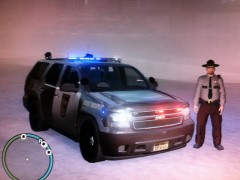 Nice!
Nice! -
Very nice it's not to detailed and that makes it look nice and not overdone, almost looks like a privet security contractor's car!
- 10 comments
- 6 reviews
-
Thats why im buying one HWP CVPI asap.
-
-
As long as it doesn't replace the nypd CVPI it's ok in my book.
-
-
WOW dude your are really spoiled......merry christmas!
-
-
-

