


VanishedLeader
Members
-
Joined
-
Last visited
Everything posted by VanishedLeader
-
 Great work, but I'd have to say this mod is a 50/50 from improvement to creating new headache. The Good: Ambient Road and highway vehicles move more smoothly The bad: Ambient vehicles have very little to no reaction to active police vehicles, especially in pursuit. Not sure what improvements this mod ultimately made. Very little difference in my LSPDFR patrolling experience
- 189 comments
- 9 reviews
-
GTA V Enhanced Remastered. And a DLC pack for police vehicles. What is also weird, even mods OUTSIDE the mods folder do not load. It's almost like using RPH boots a vanilla version of the game with exception to LSPDFR. I dont know if its an RPH issue, LSPDFR issue or if i need to accept Enhanced is just not the way to go right now.
-
LSPDFR boots fine, runs fine, but does not boot with ANY MODS. Pretty much boots 100% vanilla. Almost like it is not detecting the dlc mods folder. HOWEVER, When I boot without RPH normally, all mods load no problem. But when booting into LSPDFR, Not a single Mod loads. WHATS GOING ON??!
-
Hello all, I am running GTA V Enhanced and have recently installed LSPDFR. After installing LSPDFR, I noticed upon loading my other mods were not loading (only 2 mods, menyoo and GTAV Enhanced remastered) LSPDFR Runs fine, but of course would like for them to all work together. After tweaking and experimenting with files, I found that removing the dsound.dll file allows me to boot GTA V normally and all mods load no problem . PERFECT! But, when booting with RPH for LSPDFR, it crashes about 2 seconds into the Loading story mode screen. When I remove dsound.dll, LSPDFR loads up fine no problem, but the mods are gone. Anyone experience this or any ideas of what the problem might be? I tried fresh install of LSPDFR, GTA V etc. and still it persists. Thanks in advance.
-
Yes it sure does. Not sure what the heck is going on
-
So I updated GTAV as well as a fresh and up to date version of Rage. I also made sure to get an up to date Scripthook V as well. However, the same problem persists. I have attached another RPH log from my most recent attempt to boot after updating everything. I appreciate your help. RagePluginHook.log
-
RagePluginHook.log
-
Thanks for the reply, and taking time to help. Attached is the RPH log RagePluginHook.log
-
Hey guys, I finally had my GTAV and LSPDFR running exceptionally. However, it seems after a Rockstar Launcher update, the game will no longer loadup. After the first loading screen, right when it starts to boot into the game and it says "Loading LSPDFR" at the bottom right, the window closes and the game completely exits. It will NOT boot normally either. It completes the initial loading phase and just exits out. I have multiple backups and tried to load one of those, and those will not load either! Would anyone be kind enough to lend me some insight? Thank you!
-
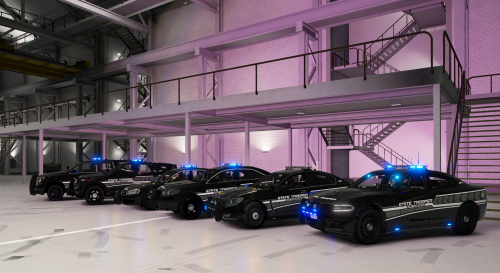 These vehicles are incredible. It's hard to find good all around models, with plenty of lighting, but not too much. Detail, and of course originality. HOWEVER, I am having an issue, and have not been able to conclude whether it is from my end or not. All of these models, once I enter the vehicle, the outermost lights on the lightbar are constantly on. Each side of the lightbar has the lights on , constantly. Is there a way to fix this? Have you seen / heard this before? Attached screenshot. (sorry it is a bit primitive, direct shot of the screen)
- 102 comments
- 5 reviews
