


hlsavior
Members
-
Joined
-
Last visited
Everything posted by hlsavior
-
Am I the only one that despises the Fusion because whenever I see it I get so excited because I think I;m looking at an Aston Martin?
-
The amount of hype this game is building is fucking ridiculous. (in a good way)
-
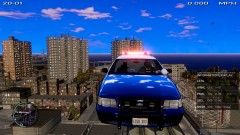
From the album: SCNG DESIGNS W.I.P
Ignore the missing textures, and the fact that the car is flying. -
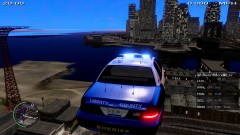
From the album: SCNG DESIGNS W.I.P
Ignore the missing textures, and the fact that the car is flying. -
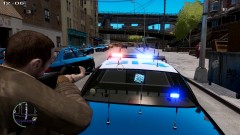
From the album: SCNG DESIGNS W.I.P
-
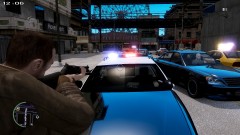
From the album: SCNG DESIGNS W.I.P
-
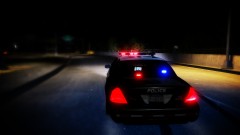 You're right, I haven't made one before. Sure there are plenty of other ones, but they aren't mine.
 -
From the album: SCNG DESIGNS W.I.P
Skin texture is by Medmark. Expected release date: Monday, August 12th. -
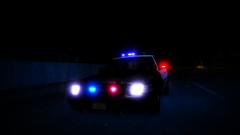
From the album: SCNG DESIGNS W.I.P
Skin texture is by Medmark. Expected release date: Monday, August 12th. -
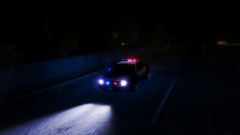
From the album: SCNG DESIGNS W.I.P
Skin texture is by Medmark. Expected release date: Monday, August 12th. -
I've spoken directly to Garry before. Kinda an asshole but thats why we love him.
-
Um..... Okay? Why exactly did you feel the need to create a thread about this?
-
Probably somewhere in Aldreny because that's where I actually live as of right now.
-
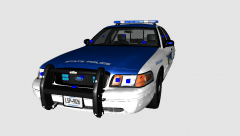
From the album: SCNG DESIGNS W.I.P
So this is still a very early build, so ignore the lack of police equipment, but I wanted to post this now to ask two things: 1) How should the rear lights be set-up? 2) Should I put lights on the side of the rambar, or will it be to much of a Christmas tree? -
Not to brag or anything..... Lol jk, congrats :)
-
-
-
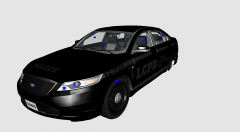 Well then looks like I'm not making a Taurus anytime soon :(
 -
-
ELS V7 OPTIMIZED _________________________________________________________________________________________ _________________________________________________________________________________________ FEATURES -Multiple police applications (police console, dash cam, laptop, etc.) -Code 3 Javelin Lightbar -4 separate vehicles to choose from -Each vehicle has very similar lighting -4 liveries for each vehicle -All vehicles have 2 grill lights and 2 rear dashboard lights -All vehicles have the Code 3 Javelin Lightbar _________________________________________________________________________________________ CREDITS -2010 Impala is originally Chevrolet Impala From Driver SF, modified for and converted to GTAIV by BxBugs123, converted in to a Police vehicle by BxBugs123, Seats By BxBugs123, rims by Schaefft -Ford Crown Vic model is original Ford Crown Victoria by Schaefft, modified for and converted to GTAIV by Chasez This version of the CVPI model has been modified by Bxbugs123 & Lt.Caine with permission by Schaefft and Chasez. Rims By Bxbugs123, Textures By Lt.Caine -2011 Dodge Charger base model from Sim Raceway 3, ripped by DMN; parts of interior from Forza 4, editing, compilation, conversion, mapping and scratch-modeling done by Dhruv. LOD2 from NFSMW:2012. Further edited to PPV by hlsavior. -2010 Tahoe model is original "Chevrolet Tahoe" by 4x4 Full Driver - Hummer H2, converted to GTAIV by Stiopa. Model improvements & Modified By Bxbugs123. Wheels By Bxbugs123, Textures by Lt.Caine. Further edited to PPV by hlsavior. -Rockwell Collins Laptop Made & Converted by Bxbugs123 Textures By Bxbugs123 & DoTTGaMMa -Code 3 Javelin glass by BxBuggs, mount by KevinDV, lighting and insides by hlsavior -Dector Genesis and WGVS by BxBuggs123 -Bodyguard Partition by Tim98 -Axixtech Lightbar by corleone, converted to the rear window and grill light LEDS by hlsavior. -Body Texture: LCPD-74 -Model assembly: hlsavior
- 20 comments
- 19 reviews
-
Or you can try to get one from bigger models. Nickie you shouldn't have a problem but I don't know about this guy. I got mine from RIdgerunner.
-
How can I make it a 2013? What needs to be changed, besides the wheels.
-
From the album: SCNG DESIGNS W.I.P
Is this fully PPV? -
The L's stand for level of detail. L0 means you are in or next to the car, L1 means a pretty large distance, and L2 if the furthest. All of your lights should be attached to the certain levels. Basically, every time you add a light, you want to attach it to the desired extra, then duplicate it and attach it to the next level of detail. This is kinda hard to explain in text so here's an example. You add a wig wag that you want to be extra_7. You want to name it, extra_7_L0 duplicate it, and name it extra_7_L1. Next, attach extra_7_L0 to the existing extra_7_L0 using the attach tool. And finally attach extra_7_L1 to the existing one using the attach tool. Like I said this is very hard to explain in text. If there isn't an existing extra_7_L0 or L1 then you just leave it as it is.
-
The blue square things, when selected they are purple-red. Anyway never move the ones that come with the car, as they are exactly where they needto be. Everything you import though, will have dummies, that you most likely will need to move. A dummy should also be near what it represents, or holds. For example, a lightbar dummy should be right in the center of the lightbar.


