


GamerCop23
Members
-
Joined
Everything posted by GamerCop23
-
Hi, Does anyone know how to change the width of the paintbrush in gimp (2.8 I think) as I have never found out and I kind of need to know how!! Thanks, fbo194
-
-
Blimey; bombings, explosions officer killed and nuclear war threat what a week. R.I.P to the MIT officer and also thought to a MBTA Transit officer who was aparantley badly injured during a pursuit with the suspects' stolen vehicle.
-
Stock/Original cars (obviously no ELS!): Any cops, DAS 1.3, LCPDFR (latest). In teamspeak 3 LCPDFR's server! My GFWL: officerfbo194
-
-
I like the impala very much!!! Great stuff! And the ambulance!
-
I think its: -pc -data -maps And then for Alderney: -jersey -nj_01.img > nj01_policeground.wdr and nj_01policestation.wdr -nj_05.img >gm-19_09.wdr I am afraid that's all I know for now!
-
-
-
FRAPS is the one, but you have to buy it, unless someone will give it to you.
-
If it is not unlock various doors then try open all doors or something like that. It is a little further down on that page.
-
-
-
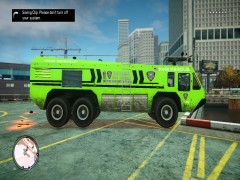 Nice perhaps a little too bright though?
 -
Thanks for the thanks guys and I am glad it helped!
-
Involved in numerous armed persons (shootout) in the Airport. The bad guys were fat security guards that Braveheart's script spawned bu then all the other guards joined in and started shooting as they do, took about ten minutes to clear up with multiple officers down. Then there's Hove Beach...
-
Yep! I think this is it: http://www.mediafire.com/?g8asn2gehfhdvyv
-
There is a "morevehicles mod" out there, adn it gives you all the EFLC vehicles for GTA IV including polce 3,4 and b. Just google it and they will be around somewhere!
-
Hi guys, I was just wondering how long have you been playing and modding GTA? Did you starto n Vice City or San Andreas, and what have you done with those games? Or was LCPDFR your first time? For me it was SAPDFR in 2011 for San Andreas!
-
No prob.
-
Yes you can change your player (eg Niko) into any player (cop) and then do the animations.
-
I think Lt. Caine had a Declasse Police Patrol LCPD type with an all red Non ELS lightbar rotating type and a more slim version as well. Take a look: http://gtapolicemods.com/downloads.php?do=file&id=205 http://gtapolicemods.com/downloads.php?do=file&id=197 Vapid Crusier: http://gtapolicemods.com/downloads.php?do=file&id=207 He also has various other cruisers and patrols and ambulances etc for Vanilla/Stock/Original types with non-ELS. Check also here: fbo194
-
No problem!
-
Nice although I would probaly remove the LCPD patch and maybe just put SECETARY POLICE or something. Good job though!
- 2 comments
- 2 reviews
-
EDIT: (Sorry to bump this!) Could a staff member please pin this for other members' benefit! Thanks. Hi, I have seen that some people got a little frustrated about when they select a cop, strooper, fatcop or actually any player model, he would still speak like Niko, either when driving into something, getting hit, or making him talk with the Numpad in LCPDFR. So to fix this: 1) Select your player model in the trainer 2) Go to page 1 of model spawning and click "Speech Menu" 3) Go down to where it says "Play random speech" and press it once. (He will say something random!) Now that's it. He should speak like whatever model he is and you can carry on listening to those strange cop speeches! Hope this helped. fbo194


