



Aaron's Workshop
Members
-
Joined
-
Last visited
Everything posted by Aaron's Workshop
-
 The front visor lights seem to flash but get hidden behind the visors and now show then show and just repeat, like a clipping issue. FiveM Version and SP
 -
-
 @NRGYYX Lights flash white?
 -
 Is this gonna be updated so the interior is much better quality.
 -
 Thanks man @bravo six seven What? @Officer Joey Kuffman @UKCopper Try reinstalling it and double check you don't have any other mods in
- 133 comments
- 15 reviews
-
-
Hey, I'm still working on The FiveM one also make sure the FiveM one is used for FiveM and not Singleplayer/RPH/LSPDFR. I'll continue to push updates out to fix these issues! @rize111 I'm aware of the current issues and will do an update whenever I can.
- 133 comments
- 15 reviews
-
 Crash Issue
 -
-
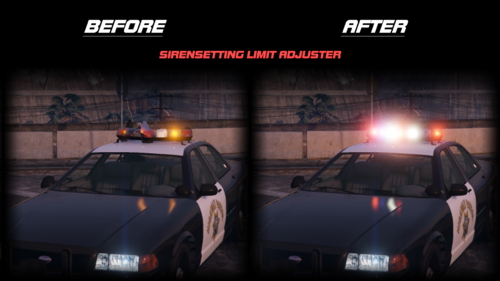
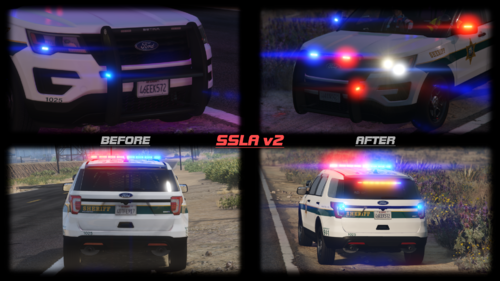 So if you download a Car Pack that is 32 sirens and some lights don't show up. That's cause the game for you is only showing 20 lights aka sirens. So this tells the game to increase it! @249Xeno& @Machinomancer
- 342 comments
- 20 reviews
-
-

-

- 2
-
-
@249Xeno Siren Setting Limit Adjuster, has nothing to do with ELS, DLS, how lighting on cars work, etc. Developers add more than 20 lights to cars. All the .asi does is increase the limit to 32.
- 342 comments
- 20 reviews
-
-
It's made for fivem only @Destiny Husky Not Singleplayer
-
-
-
Are you still experiencing any issues @BlueLine Vibes ? Also thanks for the Comment and hope you put this in a Video :)
- 133 comments
- 15 reviews
-
@big cheese If it's the .ini Reload Spam. It'll be Fixed in the 1.2.0.0 Update, thank you. I have already Fixed it! The break check part, that's due to the Behavior of the AI. Like if they want to take off, act dumb, etc. If it becomes a problem let me know and I'll fix it in the 1.2.0.1 Update! Thank You. I'm glad you like my Plugin!
- 133 comments
- 15 reviews
-
@DapperDuckOh I see. I forgot to update the Readme.md That's all the options in the .ini I'll double check everything is there and release an update if needed!
- 133 comments
- 15 reviews
-
@DapperDuck .ini Get's made whenever you load the Plugin. All the options should appear in the .ini They do for me and everyone else! Try deleting the .ini and redownloading the plugin from here!
- 133 comments
- 15 reviews
-
-
-
@LuukasXR No. Plus not every single chase is them speeding away even in real life!
- 133 comments
- 15 reviews
-
@Largo2 Oh those things appearing in the console. I'm not too sure, I'll fix that when I can.
- 133 comments
- 15 reviews
-
@CPL.BEVAN Hello. That has never happened to me nor the thousands of other people that used this Plugin including the 6 Beta Testers that tested his Plugin, do you have MTFO, Clear The Way V or any other Traffic / Move Over Mods installed in your Game? If you could Submit Photos of the following Directory plugins folder and plugins/LSPDFR Thanks!
- 133 comments
- 15 reviews
-
.thumb.png.4ae541125774b3d59e60a0636013f9c1.png) Is this Compatible with with SergeantFranki's aka ThinlineSancutary's Holsters Pack etc?
Is this Compatible with with SergeantFranki's aka ThinlineSancutary's Holsters Pack etc?- 144 comments
- 12 reviews


.thumb.png.4ae541125774b3d59e60a0636013f9c1.png)