



jjleaside
Members
-
Joined
-
Last visited
Everything posted by jjleaside
-
I haven't played LSPDFR in a bit, but I got back into it. For the past week I've updated my plugins and many other mods, and today I started playing again. Booted it up, and started as a Park Ranger with the new vehicle I installed, then after around 15 minutes of patrolling I got a RAGE crash, and it's been happening ever since around 15 minutes into the patrol. Any help would be appreciated. RagePluginHook.log
-
Here it is, been happening ever since I started LSPDFR months ago. RagePluginHook.log
-
Go to "lspdfr.ini" and find Ambient.DisablePlayerHolsteringActions = false, and change that to true and it should be working.

-
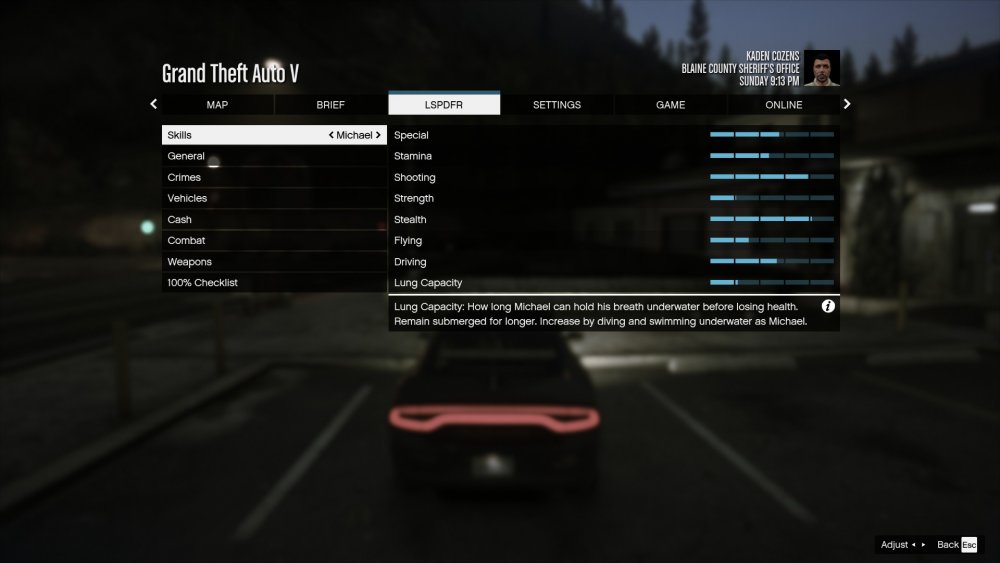
I have had this issue for a long time. Randomly while playing, the interaction menu will just stop working. Pressing "M" will do nothing at all and it worked around five minutes prior, also when this occurs I go to the "LSPDFR" section in the pause menu and instead of the normal LSPDFR stuff like sync, the menu does not work. It has "Skills", "General" and a few other things that has nothing to do with LSPDFR. Not sure if this is something I can fix in the .ini file? Any help would be appreciated as I can't turn callouts on/off and it annoys me especially when I just start playing, then having to restart my game.
-
Alright, thanks for your help.
-
Yeah, seems to be working now. One more thing, is there any way that I could have my picture retaken? I changed it shortly after I set up sync and it has not updated.
-
Here it is. RagePluginHook.log
-
Are you using Stop The Ped? If not, I do suggest this plugin if you don't already have it as it may fix this issue. On the other hand I am not sure whats happening with the AI officers, if it is an LSPDFR problem and the devs are notified I am sure they are working on fixing this issue.
-
Recently synced LSPDFR to LCPDFR.com but it doesn't seem to update that often. I started and around five minutes later it said active now, I start playing normally for around 8 minutes and it says "Active 8 minutes ago" and did not update the entire time even though I was frequently playing LSPDFR. Also I switched agencies quite a bit ago and it still has not updated on the website. Is this normal? And if it isn't, are there any fixed? I have tried all the steps provided in the support topic for sync and can't seem to get it working, thanks in advance.
-
Seems to be working perfectly fine now, happy its fixed, have a great day!
-
Unfortunately I already had this on false. Anything else that can help this?
-
Hey! So I may have figured out my issue. I went to my dlcpacks folder and found some NVE files were still in there, I deleted them and launched my game and played for around an hour straight with no crashes. Got a bit of texture loss when not looking at an area for a bit which is a bit disappointing, but all and all I think I got it working after all this time. I may still think about deleting my mods folder due to the texture loss and wanting to start clean with texture mods but at least I can play now! I will post if I have any more issues with LSPDFR, thanks for your help!
-
I used to have them on my old game files, but as of right now I have no DLC vehicles. If I need one, is there any you can link, or recommend?
-
Yeah, I am gonna try my mods folder, then reinstall my vehicles and a few other things, if that does not work then i may just reinstall the entire game. Here is the log from my latest crash RagePluginHook.log
-
tried that before. im thinking of just reinstalling my game from scratch at this point, maybe i screwed up somewhere while downloading NVE. if you find anything else then please let me know
-
Another crash. Im seriously so confused and it sucks, everything goes perfectly fine for 10-15 minutes then boom screen freezes and RPH crashes. I used to be able to play normally, I recently reinstalled my entire game before any of this, I seriously have no idea what is going on inside my game, I feel like I have done everything and the same thing happens over and over and over again. Here's my crash log, I have no idea if this will help. And as always my rage log. RagePluginHook.log
-
Crashed within 5 mins ;( RagePluginHook.log

-
Well the sad news continues. Another crash occurred after around two callouts, thought it was working this time. Here is the Rage Log, hopefully you can find something that is causing this. RagePluginHook.log
-
Just launched LSPDFR. I'll tell you if anything happens
-
@Matteov2.0 Hey, so I don't think I have any of these installed? Not sure here is a picture of my plugins.

-
Rage Plugin Hook has been crashing almost every time I use it, this never used to happen to me and its getting me frustrated since I always have a fear that my game could crash at any second. I load in fine, go on duty, patrol for like 15 minutes then boom, rage crashes. I recently tried Natural Vision Evolved and RPH crashes started, I uninstalled and removed it from my GTA V main directory and replaced it with Natural Vision Remastered. I played for around 30 minutes before another crash occurring, it would mean the world if someone could tell me what's going on with my game, or how I can fix it as I want to play LSPDFR normally again. I do have some replacement LSPD and BCSO vehicles but this was never an issue before, I used the exact same cars and everything worked fine, anyway thanks in advance. RagePluginHook.log


