
Grey3dge
Members
-
Joined
-
Last visited
Everything posted by Grey3dge
-
So you have to go into the vehicles.meta file and modify one value. I believe this is an issue with just specific models. When you go into the vehicles.meta, you'll see for each vehicle, there are two lines; <dirtLevelMin value="0.000000" /> <dirtLevelMax value="0.450000" /> The max value is different for every vehicle. SO if you have a vehicle that is experiencing this problem, change the max value to 0.000000. The vehicle won't get dirty anymore, and the windows won't black out. Hope it helps!
-
Nevermind everyone. I THINK I fixed it. It was a problem with the dlclist and the mods folder, like it always is lol....
-
In your first screenshot, do you see the three RagePluginHook items? It's the last one, the text document. That is the log for the most recent launch of LSPDFR. Insert that here so we can read it through.
-
Do you have any additional arrest mods installed? And did you check to see if the key binding for that interaction was unselected somehow?
-
Do you have any additional mods associated with that action installed? Like StopThePed or Arrest Manager?
-
Yeah, if the game loads up after disabling the mods folder, then you have a specific mod in that folder causing the crash. Try looking at the most recent mods you installed, then remove them. When the game loads up with the mods after you removed something, that was the culprit.
-
Hey everyone, I'm experiencing this same issue from the attached link. I updated my RPH and ScriptHook V today, and I was able to load in. However, when I reinstalled my NaturalVision (w/ Brighter Emergency Lights) and EUP L&O and S&R, I can no longer load back into GTA V. I tried removing my mods folder, launching without plugins, running as admin, and removing and reinstalling the above mods again, all to no avail. I don't know what I'm doing wrong, or what is causing LSPDFR to be stuck on the loading screen. Any help would be greatly appreciated. Thanks! RagePluginHook.log
-
Now I feel like an idiot lol.... Working now! Thanks for your help!!!
-
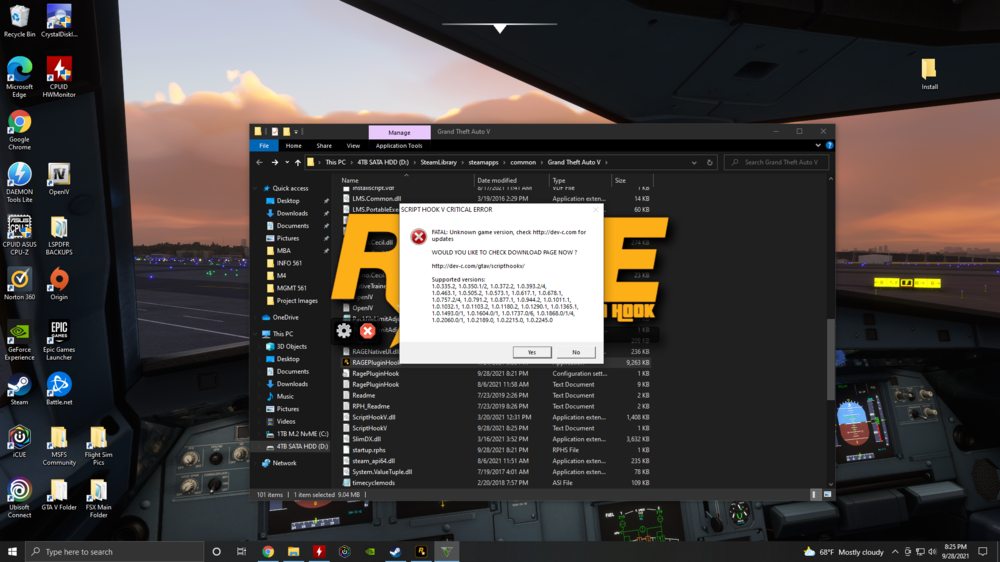
Hey everyone, So, stupid question; is RPH still outdated with the newest version of LSPDFR? I've installed the newest LSPDFR (4.9 7874) and RPH (1.87.1293.16189) files (which should have support for GTA v2372), but it keeps telling my that RPH is out of date. I believe Rockstar came out with two updates, one right before the new RPH, and then one right after the new RPH version came out, so could that be messing it up? Thanks!
-
Hi jbirnie, Thank you for your reply! You are right, it is a mod issue. I did what you told me, renamed the mods folder to "_mods" and the game loaded with no problem. It did tell me that I had to update my Albo1125.Common, which I just did. Then I put my mods folder back to normal and the game loaded up fine. (Told ya I was a novice at this stuff LOL). But it seems like everything is good except EUP (the uniforms aren't appearing), but the good thing is I have LSPDFR working again. Thanks so much for your help!
-
Hi everyone, I know this is an issue that has a few topics on it already. I recently installed EUP on my LSPDFR and my game hasn't loaded up since. I launch RPH, it goes to a black screen for a few seconds, then crashes. I have ELS, CompuLite, PoliceSmartRadio, StopThePed, and UltimateBackup installed so far, but they haven't given me any issues. I've only experienced this black screen crash after putting EUP in. I'm honestly a novice to LSPDFR and have been having difficulty getting everything to work properly in it for the past few days. Does anyone know how I can fix this? Thank you! RPH Crash Report.txt