


Ricky001
Members
-
Joined
-
Last visited
Everything posted by Ricky001
-
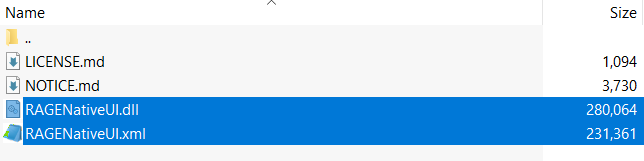
Do you have RageNativeUI updated? Seems like that could be a problem here. Please download the file from THIS LINK and drag and drop the RageNativeUI.dll and RageNativeUI.xml files into your GTAV root directory (where GTA5.exe is located) Ps.: Once you download this, make sure NOT to replace it while installing new callouts or plugins, some of which may include this file.
-
Glad I could be of help. 🙂 Thanks to @OfficerChris1 ... I just extended his support Enjoy your patrols. You should be able to install mods (just remember not to replace the RageNativeUI files you just downloaded from GitHub)
-
You can just drag and drop everything, it won't matter. What matters are the following two files (the dll and xml files):-
-
Thanks for the response. I already tried several of those steps before posting including:- 1) Disabling mods 2) Disabling custom configs for police stations (as I have <AmbientSpawns> - which rarely spawn anything XD) 3) Disabling both (so basically vanilla) ... All of them without any success. However, it's solved now, and I have no idea what caused it to work again because all I did was to play the without any plugins (except lspdfr) once, and then bring back everything else from the next run. Idk if this sounds ridiculous, but that's that. Anyway, thanks again for helping. 🙂
-
For any such crash, you NEED to attach the Rage log file RagePluginHook.log - a text file found in your GTAV root directory (where the GTA5.exe is located) This is the minimum you have to attach for people to be able to help you out.
-
Please download the file from the link as given by @OfficerChris1 and make sure NOT TO REPLACE it while installing a new plugin. If you use all updated plugins, you should be good to go, just don't replace the RageNativeUI.dll file.
-
 A wide variety of calls that adds great immersion and takes out the (otherwise) mundane and repetitive nature of patrols. Loved this set! ❤️ The calls are realistic, and it only gets with the interactions and dialogues. Thanks to the crash prevention/ error handling approach, even if something goes wrong, it isn't the end of the world! (Kudos for this!)
- 422 comments
- 25 reviews
-
-

- 1
-
-
Thanks for taking the time to respond! 🙂 Actually, I did read that the stack trace was given for whatever reason the callout may end. I just sent it here as the game crashed JUST AFTER the call, just so that you could check it out. However, as you say, it must have been something else then. However, in the Self isolation call, the ped (suspect) doesn't seem to enter my vehicle. Idk if this is also something specific to me... I'll share my experience. It happened both with vanilla cars as well as add on vehicles. On the game for which the crash log I sent you, I used STP to grab the ped and force him into my vehicle. Today, I played it again and the GPS waypoint to ped's home updated when I got into the car (but the ped did not).. so I just drove off XD The conversation at the suspect's home also took place (but the suspect remained where I left him and drove away) Once the call ended, though, I got a notification "LSPDFR.dll crash prevented successfully" (didn't crash, though, thanks to your handled exceptions 🙂) Just attaching a small snap of the log file.. if you please Don't know if something needs your attention, but nonetheless, loved your work and the calls! ❤️
- 422 comments
- 25 reviews
-
-

- 1
-
-
I recently faced a game crash shortly I finished a callout from this pack - Self Isolation Violation, to be specific. So the call just ended normally (that's what seemed while playing) and once I was Code 4, shortly after roaming around a bit more, my game crashed (RPH crash, not the lspdfr.dll plugin crash) I did notice the stack trace for this callout pack in the log and hence I'm writing here, to figure out if anything in here cause the crash. Log attached. RagePluginHook.log
- 422 comments
- 25 reviews
-
-
- 1
-
-
Hey people, Another weird crash seemingly happening at random times, with some exception. I have faced 4 crashes in the last 6 runs of the game. 3 of them were exactly the same "I start off from the Spanish Ave apt. -> drive towards the Rockford Hills PD"... right when I approach the station (near the garage), boom, it crashes. It's not the lspdfr.dll crash, RPH crashes along with the game, regardless of whether I am on or off duty. 2 of the 3 such crashes happened when I was driving myself, the other time, I used Chauffeur console command to the RHPD waypoint. Another peculiarity I noticed is that, on some rare occasions (maybe 2 out of 10 times), retracing my steps, the game doesn't crash (no explanation, sorry, idk myself) The 4th crash was one such occassion, which allowed me to drive away from the Rockford PD after not crashing... but then it crashed when I was walking around the FIB/IAA buildings. This was an one-time event as I didn't face it again. Also, if I go somewhere else and nothing crashes, and then come back to RHPD, it doesn't crash either! According to my observations, it only seems to crash when I go there directly from the apartment. I'm attaching 2 logs of the Rockford Hills PD crash (the only consistency in the otherwise random ones) - one each for when I was on (with forceduty console command) and off duty. Any help is appreciated. 🙂 RHPD_offduty.log RHPD_onduty.log
-
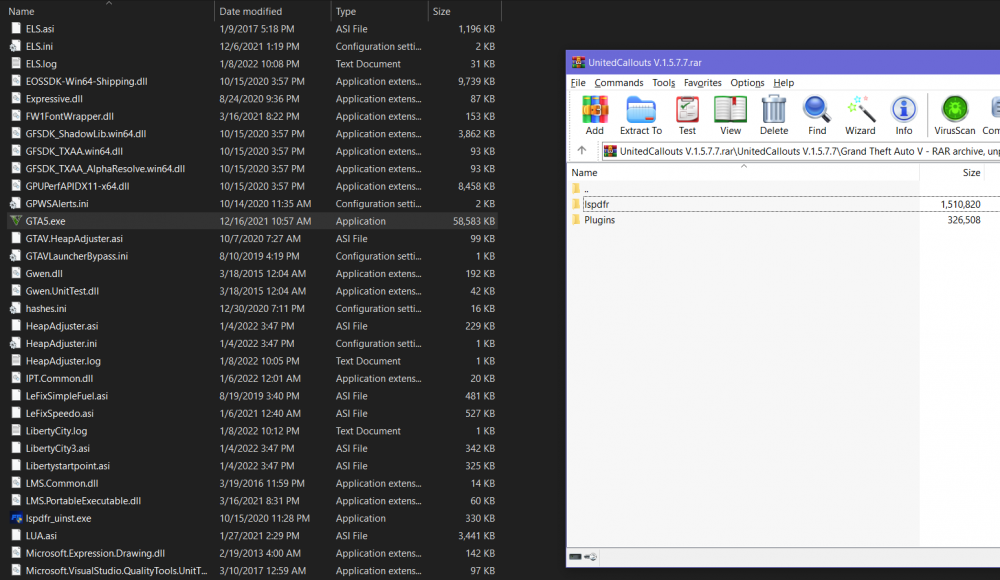
First, install LSPDFR normally as you would. If you have previously put the UnitedCallouts.dll into the plugins folder as in the original post, remove it (the dll file) Expecting you manage to do the step properly, download United Callouts and simply drag & drop everything included within the Grand Theft Auto V folder of the archive into your GTAV main folder. Most callout packs are structured this way with a plugins folder as well as a lspdfr folder - both of which go into the GTAV base directory. As you can see, just drop both these folders into the GTAV folder and you should be good to go.
-
Thank you so much for replying! I understand the point. I just posted this since I got it to work previously but not after the latest update. But I guess there were some Zone info for the LC map after all... (I noticed some "missing zone info" messages in the Rage log and did some digging) so the backup thing is solved. I still don't understand why the AmbientSpawns don't work, though .. and this is not for the LC map.. it never worked even with only the vanilla game map (only sometimes the Mission Row PD gets populated with a couple cars) I could at last reproduce the error and here is the full log. Note:- This pursuit was the default "Pursuit" callout from LSPDFR and not the "previously escaped suspect" type. I disabled the escaped suspect encounter from the ini due to the previous crash. RagePluginHook.log
-
 Not a complaint or anything, just pointing out in case it was left out, or it's only an issue with me... The vanilla LSPDFR callout "Arrest Warrant" is not accessible via the menu, only Pursuit and Hold up are available. Also, while forcing this call from the LSPDFR menu (from pause menu), the default callout notification (on the left) doesn't seem to pop up, unlike other calls. Once started, though, the call does work out just fine.
- 450 comments
- 47 reviews
-
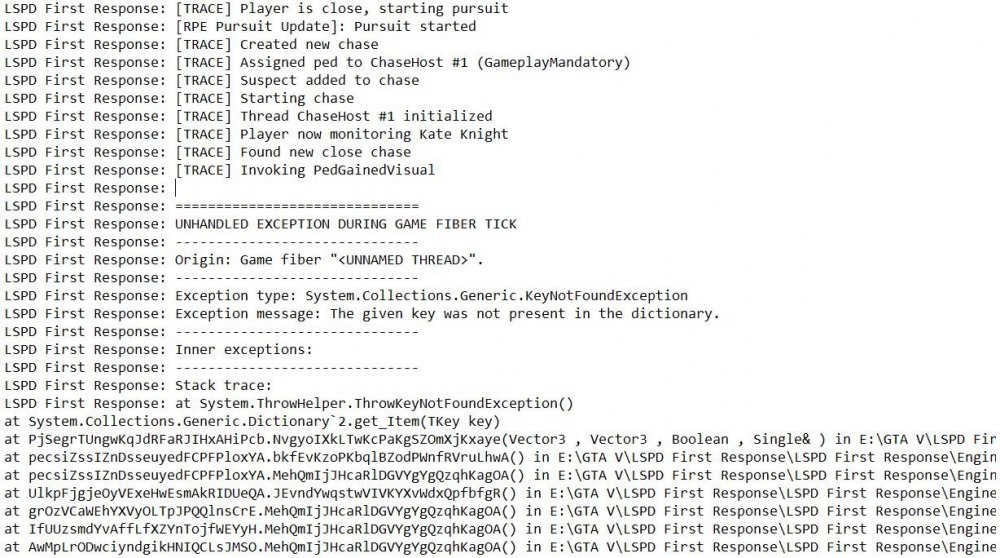
Hello everyone, Heads up, this is a rather diverse issue (encompassing 3-4 different topics, but somehow related) Reference: I'm using Liberty City V Remix mod, which has been integral in below mentioned issues. (I'm using LC East v3 to be specific) As learnt from the creator of the mod, the LC map doesn't contain any Zone info, so effectively LC comprises of SanAnd and Oceana zones according to LSPDFR configs. That's what I've been using since GTAV v2372 itself (when everything was working fine) Issue 1 : Trying to spawn vehicles in and around stations using AmbientSpawns doesn't seem to work most of the time. I have set all the chances as 100 just to try and see some of them, but to no good. Sometimes, 1 or 2 police stations do have the vehicles spawned, but the frequency of that happening is VERY LESS. This happens both for LS as well as LC map (with frequency of cars spawning at any station in LC being almost 0). I have been trying this since the last GTAV v2372 but never got it to work. So, to get an impression of a populated police station, I turn on the Ambient.DisableAmbientGameCopSpawnBlock = true (so that at least the default cop cars would spawn) Issue 2 : This has been spotted only after the latest update (v2545) of GTA and corresponding LSPDFR. The agencies specified for Liberty City have never been spotted on the map either patrolling or providing backup while in LC. Rather, on some very rare occasions, the vehicles do spawn ambiently or for backup within the LS map itself (ambient spawn seems to happen around the outskirts of LS, at the edge of the map but not in LC). (Is some Zone data changed either by LSPDFR or R*?) 🤔 Issue 3 : Using Ultimate Backup, I had customised response units in the CustomRegions configuration, but none of that works when in LC. Only basic LSPD units respond while calling for any kind of backup within LC. On the other hand, at times, a LCPD unit will randomly come in my aid when calling for pursuit backup in the middle of LS. 😐 Issue 4 : Some of the pursuits initiated in LC crashes LSPDFR with the logs showing some "KeyNotFoundException". I'm sorry for not recording the entire log, so I don't expect support on this, but just sharing the log snap at the time of spotting the error. (This was a pursuit of a previously escaped suspect type) Attachments: - 1) agency_nyc.xml (Only contains the 3 concerned LC agencies... but ALL other agencies seen in the other XMLs are present in other XMLs and properly configured... believe me!) 2) regions_new.xml (divided the map into many regions) 3) backup_new.xml 4) duty_selection_custom.xml (don't know if it matters, still included) 5) stations_nyc.xml (for the AmbientSpawns configs) 6) CustomRegions.xml (UB config) 7) (Just for the sake of reference) RPH.log snapshot at the point of error during chase. Ps.: The config files as available here have not been changed since the last time they worked in GTAV v2372. The ambient spawning didn't work in either of the versions, while the specific backup related issues seem to have started after the update (v2545). agency_nyc.xml backup_new.xml CustomRegions.xml duty_selection_custom.xml regions_new.xml stations_nyc.xml
-
SOLVED: The issue seemed to be with RPH as everything is back to normal with the latest GTAV version (2545) and its respective LSPDFR + latest RPH update!
-
Not trying to disregard that you're having a problem, but since it seems to be working perfectly since the fix, did you try teleporting to other locations and/ or setting the start point of your game as somewhere other than the apartment (like Police stations) and check if the game still crashes? Speaking from my experience, I was having crashes in 3 different scenarios prior to the fix which are all gone now, so just a suggestion!
-
GTAV Version: 1.0.2545.0 (latest) LSPDFR Version: 0.4.9.0 Build 8021 (latest) System Specs: - OS: Windows 10 Home Processor: Intel i5 @ 1.60 GHz RAM: 16GB Graphics: 2GB AV status: Entire GTAV folder added to exclusions for both 3rd party AV and Windows Defender I had been facing this issue since even before the latest update (GTAV Version 2372 and corresponding LSPDFR) - The game is crashing at random points, ranging from anywhere between 2 minutes to 30 minutes from starting the game. Sometimes, it even runs for well over an hour, but the crash seems to happening every time I play. The crashreport file mentions EXCEPTION_ACCESS_VIOLATION, but the exception address or offset don't seem to be anything specific (not same every time). I don't know if that means anything, though. Needful to mention, there is no crash whatsoever when the game is not hooked with RPH. Initially this started with all mods and scripts running (that's how I generally play the game all the time) and I don't remember doing anything specific that led to these crashes. However, just to be sure, I disabled all, literally ALL mods, scripts and plugins just as a regular troubleshooting measure. So now, there is:- a. No mods folder b. No plugins except the lspdfr.dll and lspdfr.pdb in the plugins folder c. No scripts folder d. Disabled ASI loader e. No custom configs folder in LSPDFR So, I guess I can safely say I tried it on a 'clean install of GTAV' ... but the crash still happens. I am attaching the RagePluginHook.log as well as the crashreport (in *.txt) for one such run on a clean GTAV. In this particular case, the crash happened when I was just standing idle for sometime. That isn't consistent though, because it has crashed at random times regardless of what I was doing, whether I was on or off duty, or in a callout or not. I have probably not seen it crash only when I am indoors (or that maybe because I don't spend much time indoors, Idk about that) This issue has been way too frustrating for me by now (I'm facing this since last Sept/ Oct probably). I've really given up any hope now. Any help from the community would be a blessing 🙂 Thanks RagePluginHook.log crashreport.txt
-
Exactly, no mods, clean LSPDFR even without any custom configs, but nothing seems to be the reason. I even removed all extra scripts and ASI plugins. Technically I'm playing LSPDFR on a clean GTAV installation. Much better description. Specifically the "Restore Last Mods" part is on point! I thought it was about any kind of modding, but this seems to be the perfect pinpointed issue. Sadly, the issues only seem to keep coming as I just encountered that the "Apprehended Warranted Suspect" (Arrest Warrant) callout also tends to crash while approaching the suspect's address. I was thinking only I was having these problems, but at least with the garage thing, thanks for endorsing that it is indeed an issue. Guess I'll have to take my days off patrolling and just enjoy the year-end like a normal person. XD
-
Hi fellow virtual LEOs, This one might be a slightly weird issue or maybe something going wrong only with me, but I just noticed a consistent crash issue with my game after the latest update. Whenever I enter the police garage with a vehicle, the game crashes (RPH+Game). It happens with any police garage and any vehicle... not just some specific ones. When I enter the garage on foot, though, it doesn't crash immediately, and I can brose through the vehicles in different agencies. But on modding or finally selecting a vehicle, the game crashes. I'm attaching the log file for a clean LSPDFR installation with no custom configs as well as no mods folder. Ps.: On an unrelated note, I am also facing the rather common "apartment crash" since the latest update, which is mentioned in a different thread. Just mentioning this for reference. RagePluginHook.log
-
Hi again, This one might be a slightly different issue, but I just noticed another consistent crash issue with my game. Whenever I enter the police garage with a vehicle, the game crashes (RPH+Game). It happens with any police garage and any vehicle... not just some specific ones. When I enter the garage on foot, though, it doesn't crash immediately, and I can brose through the vehicles in different agencies. But on modding or finally selecting a vehicle, the game crashes. Can anyone confirm if they're facing this too? I know this is unrelated, so if no one else is facing this, I will remove this reply to the topic.
-
Thanks for sharing this. I have noticed the exact same detail and can assure this to be true, at lease in my case with the Spanish Ave apt. I did start a separate thread mentioning this, but any help would be appreciated.
-
Hello fellow LEOs of Los Santos! Since the latest update of LSPDFR and RPH for game title update 1.0.2545.0, I have been facing the exact same problem that first, RPH crashes and then the game shuts down whenever I leave the apartment. For troubleshooting, I particularly noticed that it happens whenever I try to look towards the saved vehicle (face towards the right side of the Spanish Ave apt). To make sure, I tried to go to the nearest police station right from within the apartment, and it seemed to be alright... but just a few minutes later, it crashed again. Idk if this was random, but the apartment thing is definitely consistent. I tried to play it out with or without the mods folder (with the mods because initially I thought it was due to the gameconfig file or one of my add-on cars as my saved vehicle), but the result is the same. I'm attaching the logs for the cleanest instance I could play it on, i.e. without the mods folder, without any scripts or plugins, and with the default LSPDFR configuration files. Hoping for some help. Ps.: If it is any reference, I had been facing random crashes even before, but that didn't have any particular characteristics as this one. Just mentioning the thread for reference purposes. RagePluginHook.log crashreport.txt
-
Vielen Dank für Ihre Antwort! So, I did as you advised... the folder was already in the exclusions of my 3rd party AV. Also added it to Windows Defender list. Moreover, in an attempt to narrow things down, I disabled all, I mean ALL scripts. Had a clean LSPDFR configuration (no custom), empty plugins folder except LSPDFR, and even removed all my scripts. And it still crashed! 😞 (I once tried to test it with the mods folder disabled, but still no help, so it's kinda in the wild now) Attaching the logs for the clean LSPDFR game run. RagePluginHook.log crashreport.txt
-
Thanks for your prompt reply. I just got the chance to try them out, but unfortunately, the problem persists. (I actually expected it would persist as I got the error even with 0 plugins running with LSPDFR, but still tried) Same crash, report saying "EXCEPTION_ACCESS_VIOLATION" .. attaching the new Rage log. RagePluginHook.log
-
Hi, sorry to hijack your topic... just wanted to know whether you've found a fix, cuz I have been facing the same issue for quite some time now. I posted my issue too (and the similarity of words is uncanny 😐) and awaiting response.


