



einfachmanu
Members
-
Joined
-
Last visited
Everything posted by einfachmanu
-
 Did your replace the Vehicle Names in the xml file to an existing vehicle? I added my xmls for reference. If you still encounter issues you can send me the crash log, and I will take a look. stations_eup.xml agency_eup.xml
 -
Hi I am glad you like it! I will definitely do a Park RangerStation and Grapeseed Sheriff Station next! But for now I am working on a Callout Pack, so once thats finished I´ll make more of those. If you like more Police Precincts: Here is a cool Interior Mod i found for the DelPerroPD https://de.gta5-mods.com/maps/del-perro-police-department-mlo-add-on-fivem
-
I followed this great Tutorial Series by @SneakySteve works with the current version
-
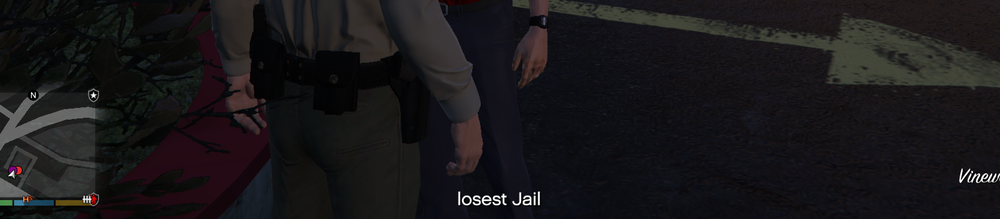
Every ingame Subtitle is replaced with "losest Jail"
-
all Subtitles only say "losest Jail" I only have Ultimate Backup, Stop The Ped and Callout Manager installed. Anyone know a fix to that? Thanks
-
PARTLY SOLVED: I got it to work like this : ReadFromNode(@"C:\Program Files (x86)\Steam\steamapps\common\Grand Theft Auto V\plugins\LSPDFR\CivilianCallouts\Places\Amount.xml", "/Amount") But still this Game Path will only work on my Pc. How do I always refer to the Gamepath Folder?
-
public override bool OnBeforeCalloutDisplayed() { Game.DisplayNotification($"Test value is {ReadFromNode(@"C:\\Program Files(x86)\\Steam\\steamapps\\common\\Grand Theft Auto V\\plugins\\LSPDFR\\CivilianCallouts\\Places\\Amount.xml" , "/Amount/")}"); return base.OnBeforeCalloutDisplayed(); } public static string ReadFromNode(string file, string node) { return SelectNodeFromXml(file, node).InnerText; } private static XmlNode SelectNodeFromXml(string filePath, string node) { if (!File.Exists(filePath)) throw new FileNotFoundException($"{nameof(SelectNodeFromXml)}(): specified file does not exist: {filePath}"); using (TextReader reader = new StreamReader(filePath)) { var doc = new XmlDocument(); doc.Load(reader); return doc.SelectSingleNode(node); } } Hey guys I want my Callout Plugin to get a variable from an xml node here is my current code: But i get this error: [4/8/2021 5:09:42 PM.172] LSPD First Response: [FATAL] OnBeforeCalloutDisplayed crashed: System.IO.FileNotFoundException: SelectNodeFromXml(): specified file does not exist: C:\Program Files(x86)\Steam\steamapps\common\Grand Theft Auto V\plugins\LSPDFR\CivilianCallouts\Places\Amount.xml Does anyone know how i shoud refer to the game path a smoother way, or did I make another mistake? Thanks <?xml version="1.0" encoding="utf-8" ?> <Amount> 2 </Amount>
-
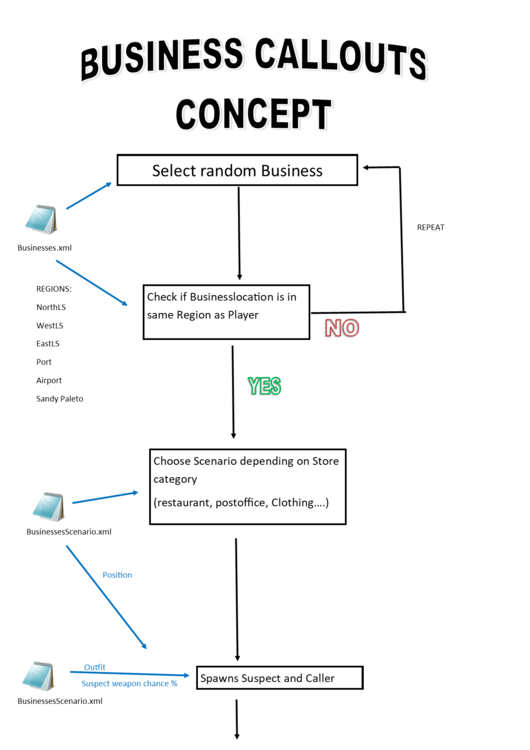
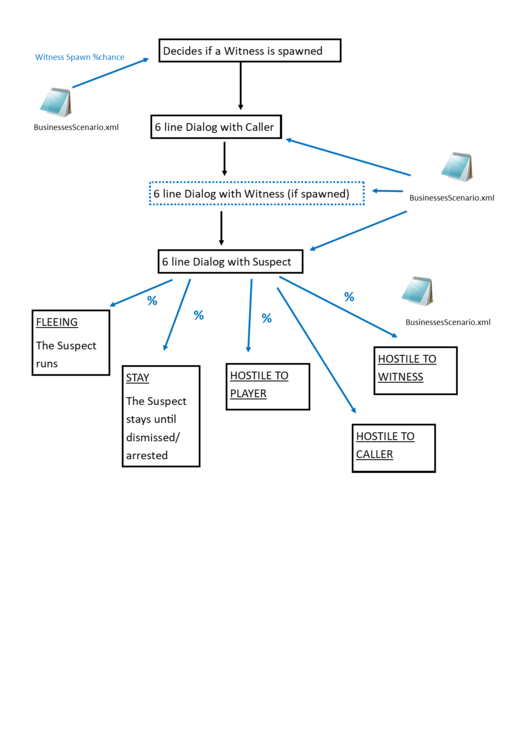
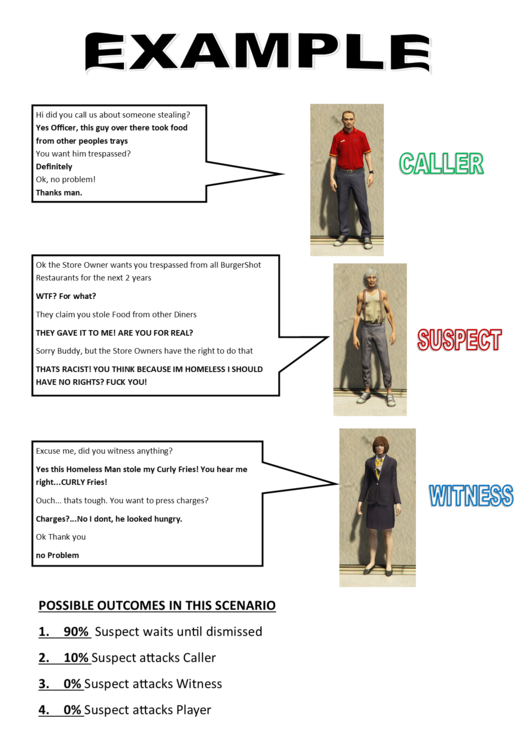
So I spent today thinking about a Callout Pack Idea. The Callout is actually always the same: A Caller -> A Witness -> A Suspect But everything from Outfits, to the Callout Location, Dialog Options and Outcomes can be added and customized. So players can easily add their own little Callout Storys. Ive always wanted to learn to code and I had 0 experience in C# before today. But I hope Ill learn and make this little project happen. Feel free to look at the illustrations and example xmls. Please let me know what you think! Happy Easter! (Pls ignore my countless grammar mistakes) Businesses.xml BusinessScenarios.xml
-
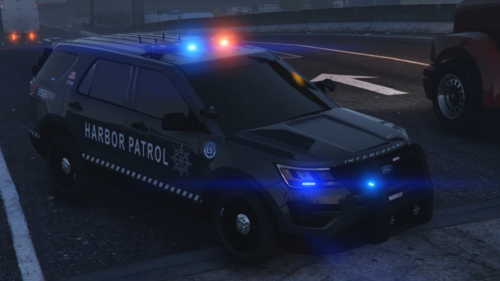 !!!All Credits for these beatiful vehicles go to their original Creators: Maurice97 and TopCop72!!! Please consider leaving a nice comment and review when you download the vehicles from their pages 🙂
 -
Do you have a Gamepad? If yes, you can use DPadLeft/DPadRight to change the clothing texture
-
SOLVED: I added some new content to the File and uploaded it again so it had to go through the reviewing process again. Was approved in less than 30mins. I guess it just slipped through the System the first Time.
-
Ok Its been over 10 hrs now and its still saying pending approval. Wanted to delete the File (to try uploading again) but it needs to be approved first. I just wanna know what I did wrong because I cant seem to figure it out. Its my first project and I was really excited to share 😕 Since the file contains uniforms, vehicle textures and xmls Ive uploaded it in the "Misc" category, Was that the mistake?
-
Hi Guys, do you get a notfication if your file upload has been denied? I was just wondering because my latest File has been marked as awaiting approval for the past 5 hours. Is it removed and I dont see it or am I just impatient and should just chill out and wait? Thx
-
Spent this sunday on my first little project. Let me know what you think! Im happy for all kinds of Feedback
-
HEY GUYS This is my first LSPDFR project so If I made any Errors please let me know, and I´ll try to fix them ASAP This file includes: -3 EUP UNIFORMS -2 VEHICLE SKINS for a crown vic and charger made by BxBugs123 and Kle0 -a texture replacement for a "Mirror Park Police Department" Sign -xml lines for UltimateBackup, agency.xml and stations.xml -a menyoo spooner savefile (spawns a few ambient peds and objects around the Police Station) If you have an questions pls slide right into my dms or leave a comment Every Plugin/mod required: https://de.gta5-mods.com/scripts/menyoo-pc-sp https://www.bejoijo.com/post/ultimate-backup
-
Install Eup Menu first and then Eup Law&Order. Then your Uniforms should work
-
Hey guys, I wannted to edit my stations.xml, but since i have the Plugins EUP an Juridistrictions+ installed, I also see a station_eup, and stations_juri.xml Which one do I need to edit so my changes appear in the Game?
-
Do you have eup L&O installed?
-
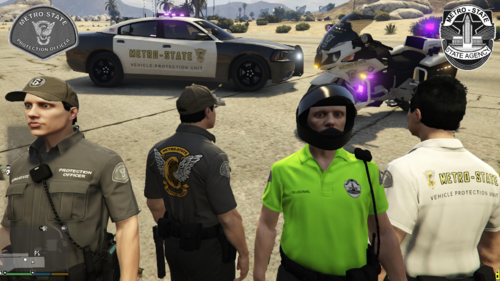 WE PUT THE "RISK" IN HIGH RISK FUNERAL ESCORTS! With those 4 new Metro State themed shirts you too can be part of a State- cetified Agency. Custom Nametag option included Have fun and STAY OUT OF MY FUNERAL!! Vehicles used in Screenshot: Charger: Bike:
- 14 comments
- 2 reviews
-
-

- 2
-
-
Hi Guys, I came across the Plugin jurisdictions+ a while ago and had the Plan to have custom police cars arriving for backup depending on the Region I'm in. (Grapeseed PD, Paleto Bay PD, Vespucci PD) But for some reason they only arrive in the right car inside los santos. Whenever I call for Backup outside of LS, for example in Grapeseed or Paleto, they always arrive in the sheriff and sheriff2 car. Does anyon know how to fix the issue? Thanks! CustomRegions.xml


