


thota
Members
-
Joined
-
Last visited
Everything posted by thota
-
**Changing Your Plugin Timeout Threshold** In the first tab of the RPH Settings, find the bar titled "Plugin Timeout Threshold" and change it to 60,000. **Accessing RagePluginHook Settings** To access your RagePluginHook settings, hold Shift straight after launching RagePluginHook. Alternatively, press the little silver cog icon when you see the RagePluginHook splash screen after launching. Do that then go on duty and if it crashes send a new log
-
Can you go on duty and then send a log Also send a screenshot of GTA V/plugins/LSPDFR
-
Send your asiloader.log and ELS.log both can be found in your GTA v folder
-
Install the originalfiles.oiv that comes with visualV download and see if it still happens
-
Please send your RagePluginHook log This is a text file called RagePluginHook. If you can see file extensions, it has a .log one. It is in your main GTA V folder. It is not inside of your logs folder.
-
Set Main.PreloadAllModels = false in your lspdfr.ini file (GTA V > lspdfr). Go into Task Manager > Details > Right click GTA V > Set as a higher priorty. It may also help to reduce your GTA V graphics settings. Keep in mind using a lot of high-quality vehicles (such as 4K textures) can also cause this problem. You can also try installing a resource adjuster https://www.lcpdfr.com/downloads/gta5mods/misc/42250-resource-adjuster/
-
Rename your mods folder to _mods and try again
-
Launch regular GTA V once in story mode fully tab out and launch RPH
-
Launch regular GTA V once in story mode fully tab out and launch RPH
-
Yes if you have custom cars you cannot just spam backup keep it to 3-4 units
-
If you use ultimate backup you need to install a separate config for that https://www.lcpdfr.com/downloads/gta5mods/misc/28735-san-andreas-ultimate-backup-eup-complete-edition/
-
Custom clothes are installed in the EUP folder so they should be uninstalled when you uninstall EUP But if you are asking if you can re add them then Depends on what eup version it was made for if it's an entire uniform pack But if it's just a few add-ons should be fine
-
What happens when you launch RPH once in game fully?
-
Send a screenshot of the error
-
Its the same error you are missing LSPDFR files Try adding your GTAV folder as an exception to your antivirus then restart your PC and reinstall LSPDFR
-
Send a new log then
-
Did you spam backup during the pursuit?
-
The only thing you could do is Try verifying your game files If that doesn't work Clean your GTAV folder using this screenshot https://i.imgur.com/uybUwEz.jpg and verify for any required files deleted accidentally
-
Callout Interface and Stop the ped has the feature for Keep calm
-
After which step? Removing SHVDN or dinput8.dll?
-
You seem to be missing LSPDFR files try using the manual installation of LSPDFR and reinstall.
-
Please send your RagePluginHook log This is a text file called RagePluginHook. If you can see file extensions, it has a .log one. It is in your main GTA V folder. It is not inside of your logs folde
-
I mean if you are unable to send the log all I can say is that the issue is something in your mods folder and you will hve to retrace your steps.
-
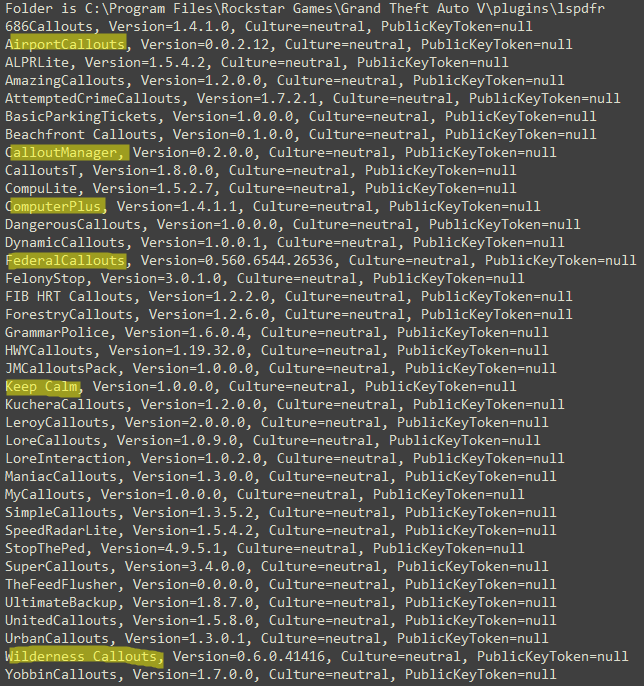
Remove the highlighted plugins as they are outdated
-
You still have a scripthookVdotnet file remove it If that doesnt work remove dinput8.dll out of your GTAV folder and try playing


