WMFong
Members
-
Joined
Everything posted by WMFong
-
Put your last modification to the desktop. Then run the game again.
-
-
Ok. The problem is from the mods folder. Did you just install any mods?
-
The problem is out from the game. Did you install any mods?
-
I did experience crash by Stop the ped. Which I was cuffing the same guy with my backup units. The game freeze and crashed. But all in all it's a cool experience in LSPDFR though. Sure, lspdfr is unstable, but it can run correctly not all the time but at least like half an hour. If you play a big open world game for hours or days, it's acceptable that you experience bugs or crashes. You can't just make an impossible request which you have no bugs or glitches in a big open world game with high graphics, high fps with days running time. Also, LSPDFR wasn't really a game, just a mod having different setting(I think it will be better to say it violates) with the own game. Few crashes, bugs (Maybe crashes each one and a half hour with 10 plugins) is acceptable for me. And I think you can make a support forum if you find unable to fix the lspdfr problem. Because it might not be the problem of LSPDFR. Might be just your antivirus delete some file and making it not working.
-
I think the problem wasn't out from LSPDFR, it's from GTA5 or the mods. Suggest moving this topic to GTA5 support
-
Ok.
-
Could be a problem of antivirus, as some of them delete file without noticing. Check whether you have whitelisted the gta5 folder
-
Ok. Saw something wrong at the log. Something wrong on lspdfr/data,
-
Maybe @UnknownBastioncan help.
-
What about trainers?
-
I was thinking why dinput cause the problem.
-
This might not be a problem of your computer. If you are using Epic version of GTA5 and you didn't load the game manually. This error will come out. So open GTA5 first, then open Rage plugin hook.(You don't need to wait GTA5 load into story mode, launch Ragepluginhook once you open GTA5.exe)
-
For people who use a mods folder: 1. Change the name of mods folder to _mods (This will disable the loading of mods folder, but won't delete the file in the folder. Which we can check where does the problem out) 2. Run the game without using Ragepluginhook. If the game crashed, that means you need to verify your game. Note: Problem can come out from mods in this situation. Sometimes if there are files lost in mods folder, you will receive this notification, asking you to verify.
-
Try to load GTA5 only, I think the problem is out from GTA5.
-
You need to load your game with rage plugin hook so that the rage plugin hook console will work. Same for LSPDFR, it requires Rage plugin hook to work.
-
 Bug found for Noose Predator. This bug appears when I turn on light and siren, appear when I turn on light only too, hope you can fix it. Edit: I found the same bug happen on Noose Dinghy too. I use 7-zip to extract the file. And it worked. Not sure if you are doing something wrong.
 -
The 'Vehicles' start tag on line 850 position 6 does not match the end tag of 'VehicleSet'. Line 856, position 6. Thats the problem
-
ELS requires Script Hook V (Alexander Blade). Check whether you have install it in GTA5 or not.
-
Ummm. Not all the plugins are updated to 4.9. So not all of them work.
-
What I just found from your RagePluginHook log is werid Swap Chain VTable value. I don't know anything about it, so I try to search it up. Another guy experiences nearly the same problem with you. Here is the solution they have use and successfully solved the problem. Not sure if it can solve your problem too. Worth a try though. Solution: Force directx 11 and force windowed mode inside the ragehook console. Hold left shift after clicking on ragehook. Link to the Support Forum where the guy who experienced nearly the same problem with you: https://www.lcpdfr.com/forums/topic/86309-cannot-get-lspdfr-to-work-rage-problem-maybe/
-
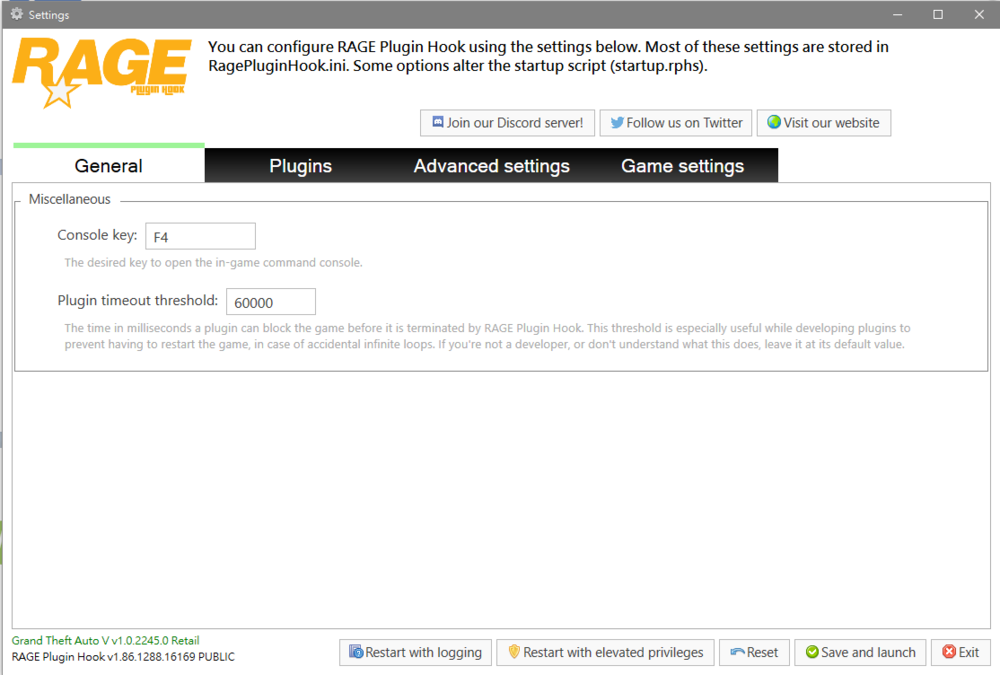
Try this method: Open GTA5.exe, then open RagePluginhook.exe. If that application appears like the image below, press save and launch. Tips: You don't need to wait for GTA5 to load into story mode. This problem appear if you have two GTA5 or you got that GTA5 from Epic.
-
 Yep
Yep -
The Menu isn't working for LSPDFR 0.4.9
-
For stop the ped, press E twice to stop him from being transfer