



dream Modifications
Members
-
Joined
-
Last visited
Everything posted by dream Modifications
-
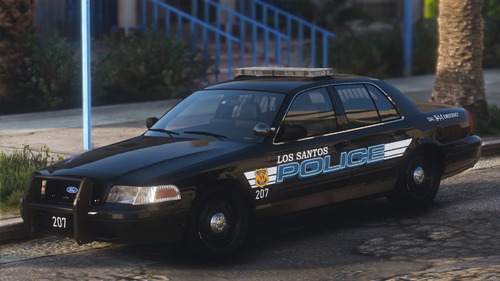 Los Santos Police Dept. (CPD) 2010 Crown Victoria 1.0 - by dream A Cleveland Division of Police based Crown Victoria with Whelen Liberty I lightbar. Discord Server Youtube channel Vehicles included: clecvpi - 2010 Ford Crown Victoria with Whelen Liberty I. Requirements: OpenIV; SirenSetting Limit Adjuster; Dynamic Lightning System by TheMayBeast - Optional, but highly recommended. Only the 3rd stage would be active without DLS. Extra list: clecvpi: extra 12: LoJack Antennas. Installation: 1. Make sure you have your ‘mods’ folder in GTA V’s main folder with a copied ‘update’ folder. 2. Open your OpenIV, turn on ‘Edit mode’ and go to GTAV/mods/update/x64/dlcpacks/. Drag and drop folder ‘dmclecvpi’. 3. Export a file called ‘dlclist.xml’ which located in GTAV/mods/update/update.rpf/common/data/. Copy this file to your desktop and open it with any editor you like. After, scroll to the bottom and locate the last line that starts with ‘<Item>dlcpacks:/….’. Add a new line, then copy and paste this line: <Item>dlcpacks:/dmclecvpi/</Item> 4. Replace old file with the new one. Additional steps for: DLS Users: Copy ‘DLS’ folder from ‘Data Files’ folder and paste them in GTAV/Plugins/ ELS Users: Copy .xml files from ‘Data Files’ folder and paste them in GTAV/ELS/pack_default/ Terms of Use: I (dream) accept no responsibility for any damage caused to your PC, game, or anything else. Backup your files before installing anything. Do not display this file on other sites as your own. Do not rip, dismantle or change the vehicle in any way (Except for livery files). If you do not accept this, please, do not use this pack.
 -
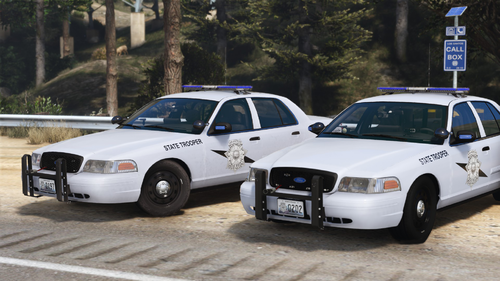
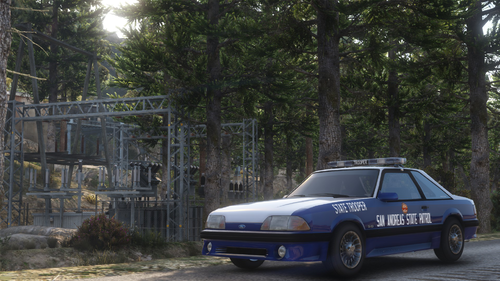 San Andreas State Patrol 1990 Ford Mustang GT 1.0 - by dream A San Andreas State Patrol Ford Mustang with Whelen Edge Strobe lightbar. Vehicle is based on Georgia State Police 90’s Mustangs. Discord Server Youtube channel Vehicles included: dpsmusta - 1990 Ford Mustang GT with Whelen Edge. Requirements: OpenIV; SirenSetting Limit Adjuster; Dynamic Lightning System by TheMayBeast - Optional, but highly recommended. Only the 3rd stage would be active without DLS. Installation: 1. Make sure you have your ‘mods’ folder in GTA V’s main folder with a copied ‘update’ folder. 2. Open your OpenIV, turn on ‘Edit mode’ and go to GTAV/mods/update/x64/dlcpacks/. Drag and drop folder ‘dmdpsmusta’. 3. Export a file called ‘dlclist.xml’ which located in GTAV/mods/update/update.rpf/common/data/. Copy this file to your desktop and open it with any editor you like. After, scroll to the bottom and locate the last line that starts with ‘<Item>dlcpacks:/….’. Add a new line, then copy and paste this line: <Item>dlcpacks:/dmdpsmusta/</Item> 4. Replace old file with the new one. Additional steps for: DLS Users: Copy ‘DLS’ folder from ‘Data Files’ folder and paste them in GTAV/Plugins/ ELS Users: Copy .xml files from ‘Data Files’ folder and paste them in GTAV/ELS/pack_default/ Terms of Use: I (dream) accept no responsibility for any damage caused to your PC, game, or anything else. Backup your files before installing anything. Do not display this file on other sites as your own. Do not rip, dismantle or change the vehicle in any way (Except for livery files). If you do not accept this, please, do not use this mod.
 -
 It's North Yankton.
 -
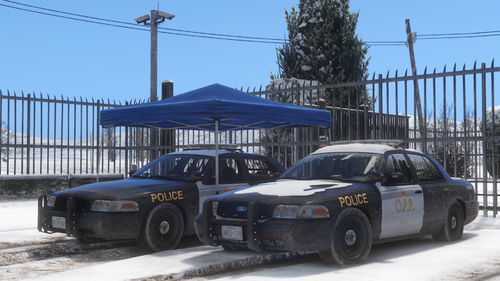
Ontario Provincial Police Crown Victoria Pack 1.0 - by dream An Ontario Provincial Police Crown Victoria pack with FS Arjent lightbar. Featuring a regular unit and one covered with snow. Discord Server Youtube channel Vehicles included: oppcvpi - 2010 Ford Crown Victoria with FS Arjent lightbar; oppcvpi2 - 2010 Ford Crown Victoria with FS Arjent lightbar(With snow). Requirements: OpenIV; SirenSetting Limit Adjuster by cp702; Dynamic Lightning System by TheMayBeast - Optional, but highly recommended. Only the 3rd stage would be active without DLS. Extra list: oppcvpi, oppcvpi2: None. Notes: v1.0 featuring a semi-realistic interior equipment. This means that some parts of the equipment are recreated from real life and some are not. Installation: 1. Make sure you have your ‘mods’ folder in GTA V’s main folder with a copied ‘update’ folder. 2. Open your OpenIV, turn on ‘Edit mode’ and go to GTAV/mods/update/x64/dlcpacks/. Drag and drop folder ‘dmoppcvpis’. 3. Export a file called ‘dlclist.xml’ which located in GTAV/mods/update/update.rpf/common/data/. Copy this file to your desktop and open it with any editor you like. After, scroll to the bottom and locate the last line that starts with ‘<Item>dlcpacks:/….’. Add a new line, then copy and paste this line: <Item>dlcpacks:/dmoppcvpis/</Item> 4. Replace old file with the new one. Additional steps for: DLS Users: Copy ‘DLS’ folder from ‘Data Files’ folder and paste them in GTAV/Plugins/ ELS Users: Copy .xml files from ‘Data Files’ folder and paste them in GTAV/ELS/pack_default/ Terms of Use: I (dream) accept no responsibility for any damage caused to your PC, game, or anything else. Backup your files before installing anything. Do not display this file on other sites as your own. Do not rip, dismantle or change the vehicle in any way (Except for livery files). If you do not accept this, please, do not use this pack.
-
 I've done a similar setup recently.
 -
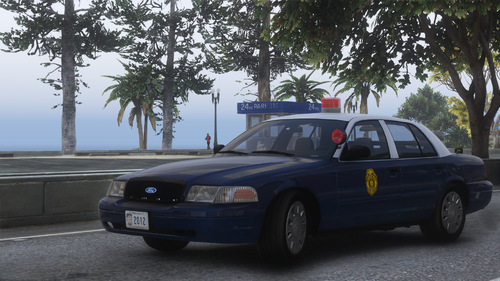
Kansas Highway Patrol 75th Anniversary Crown Victoria ‘2012’ 1.0 - by dream A Kansas Highway Patrol 75th Anniversary Crown Victoria ‘2012’ with Whelen LED Beacon. KHP purchased a special fleet of 14 cars for the 75th anniversary. The unit '2012' is the last Crown Victoria Police Interceptor (P7B) produced by Ford. Discord Server Youtube channel Vehicles included: khp2012 - 2011 Ford Crown Victoria with Whelen LED Beacon. Requirements: OpenIV; SirenSetting Limit Adjuster; Dynamic Lightning System by TheMayBeast - Optional, but highly recommended. Only the 3rd stage would be active without DLS. Extra list: khp2012: None. Installation: 1. Make sure you have your ‘mods’ folder in GTA V’s main folder with a copied ‘update’ folder. 2. Open your OpenIV, turn on ‘Edit mode’ and go to GTAV/mods/update/x64/dlcpacks/. Drag and drop folder ‘dmkhp2012’. 3. Export a file called ‘dlclist.xml’ which located in GTAV/mods/update/update.rpf/common/data/. Copy this file to your desktop and open it with any editor you like. After, scroll to the bottom and locate the last line that starts with ‘<Item>dlcpacks:/….’. Add a new line, then copy and paste this line: <Item>dlcpacks:/dmkhp2012/</Item> 4. Replace old file with the new one. Additional steps for: DLS Users: Copy ‘DLS’ folder from ‘Data Files’ folder and paste them in GTAV/Plugins/ ELS Users: Copy .xml files from ‘Data Files’ folder and paste them in GTAV/ELS/pack_default/ Note: ELS files are blank. This means you can’t control light stages, patterns, etc. Only the 3rd stage and siren selection would work. Terms of Use: I (dream) accept no responsibility for any damage caused to your PC, game, or anything else. Backup your files before installing anything. Do not display this file on other sites as your own. Do not rip, dismantle or change the vehicle in any way (Except for livery files). If you do not accept this, please, do not use this pack.
-
 Most likely, the pack will be expanded over time ELS configs are already available.The only drawback is that you won't be able to manage the stages.
 -
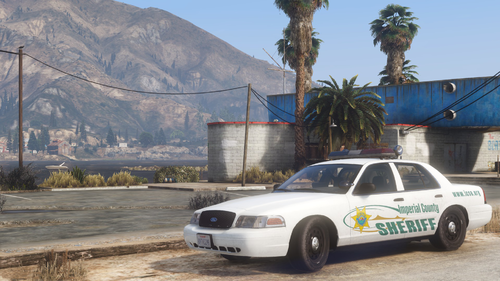
Imperial County Sheriff’s Office Crown Victoria Pack 1.0 - by dream An Imperial County Sheriff’s Office Crown Victoria Pack with Code3 MX7000/Excalibur lightbars. Imperial County is located in southern California and shares a border with Mexico. Salton Sea and Desert Shores are located in this county, which the Rockstar team recreated in GTA under the names Alamo Sea and Sandy Shores, respectively. Discord Server Youtube channel Vehicles included: icsocvpi - 2006 Ford Crown Victoria with Code3 MX7000 lightbar; icsocvpi2 - 2010 Ford Crown Victoria with Code3 Excalibur lightbar. Requirements: OpenIV; SirenSetting Limit Adjuster by cp702; Dynamic Lightning System by TheMayBeast - Optional, but highly recommended. Only the 3rd stage would be active without DLS. Extra list: icsocvpi, icsocvpi2: extra 12 - LoJack antennas. Notes: If you use DLS, then you have the option to activate side spotlights on the lightbar. To do this, activate the steady burn mode ('[' button by default). Installation: 1. Make sure you have your ‘mods’ folder in GTA V’s main folder with a copied ‘update’ folder. 2. Open your OpenIV, turn on ‘Edit mode’ and go to GTAV/mods/update/x64/dlcpacks/. Drag and drop folder ‘dmicsocvpis’. 3. Export a file called ‘dlclist.xml’ which located in GTAV/mods/update/update.rpf/common/data/. Copy this file to your desktop and open it with any editor you like. After, scroll to the bottom and locate the last line that starts with ‘<Item>dlcpacks:/….’. Add a new line, then copy and paste this line: <Item>dlcpacks:/dmicsocvpis/</Item> 4. Replace old file with the new one. Additional steps for: DLS Users: Copy ‘DLS’ folder from ‘Data Files’ folder and paste them in GTAV/Plugins/ ELS Users: Copy .xml files from ‘Data Files’ folder and paste them in GTAV/ELS/pack_default/ Note: ELS files are blank. This means you can’t control light stages, patterns, etc. Only the 3rd stage and siren selection would work. Terms of Use: I (dream) accept no responsibility for any damage caused to your PC, game, or anything else. Backup your files before installing anything. Do not display this file on other sites as your own. Do not rip, dismantle or change the vehicle in any way (Except for livery files). If you do not accept this, please, do not use this pack.
-
 Hello, If someone tries to explain it in text, then most likely you will make a mistake during installation. I advise you to find a video guide on YouTube, there are a lot of them there
 -
 Everything is fine with the livery. This car uses GTA colors, that is, you can change the colors of the car through the mod menu. By default, the car should spawn in black and white, but for some reason this is not the case with you.
 -
Since this is a Non-ELS car, in addition to replacing the car files themselves, you will need to replace all the metafiles for the mod to work correctly, which will take you much longer than installing the addon. Alternatively, you can try Lenny's Mods Loader. As far as I know, it has the ability to install vehicles like this.
-
Hello. All police cars in GTA use taillights as an addition to flashing lights, which are configured in a special meta file. That's why every car that replaces the existing ones in the game gets the same effect on the taillights. But, since this car is installed separately from those that are already in the game, I have the opportunity to disable them. Then, I just created separate flashing lights that work in place of the turn signals. Everything works correctly in my game. Could you describe the problem in more detail? Does livery appear in the game or not? If possible, I would ask you to attach screenshots of the problem.
-
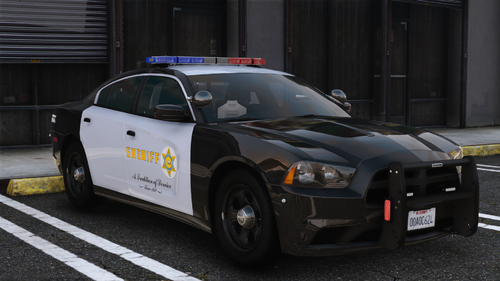
Los Angeles County Sheriff’s Department - 2014 Dodge Charger PPV 1.0 - by dream A Los Angeles County Sheriff’s Dept. 14’ Charger with Whelen Liberty lightbar. Discord Server Youtube channel Vehicle included: lasdchgr - 2014 Dodge Charger PPV with Whelen Liberty lightbar. Requirements: OpenIV; Dynamic Lightning System by TheMayBeast - Optional, but highly recommended. Only the 3rd stage would be active without DLS. Extra list: lasdchgr: None. Installation: 1. Make sure you have your ‘mods’ folder in GTA V’s main folder with a copied ‘update’ folder. 2. Open your OpenIV, turn on ‘Edit mode’ and go to GTAV/mods/update/x64/dlcpacks/. Drag and drop folder ‘dmlasdchgr’. 3. Export a file called ‘dlclist.xml’ which located in GTAV/mods/update/update.rpf/common/data/. Copy this file to your desktop and open it with any editor you like. After, scroll to the bottom and locate the last line that starts with ‘<Item>dlcpacks:/….’. Add a new line, then copy and paste this line: <Item>dlcpacks:/dmlasdchgr/</Item> 4. Replace old file with the new one. Additional steps for: DLS Users: Copy ‘DLS’ folder from ‘Data Files’ folder and paste them in GTAV/Plugins/ ELS Users: Copy .xml files from ‘Data Files’ folder and paste them in GTAV/ELS/pack_default/ Note: ELS files are blank. This means you can’t control light stages, patterns, etc. Only the 3rd stage and siren selection would work. Terms of Use: I (dream) accept no responsibility for any damage caused to your PC, game, or anything else. Backup your files before installing anything. Do not display this file on other sites as your own. Do not rip, dismantle or change the vehicle in any way (Except for livery files). If you do not accept this, please, do not use this pack.
-
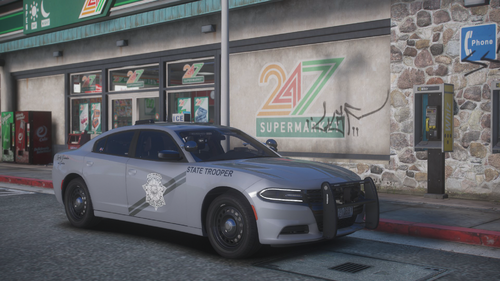 Yes, I do accept requests. My discord server can be find here: https://discord.com/invite/V2xYDqebgu
 -
Crown Victoria pack is already available here: Yes, it is possible. I'd probably add this feature in the next update
-
If vehicles have only 1 stage and TA doesn't work, that only means you've incorrectly installed the DLS configs. Again, I tested everything on the latest build of the game and it works fine for me. Right path for the configs should look like this: Grand Theft Auto V\plugins\DLS (for configs) Grand Theft Auto V\plugins\DLS\Traffic Advisory (for traffic advisor)
-
Could anybody send a screenshot with the problem? In my game everything working perfectly.
-
San Andreas State Police 2019 Charger PPV Pack 1.0 - by dream A fictional San Andreas State Law Enforcement pack based on several agencies around the US. Vehicles are equipped with all-blue Code3 lightning and 4K liveries. Discord Server Youtube channel Vehicles included: sasp2 - 2019 Dodge Charger PPV with Code3 RX2700 lightbar; sasp22 - 2019 Dodge Charger PPV Slicktop; sasp23 - 2019 Dodge Charger PPV Unmarked; Related files: San Andreas State Police Crown Victoria Pack 1.1 Requirements: OpenIV; Dynamic Lightning System by TheMayBeast - Only the 3rd stage would be active without DLS. DLS configurations are included. They allow you to change lightning stages, traffic advisor patterns etc. Extra list: sasp2: extra 10 - Partition; extra 12 - Coffee Cup. sasp22: extra 12 - Coffee Cup. sasp23: extra 1 - Radar system; extra 2 - Gun locker; extra 12 - Coffee Cup. Installation: 1. Make sure you have your ‘mods’ folder in GTA V’s main folder with a copied ‘update’ folder. 2. Open your OpenIV, turn on ‘Edit mode’ and go to GTAV/mods/update/x64/dlcpacks/. Drag and drop folder ‘dmsaspchgr’. 3. Export a file called ‘dlclist.xml’ which located in GTAV/mods/update/update.rpf/common/data/. Copy this file to your desktop and open it with any editor you like. After, scroll to the bottom and locate the last line that starts with ‘<Item>dlcpacks:/….’. Add a new line, then copy and paste this line: <Item>dlcpacks:/dmsaspchgr/</Item> 4. Replace old file with the new one. Additional steps for: DLS Users: Copy ‘DLS’ folder from ‘Data Files’ folder and paste them in GTAV/Plugins/ ELS Users: Copy .xml files from ‘Data Files’ folder and paste them in GTAV/ELS/pack_default/ Note: ELS files are blank. This means you can’t control light stages, patterns, etc. Only the 3rd stage and siren selection would work. Terms of Use: I (dream) accept no responsibility for any damage caused to your PC, game, or anything else. Backup your files before installing anything. Do not display this file on other sites as your own. Do not rip, dismantle or change the vehicle in any way (Except for livery files). If you do not accept this, please, do not use this pack.
-
Thanks for the report. I'll fix dirtmap issue shortly. But can you please be more specific about rear lights?
-
San Andreas State Police Crown Victoria Pack 1.1 - by dream A fictional San Andreas State Law Enforcement pack based on several agencies around the US. Vehicles are equipped with all-blue Code3 lightning and 4K liveries. Discord Server Youtube channel Vehicles included: sasp - 2010 Ford Crown Victoria Police Interceptor with Code3 21tr lightbar; sasp4 - 2010 Ford Crown Victoria Police Interceptor Unmarked; sasp42 - 2010 Ford Crown Victoria Police Interceptor Slicktop; sasp12 - 2004 Ford Crown Victoria Police Interceptor with Whelen Edge lightbar; sasp13 - 2004 Ford Crown Victoria Police Interceptor Slicktop; sasp14 - 1999 Ford Crown Victoria Police Interceptor Slicktop; sasp15 - 2003 Ford Crown Victoria Police Interceptor Unmarked; Related files: San Andreas State Police 2019 Charger Pack 1.0 Requirements: OpenIV; Dynamic Lightning System by TheMayBeast - Optional, but highly recommended. Only the 3rd stage would be active without DLS. DLS configurations are included. They allow you to change lightning stages, traffic advisor patterns etc. Extra list: sasp, sasp42, sasp12: extra 11 - Radar system; extra 12 - Pushbar. sasp4: extra 9 - Grille Lights; extra 10 - Rear Plate Lights; extra 11 - Front Plateholder; extra 12 - Front Licence Plate. sasp13: extra 10 - Partition; extra 11 - Radar system; extra 12 - Pushbar. sasp14: extra 12 - Pushbar. sasp15: extra 10 - Grille Lights; extra 11 - Front Plateholder; extra 12 - Front Licence Plate. Installation: 1. Make sure you have your ‘mods’ folder in GTA V’s main folder with a copied ‘update’ folder. 2. Open your OpenIV, turn on ‘Edit mode’ and go to GTAV/mods/update/x64/dlcpacks/. Drag and drop folder ‘dmsaspcv’. 3. Export a file called ‘dlclist.xml’ which located in GTAV/mods/update/update.rpf/common/data/. Copy this file to your desktop and open it with any editor you like. After, scroll to the bottom and locate the last line that starts with ‘<Item>dlcpacks:/….’. Add a new line, then copy and paste this line: <Item>dlcpacks:/dmsaspcv/</Item> 4. Replace old file with the new one. Additional steps for: DLS Users: Copy ‘DLS’ folder from ‘Data Files’ folder and paste it in GTAV/Plugins/ ELS Users: Copy .xml files from ‘Data Files’ folder and paste them in GTAV/ELS/pack_default/ Note: ELS files are blank. This means you can’t control light stages, patterns, etc. Only the 3rd stage and siren selection would work. Terms of Use: I (dream) accept no responsibility for any damage caused to your PC, game, or anything else. Backup your files before installing anything. Do not display this file on other sites as your own. Do not rip, dismantle or change the vehicle in any way (Except for livery files). If you do not accept this, please, do not use this pack.
-
 Hello, try to change texture quality in game settings. This might help since this option also applies on map.
- 107 comments
- 8 reviews
-
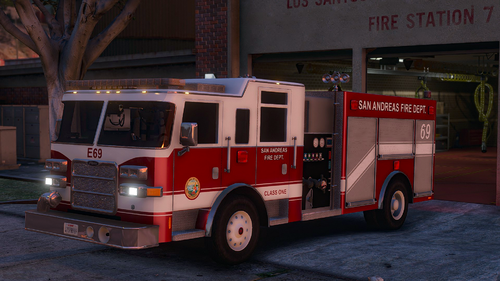 After a long break, I again take up this modification. All WIP photos will be available on my Discord server. https://discord.gg/V2xYDqebgu
- 55 comments
- 12 reviews
-
Please, add files (minimap[...]) from "x64b" installation folder to following path: GTAV/mods/update/update.rpf/x64/data/cdimages/scaleform_generic.rpf/ This should help.
- 107 comments
- 8 reviews
-
-

- 1
-
-
Please, add files (minimap[...]) from "x64b" installation folder to following path: GTAV/mods/update/update.rpf/x64/data/cdimages/scaleform_generic.rpf/ This should help.
- 107 comments
- 8 reviews
-
Please, add files (minimap[...]) from "x64b" installation folder to following path: GTAV/mods/update/update.rpf/x64/data/cdimages/scaleform_generic.rpf/ This should help.
- 107 comments
- 8 reviews



