



dream Modifications
Members
-
Joined
-
Last visited
Everything posted by dream Modifications
-
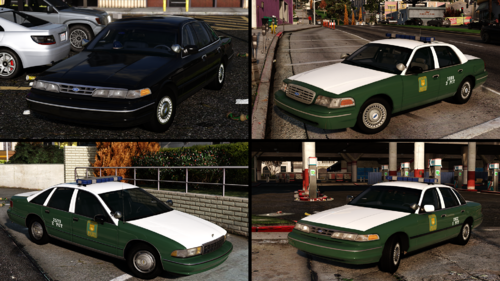 Los Santos Police Dept. Pack 1.0 - by dreamA fictional Los Santos police pack. Liveries are inspired by Cleveland Heights PD, OH. Features replace/add-on variants. Discord Server Youtube channel Join the official DLS server to participate in upcoming betas, suggest new ideas, get more configs and report any issues! DLS Discord Server Download includes: Vehicles: Add-on(Replace) versions: lspd(police) - 1996 Ford Crown Victoria with Whelen Edge; lspd2(police2) - 1994 Chevrolet Caprice with Whelen Edge; lspd3(police3) - 1998 Ford Crown Victoria with Whelen Edge; lspd4(police4) - 1996 Ford Crown Victoria unmarked. BB/RB/RR lighting options; DLS v2/ELS VCFs; Templates. Requirements: OpenIV; SirenSetting Limit Adjuster; Dynamic Lightning System by TheMayBeast - Optional, but highly recommended. Only the 3rd stage would be active without DLS. Extra list: lspd(police), lspd2(police2), lspd3(police3): None. lspd4(police4): extra_1 - Front-facing strobe light; extra_2 - Beacon stand; extra_3 - Beacon; extra_10 - Partition with gunrack; extra_12 - Gunrack without partition. Installation (Add-on): 1. Make sure you have your ‘mods’ folder in GTA V’s main folder with a copied ‘update’ folder. 2. Open your OpenIV, turn on ‘Edit mode’ and go to GTAV/mods/update/x64/dlcpacks/. Drag and drop folder ‘dm2409lspd’. 3. Export a file called ‘dlclist.xml’ which is located in GTAV/mods/update/update.rpf/common/data/. Copy this file to your desktop and open it with any editor you like. After, scroll to the bottom and locate the last line that starts with ‘<Item>dlcpacks:/….’. Add a new line, then copy and paste this line: <Item>dlcpacks:/dm2409lspd/</Item> 4. Replace old file with the new one. Installation (Replace): 1. Make sure you have your ‘mods’ folder in GTA V’s main folder with a copied ‘update’ folder. 2. Open your OpenIV, turn on ‘Edit mode’ and go to GTAV/mods/update/x64/dlcpacks/ Drag and drop folder ‘dm2409lspd’. 3. Export a file called ‘dlclist.xml’ which is located in GTAV/mods/update/update.rpf/common/data/. Copy this file to your desktop and open it with any editor you like. After, scroll to the bottom and locate the last line that starts with ‘<Item>dlcpacks:/….’. Add a new line, then copy and paste this line: <Item>dlcpacks:/dm2409lspd/</Item> 4. Replace old file with the new one. 5. Go to GTAV/mods/update/update.rpf/common/data/levels/gta5/ 6. Replace vehicles.meta file with one provided in the download. Additional steps for: DLS v2 Users: Copy the .xml files from the ‘Data Files/DLS’ folder and paste it in GTAV/Plugins/DLS/ ELS Users: Copy the .xml files from ‘Data Files/ELS’ folder and paste them in GTAV/ELS/pack_default/ Terms of Use: I (dream) accept no responsibility for any damage caused to your PC, game, or anything else. Backup your files before installing anything. Do not display this file on other sites as your own. Do not rip, dismantle or change the vehicle in any way (Except for livery files). If you do not accept this, please, do not use this mod.
 -
 updated
 -
in DLS.ini set DevMode=true
-
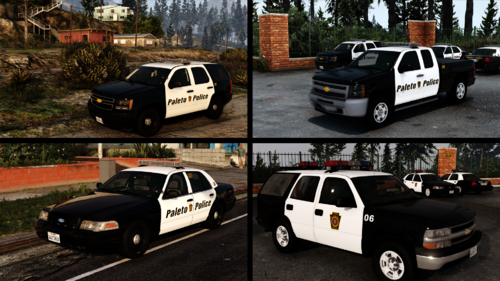
Paleto Bay Police Dept. Pack 1.1 - by dreamA fictional Paleto Police pack based on various East Coast departments. Discord Server Youtube channel Join the official DLS server to participate in upcoming betas, suggest new ideas, get more configs and report any issues! DLS Discord Server Vehicles included: pbpolice1 - 2010 Ford CVPI with Whelen Freedom II lightbar; pbpolice1b - 2008 Ford CVPI Slicktop with Code3 SuperVisor/Whelen Raider lights; pbpolice2 - 2012 Chevrolet Tahoe PPV with Whelen Freedom II lightbar; pbpolice3 - 2013 Chevrolet Silverado with Whelen Freedom II lightbar; pbpoliceold1 - 2001 Ford CVPI with Federal Signal Streethawk; pbpoliceold1b - 1999 Ford CVPI with ES CopLite lights; pbpoliceold2 - 2002 Chevrolet Tahoe with Federal Signal Streethawk/Vector lightbars. Requirements: OpenIV; SirenSetting Limit Adjuster; Dynamic Lightning System by TheMayBeast - Optional, but highly recommended. Only the 3rd stage would be active without DLS. Installation: 1. Make sure you have your ‘mods’ folder in GTA V’s main folder with a copied ‘update’ folder. 2. Open your OpenIV, turn on ‘Edit mode’ and go to GTAV/mods/update/x64/dlcpacks/. Drag and drop folder ‘dm0208paletopd’. 3. Export a file called ‘dlclist.xml’ which is located in GTAV/mods/update/update.rpf/common/data/. Copy this file to your desktop and open it with any editor you like. After, scroll to the bottom and locate the last line that starts with ‘<Item>dlcpacks:/….’. Add a new line, then copy and paste this line: <Item>dlcpacks:/dm0208paletopd/</Item> 4. Replace old file with the new one. Additional steps for: DLS Users: Copy the ‘DLS’ folder from the ‘Data Files’ folder and paste it in GTAV/Plugins/DLS/; Go to GTAV/Plugins/ and open DLS.ini with any text editor; Add following lines between any of the two key bindings: [TOGGLE_AUX1] Key=U (You can change any of the key bindings including this one in this file to your liking.) ELS Users: Copy .xml files from ‘Data Files’ folder and paste them in GTAV/ELS/pack_default/ Default DLS Controls: Toggle stages: J Reverse toggle stages: LShift+J Toggle traffic advisor: I Reverse traffic advisor: LShift+I Toggle Aux functions: U Toggle takedowns: O Toggle left alley lights: Page Down Toggle right alley lights: Page Up Terms of Use: I (dream) accept no responsibility for any damage caused to your PC, game, or anything else. Backup your files before installing anything. Do not display this file on other sites as your own. Do not rip, dismantle or change the vehicle in any way (Except for livery files). If you do not accept this, please, do not use this mod.
-
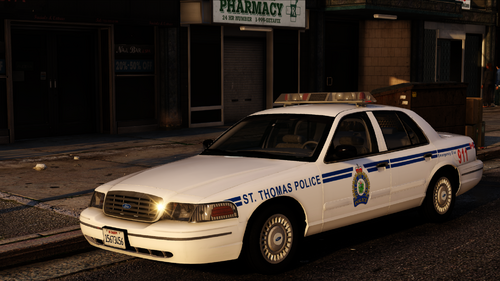 1998 Ford CVPI - St. Thomas Police 1.0 - by dreamOn September 15th, 2011 — 15 years ago — the last Ford Crown Victoria rolled off the assembly line at the plant in St. Thomas, Ontario. Over 1.5 million Crown Vics were made over the years. To this day, this iconic car still serves some communities in North America. I decided to mark this anniversary and release a model of its hometown's patrol car. A St. Thomas Police 1998 Ford Crown Victoria squad with Code3 LP6000 lightbar. Discord Server Youtube channel Join the official DLS server to participate in upcoming betas, suggest new ideas, get more configs and report any issues! DLS Discord Server Vehicles included: stpoliceold1 - 1998 Ford CVPI with Code3 LP6000. Requirements: OpenIV; SirenSetting Limit Adjuster; Dynamic Lightning System by TheMayBeast - Optional, but highly recommended. Only the 3rd stage would be active without DLS. Extra list: stpoliceold1: None. Installation: 1. Make sure you have your ‘mods’ folder in GTA V’s main folder with a copied ‘update’ folder. 2. Open your OpenIV, turn on ‘Edit mode’ and go to GTAV/mods/update/x64/dlcpacks/. Drag and drop folder ‘dmstpol’. 3. Export a file called ‘dlclist.xml’ which is located in GTAV/mods/update/update.rpf/common/data/. Copy this file to your desktop and open it with any editor you like. After, scroll to the bottom and locate the last line that starts with ‘<Item>dlcpacks:/….’. Add a new line, then copy and paste this line: <Item>dlcpacks:/dmstpol/</Item> 4. Replace old file with the new one. Additional steps for: DLS v2 Users: 1. Copy the ‘DLS’ folder from the ‘Data Files’ folder and paste it in GTAV/Plugins/DLS/; 2. Go to GTAV/Plugins/ and open DLS.ini with any text editor; 3. Add following lines between any of the two key bindings: [TOGGLE_AUX1] Key=U (You can change any of the key bindings including this one in this file to your liking.) ELS Users: Copy .xml files from ‘Data Files’ folder and paste them in GTAV/ELS/pack_default/ Default DLS Controls: Toggle stages: J Reverse toggle stages: LShift+J Toggle traffic advisor: I Reverse traffic advisor: LShift+I Toggle Aux functions: U Toggle takedowns: O Toggle left alley lights: Page Down Toggle right alley lights: Page Up Terms of Use: I (dream) accept no responsibility for any damage caused to your PC, game, or anything else. Backup your files before installing anything. Do not display this file on other sites as your own. Do not rip, dismantle or change the vehicle in any way (Except for livery files). If you do not accept this, please, do not use this mod.
 -
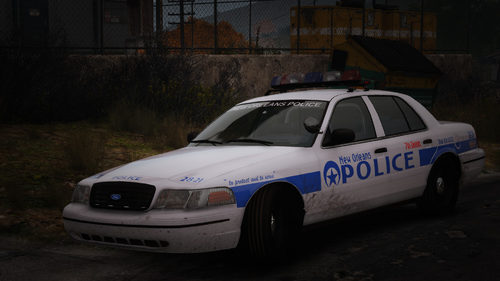 thats one of the dls features
 -
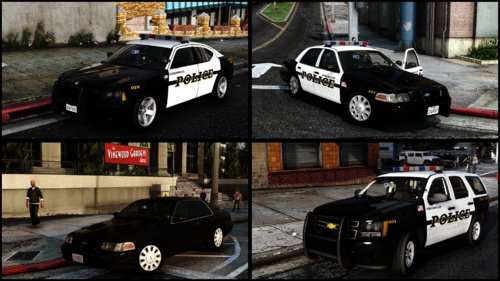 dm me on discord to get them
 -
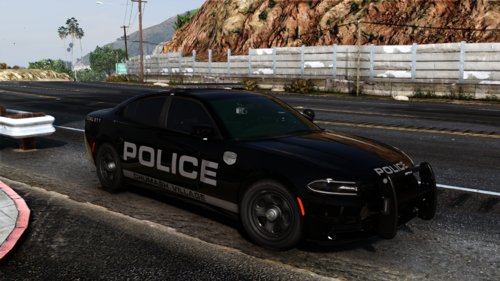 2018 Dodge Charger PPV - Chumash Police Dept. 1.0 - by dream A fictional 2018 Dodge Charger PPV with SoundOff Signal lights. Discord Server Youtube channel Join the official DLS server to participate in upcoming betas, suggest new ideas, get more configs and report any issues! DLS Discord Server Vehicles included: cpd1a - 2018 Dodge Charger PPV with SoS nForce lightbar. Requirements: OpenIV; SirenSetting Limit Adjuster; Dynamic Lightning System by TheMayBeast - Optional, but highly recommended. Only the 3rd stage would be active without DLS. Extra list: cpd1a: Extra 1 - Spotlight option 1; Extra 2 - Spotlight option 2. Installation: 1. Make sure you have your ‘mods’ folder in GTA V’s main folder with a copied ‘update’ folder. 2. Open your OpenIV, turn on ‘Edit mode’ and go to GTAV/mods/update/x64/dlcpacks/. Drag and drop folder ‘dmcpd’. 3. Export a file called ‘dlclist.xml’ which is located in GTAV/mods/update/update.rpf/common/data/. Copy this file to your desktop and open it with any editor you like. After, scroll to the bottom and locate the last line that starts with ‘<Item>dlcpacks:/….’. Add a new line, then copy and paste this line: <Item>dlcpacks:/dmcpd/</Item> 4. Replace old file with the new one. Additional steps for: DLS Users: 1. Copy the ‘DLS’ folder from the ‘Data Files’ folder and paste it in GTAV/Plugins/DLS/; 2. Go to GTAV/Plugins/ and open DLS.ini with any text editor; 3. Add following lines between any of the two key bindings: [TOGGLE_AUX1] Key=U (You can change any of the key bindings including this one in this file to your liking.) ELS Users: Copy .xml files from ‘Data Files’ folder and paste them in GTAV/ELS/pack_default/ Default DLS Controls: Toggle stages: J Reverse toggle stages: LShift+J Toggle traffic advisor: I Reverse traffic advisor: LShift+I Toggle scene mode: U Toggle takedowns: O Toggle left alley lights: Page Down Toggle right alley lights: Page Up Terms of Use: I (dream) accept no responsibility for any damage caused to your PC, game, or anything else. Backup your files before installing anything. Do not display this file on other sites as your own. Do not rip, dismantle or change the vehicle in any way (Except for livery files). If you do not accept this, please, do not use this mod.
 -
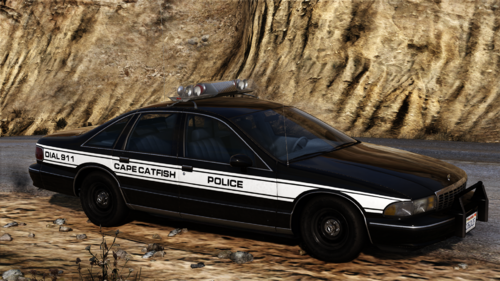 I think any livery for the 94 9c1 available here or anywhere else will fit this model.
 -
1994 Chevrolet Caprice 9C1 - Cape Catfish Police 1.0 - by dream A fictional 1994 Chevrolet Caprice 9C1 with Code3 XL lightbar. Discord Server Youtube channel Join the official DLS server to participate in upcoming betas, suggest new ideas, get more configs and report any issues! DLS Discord Server Vehicles included: ccpdold1a - 1994 Chevrolet Caprice 9C1; Requirements: OpenIV; SirenSetting Limit Adjuster; Dynamic Lightning System by TheMayBeast - Optional, but highly recommended. Only the 3rd stage would be active without DLS. Extra list: ccpdold1a: None. Installation: 1. Make sure you have your ‘mods’ folder in GTA V’s main folder with a copied ‘update’ folder. 2. Open your OpenIV, turn on ‘Edit mode’ and go to GTAV/mods/update/x64/dlcpacks/. Drag and drop folder ‘dmccpd’. 3. Export a file called ‘dlclist.xml’ which is located in GTAV/mods/update/update.rpf/common/data/. Copy this file to your desktop and open it with any editor you like. After, scroll to the bottom and locate the last line that starts with ‘<Item>dlcpacks:/….’. Add a new line, then copy and paste this line: <Item>dlcpacks:/dmccpd/</Item> 4. Replace old file with the new one. Additional steps for: DLS Users: Copy ‘DLS’ folder from ‘Data Files’ folder and paste it in GTAV/Plugins/DLS/ ELS Users: Copy .xml files from ‘Data Files’ folder and paste them in GTAV/ELS/pack_default/ Terms of Use: I (dream) accept no responsibility for any damage caused to your PC, game, or anything else. Backup your files before installing anything. Do not display this file on other sites as your own. Do not rip, dismantle or change the vehicle in any way (Except for livery files). If you do not accept this, please, do not use this mod.
-
"i" to cycle TA patterns, Shift+i to cycle them backwards "o" to activate takedowns Page Up/Down to activate alley lights. All keys are configurable in DLS.ini
-
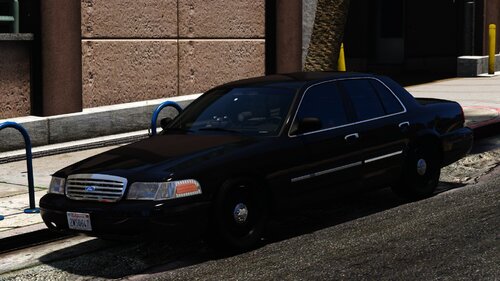
Vinewood Police Dept. Pack 1.0 - by dream A fictional Vinewood Police Pack with Whelen Edge Ultra lightbar. Discord Server Youtube channel Join the official DLS server to participate in upcoming betas, suggest new ideas, get more configs and report any issues! DLS Discord Server Vehicles included: vpd1a - 2008 Ford Crown Victoria PI; vpd1b - 2006 Ford Crown Victoria PI Unmarked; vpd2a - 2007 Chevrolet Tahoe PPV; vpd3a - 2007 Dodge Charger PPV. Requirements: OpenIV; SirenSetting Limit Adjuster; Dynamic Lightning System by TheMayBeast - Optional, but highly recommended. Only the 3rd stage would be active without DLS. Extra list: vpd1a, vpd1b: extra_1 - Spotlight Option 1; extra_2 - Spotlight Option 2; extra_12 - Parking Lights. vpd2a, vpd3a: extra_12 - Parking Lights. Lighting showcase: https://youtu.be/QvMgeyTSBy4 Installation: 1. Make sure you have your ‘mods’ folder in GTA V’s main folder with a copied ‘update’ folder. 2. Open your OpenIV, turn on ‘Edit mode’ and go to GTAV/mods/update/x64/dlcpacks/. Drag and drop folder ‘dmvpd’. 3. Export a file called ‘dlclist.xml’ which is located in GTAV/mods/update/update.rpf/common/data/. Copy this file to your desktop and open it with any editor you like. After, scroll to the bottom and locate the last line that starts with ‘<Item>dlcpacks:/….’. Add a new line, then copy and paste this line: <Item>dlcpacks:/dmvpd/</Item> 4. Replace old file with the new one. Additional steps for: DLS Users: Copy ‘DLS’ folder from ‘Data Files’ folder and paste it in GTAV/Plugins/DLS/ ELS Users: Copy .xml files from ‘Data Files’ folder and paste them in GTAV/ELS/pack_default/ Terms of Use: I (dream) accept no responsibility for any damage caused to your PC, game, or anything else. Backup your files before installing anything. Do not display this file on other sites as your own. Do not rip, dismantle or change the vehicle in any way (Except for livery files). If you do not accept this, please, do not use this mod.
-
 Both links are working fine for me.
 -
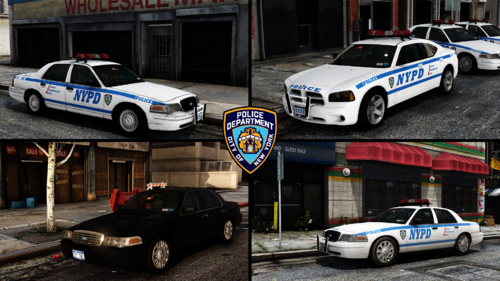 New York Police Dept. Pack 1.1 - by dreamNew York Police Dept. RMP pack. Now features versions with & without snow. Discord Server Youtube channel Join the official DLS server to participate in upcoming betas, suggest new ideas, get more configs and report any issues! DLS Discord Server Vehicles included (Click on vehicle name to see lighting showcase; click here to see full playlist): nypd1a - 2008 Ford Crown Victoria PI RMP; nypd1b - 2006-2008 Ford Crown Victoria PI RMP Unmarked; nypd2a - 2006 Dodge Charger PPV RMP; nypdold1 - 2001 Ford Crown Victoria PI RMP. Requirements: OpenIV; SirenSetting Limit Adjuster; Dynamic Lightning System by TheMayBeast - Optional, but highly recommended. Only the 3rd stage would be active without DLS. Extra list: nypd1a: None. nypd1b: extra_1 - Rear lights option #1; extra_2 - Rear lights option #2; extra_3 - Dash Beacon; extra_4 - Grille lights option #1; extra_5 - Grille lights option #2. nypd2a: extra_4 - Headlight LED flashers. nypdold1: None. Installation: 1. Make sure you have your ‘mods’ folder in GTA V’s main folder with a copied ‘update’ folder. 2. Open your OpenIV, turn on ‘Edit mode’ and go to GTAV/mods/update/x64/dlcpacks/. Drag and drop folder ‘dmnypd’. 3. Export a file called ‘dlclist.xml’ which is located in GTAV/mods/update/update.rpf/common/data/. Copy this file to your desktop and open it with any editor you like. After, scroll to the bottom and locate the last line that starts with ‘<Item>dlcpacks:/….’. Add a new line, then copy and paste this line: <Item>dlcpacks:/dmnypd/</Item> 4. Replace old file with the new one. Additional steps for: DLS Users: 1. Copy the ‘DLS’ folder from the ‘Data Files’ folder and paste it in GTAV/Plugins/DLS/; 2. Go to GTAV/Plugins/ and open DLS.ini with any text editor; 3. Add following lines between any of the two key bindings: [TOGGLE_AUX1] Key=U (You can change any of the key bindings including this one in this file to your liking.) ELS Users: Copy .xml files from ‘Data Files’ folder and paste them in GTAV/ELS/pack_default/ Default DLS Controls: Toggle stages: J Reverse toggle stages: LShift+J Toggle traffic advisor: I Reverse traffic advisor: LShift+I Toggle Aux functions: U Toggle takedowns: O Toggle left alley lights: Page Down Toggle right alley lights: Page Up Terms of Use: I (dream) accept no responsibility for any damage caused to your PC, game, or anything else. Backup your files before installing anything. Do not display this file on other sites as your own. Do not rip, dismantle or change the vehicle in any way (Except for livery files). If you do not accept this, please, do not use this mod.
 -
 no
no -
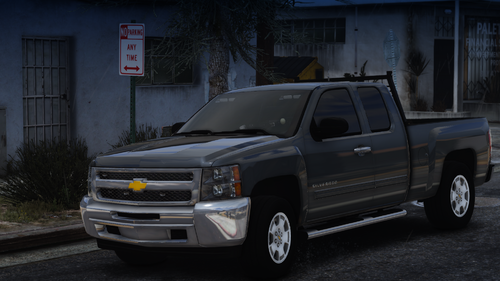 2012 Chevrolet Silverado - Unmarked Whelen Package 1.0 - by dream A fictional unmarked 2012 Chevrolet Silverado with Whelen lights. Discord Server Youtube channel Join the official DLS server to participate in upcoming betas, suggest new ideas, get more configs and report any issues! DLS Discord Server Vehicles included: udcsilv - 2012 Chevrolet Silverado (unmarked). Requirements: OpenIV; SirenSetting Limit Adjuster; Dynamic Lightning System by TheMayBeast - Optional, but highly recommended. Only the 3rd stage would be active without DLS. Extra list: udcsilv: None. Installation: 1. Make sure you have your ‘mods’ folder in GTA V’s main folder with a copied ‘update’ folder. 2. Open your OpenIV, turn on ‘Edit mode’ and go to GTAV/mods/update/x64/dlcpacks/. Drag and drop folder ‘dmudcsilv’. 3. Export a file called ‘dlclist.xml’ which located in GTAV/mods/update/update.rpf/common/data/. Copy this file to your desktop and open it with any editor you like. After, scroll to the bottom and locate the last line that starts with ‘<Item>dlcpacks:/….’. Add a new line, then copy and paste this line: <Item>dlcpacks:/dmudcsilv/</Item> 4. Replace old file with the new one. Additional steps for: DLS Users: Copy .xml files from ‘Data Files’ folder and paste them in GTAV/Plugins/DLS/ ELS Users: Copy .xml files from ‘Data Files’ folder and paste them in GTAV/ELS/pack_default/ Terms of Use: I (dream) accept no responsibility for any damage caused to your PC, game, or anything else. Backup your files before installing anything. Do not display this file on other sites as your own. Do not rip, dismantle or change the vehicle in any way (Except for livery files). If you do not accept this, please, do not use this mod.
 -
 please send SSLA log file from game's root folder
 -
so you do use non-ELS or hybrid vehicles. again: try to disable them by simply removing from dlcpacks folder and check if this fixes the issue.
-
alright, another thing i suggest is to check SSLA (SirenSettingLimitAdjuster). make sure you have SP latest version. by changing id i mean value in 'carcols.meta' and 'carvariation.meta'. it might be complicated and i suggest you try it only if replacing SirenSetting plugin wont fix the issue.
-
ELS only handles lights and siren activation. i can't say for sure but sounds like sirenid from my cars conflicts with other non-ELS models you have. try disabling them or change id.
-
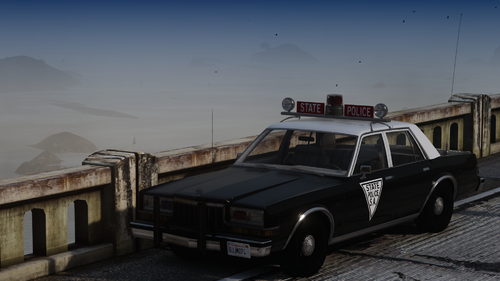 SA State Police 1983 Dodge Diplomat 1.0 - by dream A fictional 1983 Dodge Diplomat with a crossbar lightbar. Discord Server Youtube channel Join the official DLS server to participate in upcoming betas, suggest new ideas, get more configs and report any issues! DLS Discord Server Vehicles included: spold1a - 1983 Dodge Diplomat A38. Requirements: OpenIV; SirenSetting Limit Adjuster; Dynamic Lightning System by TheMayBeast - Optional, but highly recommended. Only the 3rd stage would be active without DLS. Extra list: spold1a: extra_1 - Antenna Option 1; extra_2 - Antenna Option 2; extra_9 - Partition; extra_11 - Donuts on the dash. Installation: 1. Make sure you have your ‘mods’ folder in GTA V’s main folder with a copied ‘update’ folder. 2. Open your OpenIV, turn on ‘Edit mode’ and go to GTAV/mods/update/x64/dlcpacks/. Drag and drop folder ‘dmspdipl’. 3. Export a file called ‘dlclist.xml’ which is located in GTAV/mods/update/update.rpf/common/data/. Copy this file to your desktop and open it with any editor you like. After, scroll to the bottom and locate the last line that starts with ‘<Item>dlcpacks:/….’. Add a new line, then copy and paste this line: <Item>dlcpacks:/dmspdipl/</Item> 4. Replace old file with the new one. Additional steps for: DLS Users: Copy file from ‘DLS v2’ folder from ‘Data Files’ folder and paste it in GTAV/Plugins/DLS/ ELS Users: Copy .xml files from ‘Data Files’ folder and paste them in GTAV/ELS/pack_default/ Terms of Use: I (dream) accept no responsibility for any damage caused to your PC, game, or anything else. Backup your files before installing anything. Do not display this file on other sites as your own. Do not rip, dismantle or change the vehicle in any way (Except for livery files). If you do not accept this, please, do not use this mod.
 -
Probably not as the installation process will become much more complicated.
-
Yes
-
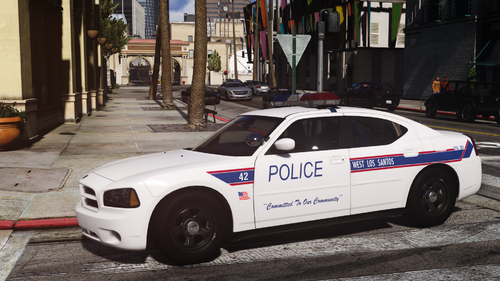
Thank you. Pack is fictional. Liveries are based off Daytona Beach PD, FL.
-
West Los Santos Police Dept. Pack 1.0 - by dream A fictional West Los Santos Police Pack with Whelen Delta lightbar. Liveries are based off Daytona Beach PD, FL. Discord Server Youtube channel Join the official DLS server to participate in upcoming betas, suggest new ideas, get more configs and report any issues! DLS Discord Server Vehicles included: wlspd1a - 2006 Ford Crown Victoria PI; wlspd2a - 2008 Dodge Charger PPV; wlspd3a - 2009 Chevrolet Tahoe PPV. Requirements: OpenIV; SirenSetting Limit Adjuster; Dynamic Lightning System by TheMayBeast - Optional, but highly recommended. Only the 3rd stage would be active without DLS. Extra list: wlspd1a, wlspd2a, wlspd3a: extra_ten - Lojack system. Installation: 1. Make sure you have your ‘mods’ folder in GTA V’s main folder with a copied ‘update’ folder. 2. Open your OpenIV, turn on ‘Edit mode’ and go to GTAV/mods/update/x64/dlcpacks/. Drag and drop folder ‘dmwlspd’. 3. Export a file called ‘dlclist.xml’ which is located in GTAV/mods/update/update.rpf/common/data/. Copy this file to your desktop and open it with any editor you like. After, scroll to the bottom and locate the last line that starts with ‘<Item>dlcpacks:/….’. Add a new line, then copy and paste this line: <Item>dlcpacks:/dmwlspd/</Item> 4. Replace old file with the new one. Additional steps for: DLS Users: Copy ‘DLS’ folder from ‘Data Files’ folder and paste it in GTAV/Plugins/DLS/ ELS Users: Copy .xml files from ‘Data Files’ folder and paste them in GTAV/ELS/pack_default/ Terms of Use: I (dream) accept no responsibility for any damage caused to your PC, game, or anything else. Backup your files before installing anything. Do not display this file on other sites as your own. Do not rip, dismantle or change the vehicle in any way (Except for livery files). If you do not accept this, please, do not use this mod.




