



Veteranfighter
Members
-
Joined
-
Last visited
Everything posted by Veteranfighter
-
 Hey, I still have to resolve one issue, will be up tomorrow
 -
Yes, fixed in the new update. Releasing tomorrow.
-
Can you send me your log please? Callsigns are already randomized, what do you exactly mean?
-
Okay, odd, can you send me your log?
-
Hey DooVan, VirusTotal uses 62 different Security Vendors to detect whether a file is malicious or not. 61 of those Security Vendors did not detect a problem, 1 Vendor did. That 1 Vendor is MaxSecure, one of the least recommended virus scanners out there, also because it's known for many false results. MaxSecure detected "Trojan.Malware.300983.susgen" which is not an actual virus but only a part of a program which behaves like a virus. Of course it could be a virus, but in this case it isn't. At the moment I am not fully sure why MaxSecure triggers this false positive, I assume it's because I use reflection to get the callout position. With reflection you can modify other programs in theory, but that's not what I am doing here. This program is not obfuscated by the way, so feel free to decompile it using dotPeek by jetbrains or a decompiler by your choice to convice yourself that this program is 100% safe. If you don't understand how to do this, it's no problem. I will release an open source version on Github as soon as this plugin gets out of it's Beta phase. Virus Total Scan: https://www.virustotal.com/gui/file/43805128c251e60da6a10f56680bb860fa030013ba57e70da6872dd9f242713f/detection Hey, does this happen to all calls or just particular ones? Do you use UltimateBackup? Are you far a way from the call when requesting? And please send me your log if this happens again I don't see a reason why it should not. If it doesn't work for you please let me know so I can work on a fix.
-
can you send me your log? I'll fix this immediately Hey, there's one problem with the modification. If a callout dev decides to not set a CalloutPosition there's not really a way to figure out where the call takes place. I am still working on some kind of work around. Also a known issue is that if you are closer than ~1,7 miles to the call the backup won't arrive. This issue is already patched for the new update. Thank you very much for reporting and let me know whether you still experience those kind of issues in the next update
-
Hey, the new version is already uploaded and is just being virus checked by LSPDFR. The new version will support Ultimate Backup which should fix pretty much all of those issues.
-
Fix is going up today. Thanks for reporting
-
Just to make this clear: you can use this plugin with Ultimate Backup installed, but the plugin won't make use of Ultimate Backup yet and will instead use the default lspdfr methods to request backup.
-
Hey, not at the moment since Ultimate Backup doesn't have an API option to request backup to a specific location
-
AI:Respond Open Beta by Lenge Features Press U while responding to request backup. The requested backup will arrive with you on scene. Requirements LSPDFR 0.4.9 or higher RageNativeUI Installation Drag the "plugins" folder from the zip to your GTA5 main directory Suggestions and Support If you have any questions/suggestions/bugs or other concerns feel free to contact me on my discord: https://discord.com/invite/4zx2uXCmMe Reviews and Showcases Official showcase video: Enjoy and have fun
-
 Hey, me and other LSPDFR Mod developers are well aware of this issue. Sadly there doesn't seem to be a fix for it. If there's a solution for it, I will try to fix it. This isn't only a UrbanCallouts problem.
- 105 comments
- 13 reviews
-
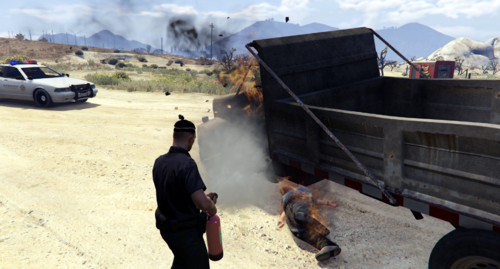 Without the mod the fire wont go out when trying to put it out with the extinguisher, the mod solves this
 -
It is to make the fire extinguisher fully useable Yes you can. Can you send your RagePluginHook.log file after the crash appears?
-
-
-
-
I recommend joining one of these discord servers to seek for help: https://discord.gg/lspdfr-ts-788491012553179217 https://discord.gg/ulss
- 105 comments
- 13 reviews
-
-

- 2
-
-
-
-
Hey, do you have a log for me?
-
Bah, like I said, i WAS using the mrap I changed it to a simpler Lenco Bearcat, haven't gotten the call since though to test. Oh okay. Just lemme know whether you encounter any issues next time you get the call
- 105 comments
- 13 reviews
-
-
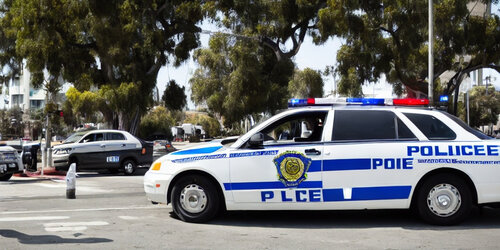 GPT Callouts This callout pack was generated by an AI How an AI Created an LSPDFR Callout Pack The world of LSPDFR is always evolving, with new and exciting callouts being added by the community all the time. But what if an AI could create its own callout pack? That's exactly what we set out to discover. To create the callout pack, we used a state-of-the-art language model called GPT-3, developed by OpenAI. We provided the AI with some initial prompts and let it generate the callouts, descriptions, and other necessary details. The AI-generated LSPDFR callout pack included a variety of different scenarios that officers might encounter on the streets of Los Santos. The text above was created by Artificial Intelligence. ________________________________________________________________ Included callouts: Suspicious Person Speeding vehicle Dead Person Car on Fire Shooter Fight Source Code: https://github.com/Veteranfighter/GPTCallouts/tree/main Installation: Although the callouts are quite simple, they're still playable and somewhat enjoyable. So if you want to test those plugins yourself, download the .zip file and drag both files to: Your GTA5 Directory/plugins/LSPDFR If you have any concerns regarding the plugin, feel free to contact me on my Discord Server: https://discord.gg/4zx2uXCmMe Disclaimer Since I only fixed some bugs, all credit for the callouts goes to: https://openai.com/ Try it yourself: https://chat.openai.com I am not associated with OpenAI. Have fun 🙂
 -
Hello, you could just add the MRAP as an addon car and replace the vanilla one with a model that comes with some valid doors. Otherwise I will fix this issue for the next patch, but it'll take a while until then.
- 105 comments
- 13 reviews



