Twuben
Members
-
Joined
-
Last visited
Everything posted by Twuben
-
As long you downloaded it from the official source (this website) you should be fine adding an exception/allowing it to pass on the anti-virus. I really doubt the dev team would add a virus considering the fanbase they have lmao. Most likely just a false-positive 🙂
-
Thank you and it's exactly that! [5/19/2025 1:58:22 AM.737] LSPD First Response: Inner exceptions: [5/19/2025 1:58:22 AM.737] LSPD First Response: Exception type: System.IO.FileNotFoundException [5/19/2025 1:58:22 AM.737] LSPD First Response: Exception message: Could not find file 'RAGENativeUI.resources'. Are you sure you have RageNativeUI.dll in your root GTAV directory? If you do try to download the latest version of RageNativeUI and replace the one you have. Because currently your game is crashing when it tries to find RageNativeUI and doesn't find it. As you can see here "[5/19/2025 1:58:22 AM.737] LSPD First Response: Exception message: Could not find file 'RAGENativeUI.resources'." .resources is just a method within the file for coding, but yeah it's trying to find RageNativeUI Hope that helps 🙂 EDIT: Just saw the pics again, and yeah RageNativeUI should be in your Root folder. In GTAV where the GTA.exe is found, not in the plugins, not in any other folder. In the root folder! I don't even know how I missed that on the first time 😂 So you just have to move that file to where GTA.exe is located and that should fix everything
-
Hello 🙂 Can you send your RPH.log file please? So we can help you Thank you
-
I have no clue 😂 But it's in here somwhere
-
Lenny might not be able to answer right now, but I've taken a look at this log file and nothing really stands out. So what you're saying is that the mods folder was named _mods, the game essentially worked fine, but now that you renamed it back to mods the game now crashes. Well as suspected by Lenny this is a mods issue, meaning if you unless have a backup of the files you modified within mods that's if you modified any, you will have to clear it all out. But rename the folder back to _mods and see if it crashes after you added Callout Interface.
-
Well taking a look at the log there's nothing that stands out really. Let's try this Rename your mods folder to _mods, test your game if that doesn't work Rename your plugins folder to _plugins, then create a new folder named plugins and copy the essential stuff over. Meaning LSPDFR.dll/pdb and the LSPDFR folder without any plugin in it. Then test it Tell me how it works out 🙂
-
So in the root folder theres a file named RagePluginHook.log. You can send that here
-
Hi @TheMando 🙂 Could you send the entirety of the RagePluginHook.log file please? Thank you! I'll try to help you out
-
Looking good tbf, better than anything I could come up with lmao But yeah I'll be waiting for your message when it's time to test 😃 Keep up the good work!
-
Hi @dont have one 🙂 Is this a problem that only happens with LSPDFR or it also happens in vanilla? Assuming it happens in vanilla you could try these things: Go to: Documents > Rockstar Games > GTA V and delete the settings.xml You can also force windowed mode, if I'm not wrong when you launch Rage, if you click on the cog to access the settings, in one of the menus there's force windowed. Last I advise that you update your graphics card in case you haven't, if you're using Nvidia they have their own app to do that same for AMD I believe. Hope that helps 🙂
-
Hi @quirkycracker 🙂 No worries about being new, we all start somewhere Could you go to your root directory, look for RagePluginHook.log and send it here please? It would help us out trying to decipher your errors/crash Thank you
-
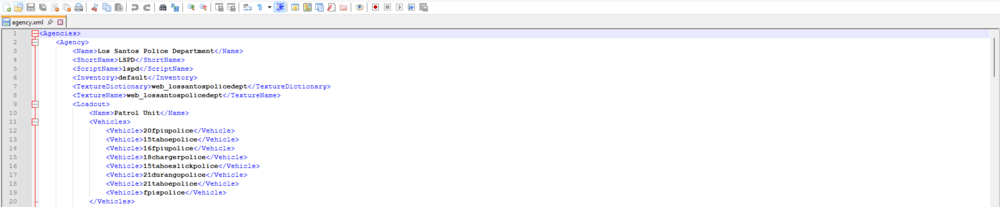
Hello 🙂 I'll try to not use very hard words so you can understand better! So the cars you installed are they all replacements like (police, police2, police3) or a mix of both like (police, etc.. ) and like (crownvic, fpiutahoe, etc..) Because if they're all replacements so (police, police2, etc..) then replacing them in the right folder should be good enough, otherwise if you also have addons like (crownvic, tahoefpiu, etc..) you need to do this. Go in: GTAV > lspdfr > data > agency.xml And add the addon cars (crownvic, fpiutahoe etc..) the ones that are not named (police, police2) Like this Hope that helps 🙂
-
Seems like it, at least the log does say CalloutInterfaceApi caused an error. Maybe removing that plugin would help
-
Hello 🙂 There's no crash in your log, did your game close, or was it just the warning that LSPDFR crashed/unloaded on the bottom left?
-
Hi again @bigbennius 🙂 Thanks for the detailed features list and I'm instantly loving it! I do believe a lot of CADs do have the aforementioned features, mainly paid ones, at least to some extent. I think the free ones have sort of the same features but to a less extent. So if you want to stand out making it free would not only up the game for every developer making a free CAD but it would more likely make you stand out among all the free/paid competition as people rather well you know have stuff for free. I think you could add even more features or an early access version if you want to go down the paid route. So you could have both versions. But it's amazing how you've thought really well about it. Lmao, poor dispatchers. So if you want my honest opinion, go get them! It looks incredibly well thought and it has a lot of promise. I wouldn't change a single thing. Maybe I'll come up with another few ideas, but I'll certainly let you know. If you need any help, even debugging (I might not be best but I know my way around it), testing whatever... Count me in. Tbf you can even add me on discord to make communication easier if you want! Same username as here 🙂 Keep doing a great job!
-
Well from what you're telling me, I assume the GrammarPolice.ini probably got messed up somewhow, maybe another plugin overwrote it. Not sure. But I advise you installing all original files from GrammarPolice
-
Well if it's police4 then you just write police4 on the vehicles set. Its really the same, if it isn't a replacement but instead an addon, you add like like an addon. Now if it's a replacement for a vehicle that you already replace, well I mean I know there's a way of doing it, but I think you gotta rename every file. Like Lets say you have 2 police2, you rename one as police2 and the other to another name. I think it might work like that, never tried it out and never tested it really. So if you do it do not expect it to work lmao Also don't worry about the questions, ask away EDIT Feel free to add me on discord if you want, I can help you faster through there if you need anything Same username
-
Well thats definitely weird, I guess for this one you should really talk with someone is part of the lspdfr dev team
-
Well thats weird. Never had that happen to me. Are you sure you had the mods folder named _mods and the plugins folder only with LSPDFR in it?
-
Can you provide your RPH.log please?
-
Hi! 🙂 I don't play FiveM a lot, I used to, but never really got into CADs myself as I never done police RP. However from what I've seen from other people like youtubers. I think there's a lot of CADs out there that miss on adding multi agency support, when for example EMS/Fire join the RP Maybe adding that would be nice? I think on the dispatchers end (I might be wrong) there's a lot of latency too. For example an officer goes 10-8 and it takes a bit for the dispatcher to see it on their end. I should focus the importance on an easy/minimal/cleaner UI, don't clutter things up there's a lot of cluttered CADs out there, don't be another one of them Maybe a call history that stays persistent until server reset? Or maybe even after tbf, I think it's doable as long you have file keeping track of all the calls. Adding to this maybe even a call history that can be exported and reviewed, for like courts rp? I’m definitely interested in what you’re working on, so please keep everyone posted. Would be down to help test or give feedback once you’ve got something up and running.
-
So on your root directory of GTA look for RagePluginHook.log, and attach it here by dragging it here when replying to me or someone else 🙂
-
Weird, but glad it worked out for you then. I was having problems with rage as well initially when I clean installed but then just set both rage and gta to launch as admin and it fixed it. Anyways sorry I couldn't help further, I mean I wasn't really available 😕 Just don't forget to mark the post as solved
-
Glad that it worked 🙂 So for your 1st question if you replace lets say police2, just having it police2 in ultimate backup will use the replacement, since you're replacing the base game car. If there's more than 3 cars in a jurisdiction and you only have 1 replacement, just use 1 car, Ultimate backup only really requires 1 vehicle per vehicle set. For peds is a bit harder, but you see for example the line that says <Ped... comp shirt="..." comp pants=...= etc.. ...> Well the comp shirt, comp pants and so on is what you're looking for to replace with your own compositions numbers, lets say you add a new shirt and it goes to number 45, like when you're in EUP menu or whatever other menu you have to change clothes you scroll through the numbers right, well lets say that a shirt is on number 45. You put that number in comp shirt ="45" and the ped for that region will use that number I can send you the file I actually use in my game and see how I did it. I have a few more regions/peds added and obviously different vehicles. Don't forget to mark the problem as solved 🙂 CustomRegions.xml
-
Did you change anything?