


tylermaillet
Members
-
Joined
-
Last visited
Everything posted by tylermaillet
-
-
The solution for this mid-loading crash seemed to solve itself, however I've found the culprit for the game not opening and it is the CScenario Patch linked in the ReadMe. https://www.gta5-mods.com/tools/cscenariopoint-patch, this file put in my directory causes my game not to open which in the readme is "STRONGLY ADVISED".
-
Just did a fresh install with only the coastal callouts required files and am now getting a game crash after a long loading screen, however the logs DO generate. I believe they didn't generate because one of the recommended mods prevented the game from opening thus not initiating some of the other logs (and not having run the game with the files the logs are based on beforehand). Here are the logs now as requested. ModManager.log RagePluginHook.log vfs.log
-
I seemed to lose the ability to edit the comment above, so I'm just going to add onto it with the correct format. Have you read README.txt, and double-checked it at least twice? Yes. Did you watch the installation tutorial video? No, I will watch this once I've posted this. Have you installed a compatible gameconfig.xml file? If so, link to the gameconfig you installed. Yes, from the RagePluginHook discord https://de.gta5-mods.com/misc/gta-5-gameconfig-300-cars. The one on the ReadMe was not updated. Have you installed a HeapAdjuster mod? If so, link to which one you installed. Yes, the one you recommended. Did you install the OpenIV.asi from OpenIV? Yes. What game version are you on? 2060. What version of RagePluginHook and LSPDFR do you have installed? The updated ones for version 2060. Have you installed Lenny's Mod Loader? If so, have you tested it with any other mods, and did it work? This was my first time installing LML, so I hadn't tested it with other mods. What version of LML do you have installed? Right-click on "ModManager.Core.dll" in your GTA V folder and check the version. These instructions are pretty vague but if this is what you're looking for, 0.3.7335.36269. Upload a copy of the following files from your GTA V main folder: RagePluginHook.log is the only one that is in my main folder, however it is outdated and does not update when I try and open my game. RagePluginHook.log vfs.log modmanager.log Upload a screenshot of your GTA V/Plugins/LSPDFR folder. Upload a screenshot of your main GTA V folder. Upload a screenshot of your GTA V/lml folder, and your GTA V/lml/downloader folder (if you installed the LML package with the mod manager) Describe your problem in detail. Explain what you have already tried to solve the problem. Read the post above. Sorry for not following the correct format earlier.
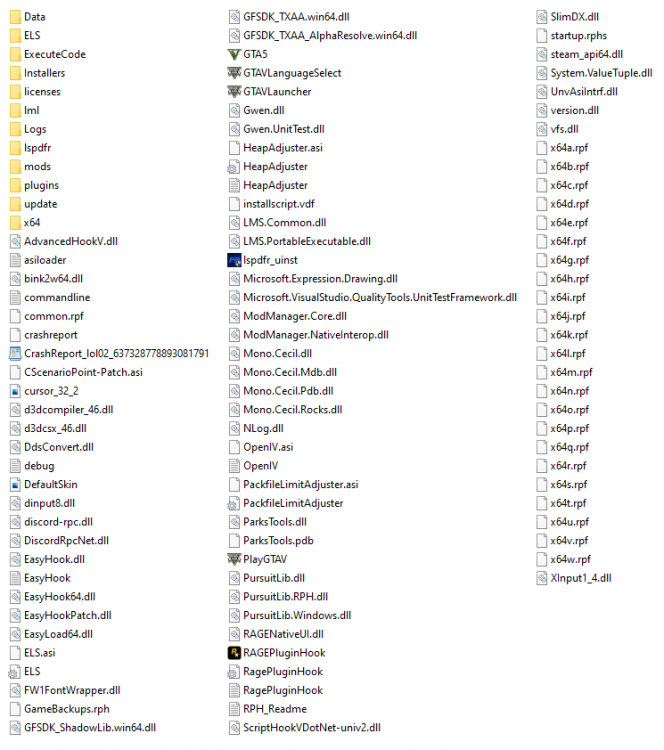



-
After trying for the past few days (including before GTA updated), I've been trying to get this plugin along with those recommended/required in the readme to work but I've always run into the same issue. Without installing any other mods, when I run through the list on the readme, afterwards my GTA V game is no longer functional, with or without using the Rage Plugin Hook. It opens the rockstar launcher, but no game will execute and it'll stop playing the game on Steam. I've validated the files on Steam, and can confirm that the game was working fine with base LSPDFR prior to trying to trying to get Coastal Callouts to work. The game does not produce an error log, however I do get an "EasyHook", "OpenIV", "HeapAdjuster", and "asiloader" log. asiloader log says "Finished loading *.asi plugins" at the end, OpenIV log says "TRACE: Log opened", "TRACE: Init started (v. 1.2.0.1)", "TRACE: Game version (v. 1.0.2060.0)", "TRACE: Init finished" EasyHook log says "Found LhAllocateMemoryEx at 7ffad1b05180", "Found LhFreeMemory at 7ffad1b05270", "Found LhFreeMemory inlined at 7ffad1b08968" at the end of the new entries. Hopefully that's enough to figure it out, thanks.




