




Adrien Martin
Members
-
Joined
-
Last visited
Everything posted by Adrien Martin
-
Wow those are pretty frequent stutters. Your computer specs look fine and should handle GTA no problem - other than your RAM which is borderline. I usually hit 7.2 GB RAM usage - nonetheless, you should still be able to play without stutters or major issues like this. Here are a few questions: 1. Have you tried turning off the Reflection MSAA in your GTA graphics settings? 2. Have you tried reducing Distance Scaling, Reflection Quality, Shadow Quality in your GTA graphics settings? 3. Have you tried turning off the Radeon FPS cap? 4. Are you using the latest Readeon driver? 5. Is your CPU maxing out (100%)? That would be my first line of attach there. Hopefully, something works there!
-
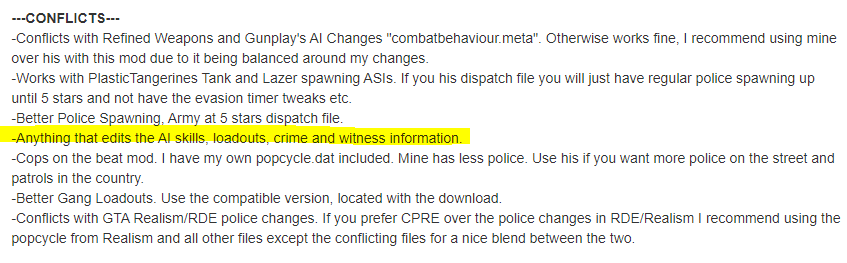
Yes, that might be a great place to start! Looks like that mod edits police AI actions, so that might be causing a major conflict with LSPDFRs own internal police AI mechanics. Here are some warnings from that mod itself:
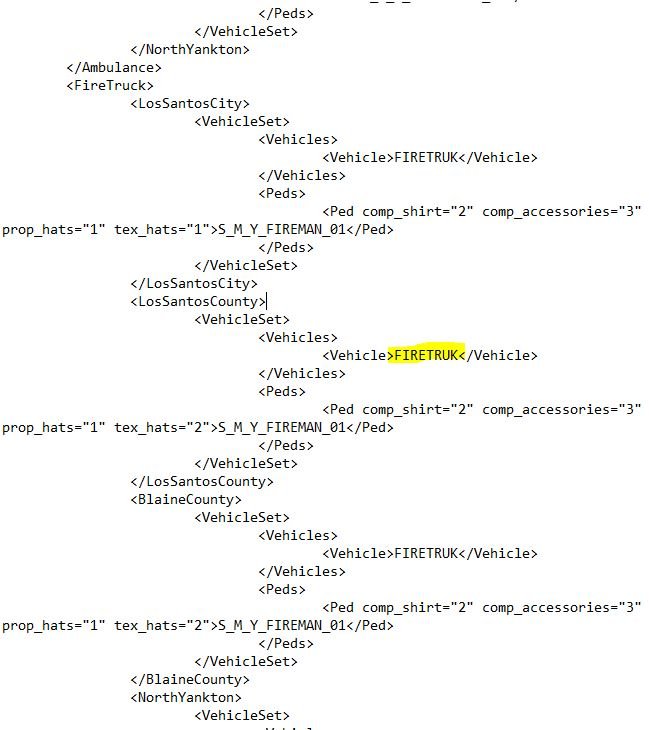
 Hi! Hmm, SWAT stockade and other vehicles should show up fine. Have you modded them at all?That is really weird... Im not really sure what else you can try. Maybe try removing PursuitsOnTheFly and seeing if that does anything? My next bet would be removing all the callout mods and seeing if that changes anything. Sometimes callout scripts are very buggy and maybe that is conflicting with something here?That is great feedback! If you're using Ultimate Backup and you have a firetruck using a custom name like "firetruck_54" or something from a DLC (that was totally made up), then you can tell Ultimate Backup to use that custom firetruck instead of the default one. You just have to open the file in your Plugins > LSPDFR > Ultimate Backup > Default Regions and locate the line of firetruck code. Then you input the custom vehicle name and save. Likewise, you can do this with all your State vehices by searching for the state code (check the CustomRegions file as well). It's possible your DLC pack has a vehicle using the Firetruck slot to get more vehicles in the game. If that is the case and you don't have a custom firetruck installed, you might need to download one.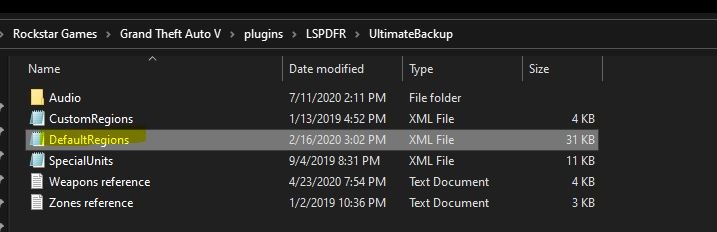
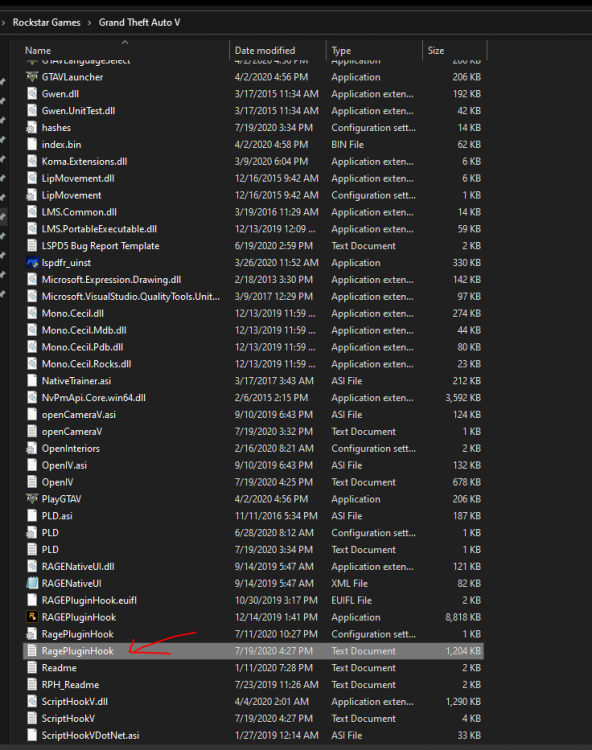
 Nice! Looks super exciting! Can't wait to see more development on this 😃Specs look pretty good on this PC! Graphics card, processor, and hard drive should all work great! You may need some additional RAM memory though if you experience texture loss. 8GB might be a little tight. When I run GTA V and LSPDFR my memory runs at about 7.4GB the whole time.Es ce-que tu avais le fichier Mods actif quand tu as joue au jeu et tire le RageHook log?Okay a couple things you might be able to try. This is a tough one because there could be endless things causing issues sadly (callouts, outdated files, mod conflicts, etc.). But.. lets try these to start: 1. The items in red quoted above (Ultimate Backup and UltimateBackups). Are those duplicates or do you have those 2 files in there? If so, you could remove the UltimateBackups file which may be causing a conflict with the original Ultimate Backup. 2. You could try removing RichsPoliceEnhancements (in yellow above) and test pursuits without it. This mod automatically initiates pursuit backup so it is possible it is causing issues there. Hopefully one of these will fix it!Was this with the Mods folder active?Oh shucks hopefully that gets fixed quickly. I don't believe you'll be able to find any way to get it without supporting the author. The older Natural Vision Remastered is still available for free. You could also try using some other graphics mods that have similar effects that are free.Definitely try all of LoneAmerican's recommendations! Did you reinstall your ELS VCF files properly? It might be possible that one of these is causing an issue?Hi! What plugins do you have installed? Its possible one of these is causing conflicts.It is in your main GTA V folder here:
 LIVEPD:FR EP# 2! Foot pursuit with K9 Chief!Pouvez-vous poster votre RagePluginHook.log?Oh yes absolutely! GTA V with all the plugins and such should only eat about 80-100GB of space. It is quite a bit but youll still have a lot of space to work with. Plus having windows run off your SSD makes it boot so fast! 😄You might also try installing the Callout Manager mod down below. Sometimes the callout packs have calls that don't trigger all the time so this lets you select ones who haven't seen all that often. Makes it pretty fun!Nifty truck. Surprising they use these instead of the Bearcats.Hey! This sounds normal and looks like your computer is reading your HDD and SSD correctly. Normally, computers will never give you the full 512GB or 1TB of the SSD/HDD. There is always space allocated for system stuff.First episode premiers tonight at 6pm PST/9pm ET! Don't miss the action!!



Account
Navigation
Search
Configure browser push notifications
Chrome (Android)
- Tap the lock icon next to the address bar.
- Tap Permissions → Notifications.
- Adjust your preference.
Chrome (Desktop)
- Click the padlock icon in the address bar.
- Select Site settings.
- Find Notifications and adjust your preference.
Safari (iOS 16.4+)
- Ensure the site is installed via Add to Home Screen.
- Open Settings App → Notifications.
- Find your app name and adjust your preference.
Safari (macOS)
- Go to Safari → Preferences.
- Click the Websites tab.
- Select Notifications in the sidebar.
- Find this website and adjust your preference.
Edge (Android)
- Tap the lock icon next to the address bar.
- Tap Permissions.
- Find Notifications and adjust your preference.
Edge (Desktop)
- Click the padlock icon in the address bar.
- Click Permissions for this site.
- Find Notifications and adjust your preference.
Firefox (Android)
- Go to Settings → Site permissions.
- Tap Notifications.
- Find this site in the list and adjust your preference.
Firefox (Desktop)
- Open Firefox Settings.
- Search for Notifications.
- Find this site in the list and adjust your preference.