Pjotr
Members
-
Joined
-
Last visited
Everything posted by Pjotr
-
-
-
 Another very good plugin by Vincent, The thing I use the most is Drop the weapon, I use it in the Brandishing Weapon callout from Simple Callouts and in the shots fired callout (also from simple callouts)
- 118 comments
- 17 reviews
-
-

- 1
-
-
I am creating a PreMiD presence for LCPDFR.com and I have a couple of questions, but first let me explain what PreMiD is: PreMiD is a utility that allows you to set a discord presence depending on what you are browsing on the web. Site: https://premid.app/ So I have a couple questions and I hope that I can ask more in this topic about the site. My questions are as followed: Are you okay with me creating a PreMiD Presence for https://www.lcpdfr.com? Who is the official owner of Lenny's Mod Loader G17 Media or LMS? What are all the redirects to LCPDFR.com?
-
 Wrong sections
 -
So first of all I would like to say that the site upgrade turned out very great and looks really good! Then the actual suggestion, so my first idea/suggestion was that there was a page in the link https://status.lcpdfr.com or https://lcpdfr.com/status that displays the current site, lspdfr sync and api status in all regions, my second suggestion is that the queue is visible to the public or that in the approval message your position in queue.
-
 shh lenny
 -
No problem!
-
I am not french I can only read it a tiny bit
-
Does everyone have this?
-
Is it me or is that french 😂
-
 You've got a new download!
 -
My plugin is still waiting to be approved though It just got approved 😀
-
I still don't know what is does, can someone explain this mod to me?
-
Nobody can do anything about that except lcpdfr.com staff.
-
When all my drives failed on me I lost all my data so I had to download everything again, when I tried to download my file I couldn't because it was set to private. So I clicked "unhide this file" when clicked I could download it, so I did. Then I clicked "hide this file" and it got queued for deletion. This does not seem intended. Oh sorry just saw the old post of the "hiding/unhiding change"
-
 Ah makes sense!
 -
You cannot learn C# from no-one so why is the credits field empty?
-
I do not have one, I do have 3 RagePluginHook Plugins though, one is on my account. And what you should also check out is NativeDB.
-
It seems like you where in a rush to make the call-out pack or you prefer quantity over quality. I still like the idea though, I also see potential in this. the last thing is that there are no credits, you must have learned C#, C++ or VB with a source or could you suddenly code?
-
-
Game.LocalPlayer.Character.Tasks.PlayAnimation("random@arrests", "generic_radio_chatter", 1.5f, AnimationFlags.UpperBodyOnly | AnimationFlags.SecondaryTask); Found from https://github.com/Albo1125/PoliceSmartRadio/blob/master/PoliceSmartRadio/DisplayHandler.cs#L444
-
-
-
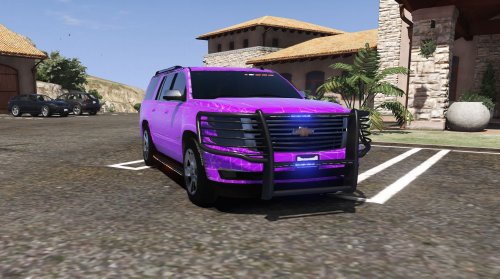 Since you haven't uploaded anything, I think you should be less aggressive in your comment. “and you go around to all theses files saying theses comments but yet you can't upload anything. You don't know the hassle of coding or making cars.” by @Syther I recommend removing the top side lightbar