




Charlie686
Members
-
Joined
Everything posted by Charlie686
-
No problem, best of luck!
-
Nice to hear, enjoy 😜
-
That's for FiveM...
-
Does the game load without RAGE?
-
That could be it. Rename your mods folder to _mods and retry for me.
-
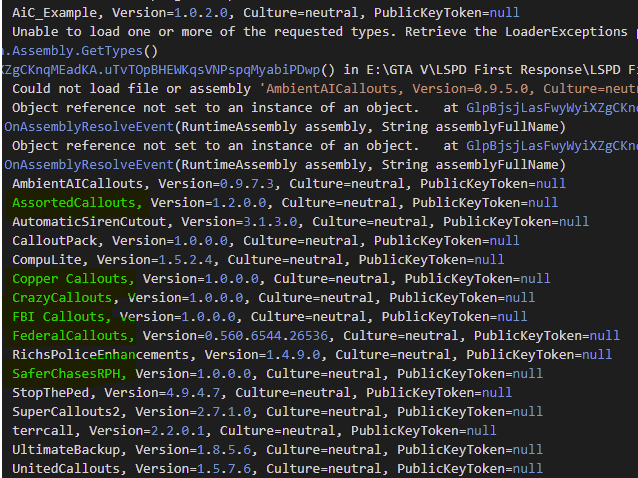
All those in bold I advise you remove as they are out of date. FBI Callouts is another I would suggest removing. As well as, reinstall AmbientAICallouts as it seems to be missing some files.
-
Attach your RagePluginHook log -> a text document found in your main directory.
-
You need to update RageNativeUI I believe. https://github.com/alexguirre/RAGENativeUI/releases
-
You have ENB. This interefers with how RAGE hooks so do this: 1. Launch GTAV without RAGE and go into story mode. 2. Once you see your character, ALT + TAB out and open RAGE. 3. Let it hook.
-
Nice to hear, enjoy! Interesting it wasn't CompuLite; noted!
-
Install them? Could you attach a screenshot for me?
-
Siren? Do you mean lights?
-
-
Attach your RagePluginHook log -> a text document found in your main directory.
-
They did not 😉 Install it here: https://github.com/alexguirre/RAGENativeUI/releases
-
Like WMFong said, you have an invalid XML coming from CompuLite. Revert all changes made in regards to it.
-
Attach your RagePluginhook log -> a text document found in your main directory.
-
Because you need to launch GTAV with Epic Games first, then at the siren loading screen, ALT + TAB out and open RAGE.
-
Good try, but not quite haha. You didn't follow the path correctly: GTAV\Plugins\LSPDFR\CompuLite\Localization.ini So you need to place it in the CompuLite folder 😄
-
I'm not sure why you tagged me; I'm not a staff member, just some person behind a screen helping people 🤷♂️ If you aren't getting a response on the forums, best chance is to take a look at the many many Discord servers out there, if you want to look at that Disboard would be a good place.
-
You are missing GTAV\Plugins\LSPDFR\CompuLite\Localization.ini for CompuLite. Acquire it from the install and place it in the above path 🙂
-
Mhm, I see. Does the issue persist with another vehicle? And did the installed veihcles come with any vehicles.meta entries?
-
-
Looks like you made an error when re-making your mods folder. Do you have a game config installed?
-
Rename your mods folder to _mods and retry.

