


Zer0Gravity16
Members
-
Joined
-
Last visited
Everything posted by Zer0Gravity16
-
I had the same problem. Instead of loading the Cop Holster plugin on startup, I loaded it in RPH console in game. You can also try to unload Cop Holster in console and then load it again. It worked for me.
-
It is all the car packs I have which is ELS. I also didn't change anything with the xml. I have had this problem since I first downloaded lspdfr and ELS. Non ELS cars works for AI but not ELS enabled vehicles.
-
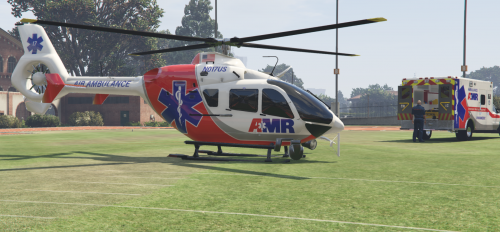 Is there any way to add a rappel to the helicopter? I use it with Ultimate Backup and the Paramedics also fall from the sky. Kinda looks a little odd. Otherwise, I love the helicopter.
- 35 comments
- 3 reviews
-
Well, the thing is that only when the AI drives the car, the lightbar is stuck/frozen and some lights are on. But when I go into the exact same vehicle the AI drove, the lightbar works. It's not a specific car or cars that ELS is not working, it's only when the AI drives the car and responds code 3.
-
It's probably a simple fix but my ELS AI vehicles aren't flashing. The AI vehicles lightbar are all just still/frozen and just some of the lights are even on(depending on the vehicle). The rest of the vehicle lights are working properly but not the lightbar. But when I use ELS vehicles, the lightbar suddenly works. Yes I have ElsActiveOnAi = true. So what can be wrong?
-
Omg, I found the issue. It was because I named a vehicle handlingId wrong in the Vehicles Meta. 😅 Oh, well well. Thanks for the reply though. I would never have found it out without you suggesting the mods folder. Appreciate the help.
-
Thanks for the reply, I will try that now 😀
-
Hi, so I used a Scripthook V workaround for GTA 5 Epic Games. The workaround ScripthookV was in 1.0.1868.1. I have used it for a long time now and it have worked wonderfully with all plugins. I recently thought I would maybe try to download the ScripthookV with the new version (1.0.1868.4). So I changed the old ScripthookV.dll with the new. I then tried to launch the game but it crashed a little bit after the first loading screen started. I then tried to switch the ScripthookV.dll to the old one I used before but it still didn't work. After that, I tried to launch the game without Rage Plugin Hook. It did load into the game menu but when I tried to load Story Mode, the game crashes just like when I loaded with Rage Plugin Hook. I then tried to launch the game without the scripts, mods and plugins, and it worked. I could go into Story Mode without crashing. So what have happened? Something with loading mods into Story Mode, or something with ScripthookV? I am pretty new to modding. Here is the crash report CrashReport.txt
-
Hey, i have had a problem with my AI police vehicles. The headlights and taillights are flashing properly but the lightbar is not flashing. The police vehicles i use is working properly but not when the AI is using it. The lightbar is usually stuck to one mode (no flashing) or not even on. I am using ELS on my police vehicles. I tried to reinstall ELS but it's still the same.

