


pvarck31
Members
-
Joined
-
Last visited
Everything posted by pvarck31
-
I fixed it. Had the wrong localization file in the folder. Now I have an issue with traffic stops. I have the controller key set to A to start the stop. But apparently I also have A to cancel the stop. Because every time I hit it, it cancels the stop. Like when I'm in my car using compulite. If I hit A to select anything it cancels it. I can't find where to change this key.
-
Made sure it was updated. Still crashes when I push G. EDIT: Looks like it crashes when I initiate stop the ped with the right D Pad on my controller as well. So it's gotta be something with stop the ped.
-
Ok, so I put it in the folder. All my plugins load now, but still gives me an unhandled exception. Says the same issue in the log. RagePluginHook_06062021_153904.log2.txt EDIT: I fixed it. I needed one for stop the ped too. Thanks for the help. Now every time I hit G to load one of the plugins, and it's been a while since I played and can't figure out which plugin it was, First Response crashes. G would bring up a menu where I could search a car, call a tow, and a few other things. Now I get a crash every time I press it. RagePluginHook_06062021_155601.log3.txt
-
I did get it. Still doesn't work. Same thing happens. Am I maybe putting it the wrong place? I put in with the .dll and .ini of Compulite in LSPDFR.
-
So every time I go to force duty I get an unhandled exception after a few plugins load. So it's not loading all of them. In the log I see where it looked for an initialization file for compulite. I made sure that's in there. Not sure what to do. RagePluginHook_06062021_005348.log
-
Ok, I'll post it later when I'm home.
-
I'm having an issue while streaming. Basically Grammar Police won't work. I hit ALT and I get the signal sound, but dispatch doesn't respond to me. Any idea why this would be?
-
Well I feel like a complete idiot. I got it working. I was hitting left TAB. Thanks for your help.
-
That's the problem. I can't use it. It shows the plugin is loaded, but when I press ALT nothing happens. I don't know any other way to try to use it.
-
rage.txt
-
Hey everyone. I recently had to do a fresh install of everything and for some reason Grammar Police shows that it's loaded when it loads my plugins, but doesn't work. I hit ALT and get nothing. It's like it just isn't there.
-
Hey guys, I'm going to be streaming LSPDFR on Twitch. Did a test stream last night, and an hour or so tonight. I will be doing serious roleplay. Although sometimes will just have some fun. I'm still learning how to stream so pardon my noobness if anything gets messed up. Watch me here. Thanks everyone!
-
That worked! Thank you!
-
So I basically couldn't play because something happened and no idea what it was, so I did a fresh install. Spent hours last night and today putting all my old stuff into the game. I go to play and I get into the game. Then when I force duty all the plugins start loading, and as that is happening first response crashes. I try to reload it but it still won't work. The game will just freeze or it will crash again. I'm not sure what to do. I attached the Rage log. Hope that helps. I would really appreciate some help. Thanks. Just to Edit, I keep trying and sometimes the game will load, the F4 console works, but it's just a black screen with the loading wheel spinning super fast. UGH RagePluginHook.log
-
I think this has to be something with Open IV. Everything was find until I went into it to install a new car yesterday. It told me I needed to update my mods folder or the game could crash. So I clicked yes. Now it won't work. So I have no idea what to even try. Everything worked perfectly before this.
-
I'd really appreciate some help. Nothing seems to work. I deleted the car files, but still crashes. RagePluginHook_12092019_204252.log
-
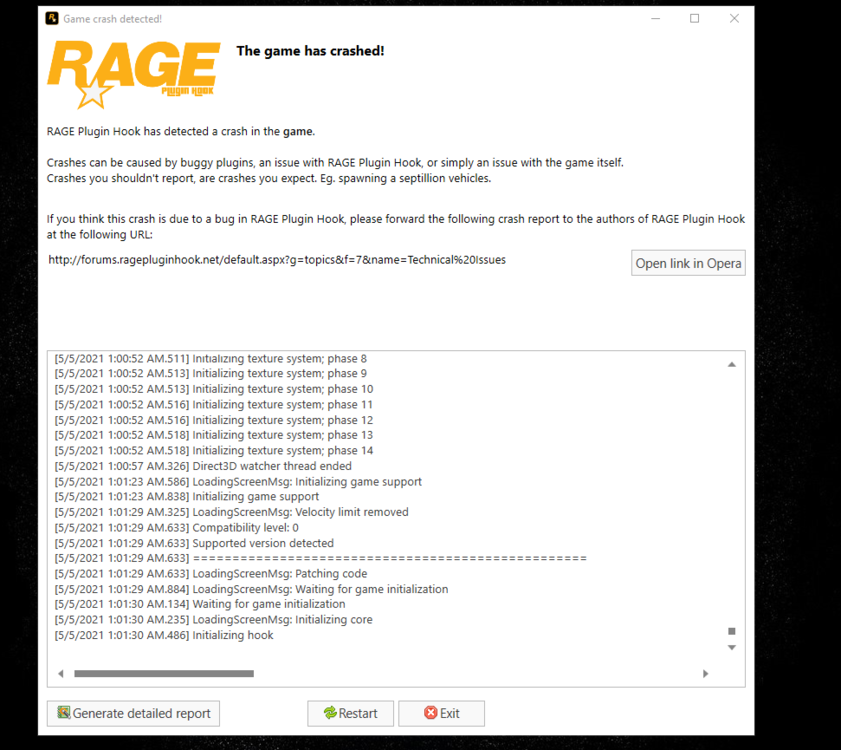
So I don't know what the deal is. I just added a single car into Open IV. When I first went in, it said something was outdated and the mods folder needed updated or the game could crash. So I did it. Then I just did the regular steps to install a single car. So I go and load the game, and everything is fine as it starts loading, then all of a sudden a box comes up from Rage saying the game has crashed and then it just stops. Tried a few times, happens the same exact time every time. This is what it showed me. I have it scrolled to the bottom. I don't even have a clue where to start because I don't have a crash report through GTAV itself. Any help would be much appreciated.
-
Somehow it worked after trying it again. Thank you for your help!
-
Didn't work. It loaded all my plugins but didn't set me on duty. When I try to force duty nothing happens now. The console won't even recognize the command.
-
Can you tell me which files go where. Sorry to ask, but there is no readme.
-
Can someone please help me with this. I can't play. I looked at all the other posts about this and nothing I tried fixed it.
-
So I can get into the game just fine. When I type in force duty everything starts to load normally, but then it gives me the beep and says First Response has crashed. I've tried five times and it's the same thing. It also said there is an unhandled exception during fiber tick. I did add some plugins last night, but don't see a reason it would affect the game. Here is the log. RagePluginHook_16042021_015508.log
-
Thank you, that worked. I can't believe I forgot about that.
-
Anyone?
-


